Page Needs a refresh error

I have tried everything I can find in the MANY posts here in Support. There are no Wordfence firewall issues - I even tried adding a wordfence firewall then disabling it - or Mod security in cPanel. I've updated limits in PHP, I have turned off all apps, uninstalled and reinstalled Brizy, tried new themes, increased max variables, memory limit, deleted old revisions, etc etc etc.
This is not the first time this has happened and goes away when a new Brizy version comes out - usually. Extremely frustrated as I am now three updates behind for the customer.
I bought the LTD really early, and am really frustrated with you guys right now. This issue should have been fixed long ago...
https://caravanofcuriosities.com/
all pages
-

Hi Scott,
We're sorry to hear you're having this issue with Brizy.
Please provide us with temporary access to your WP Admin page so we can take a look. Please add us as an Admin user to your WordPress Dashboard and send the following details to communitysupport@brizy.io.
Community Post link: https://support.brizy.io/hc/en-us/community/posts/25938119019282
WordPress Admin URL:
Username:
Password:Additionally, we will also need temporary access to cPanel:
cPanel host address:
Username:
Password:Best regards,
Ariel H.0 -
Hi Scott,
Thank you for your cooperation.
You're absolutely right, every line in iniPHP is more than sufficient.
Upon checking, I found that the issue doesn't happen on smaller pages. As the page grows with more content and elements, the issue appears. I came across this error in the console, and I'm not sure if it’s related to your hosting account. Could you please confirm this with your hosting provider?
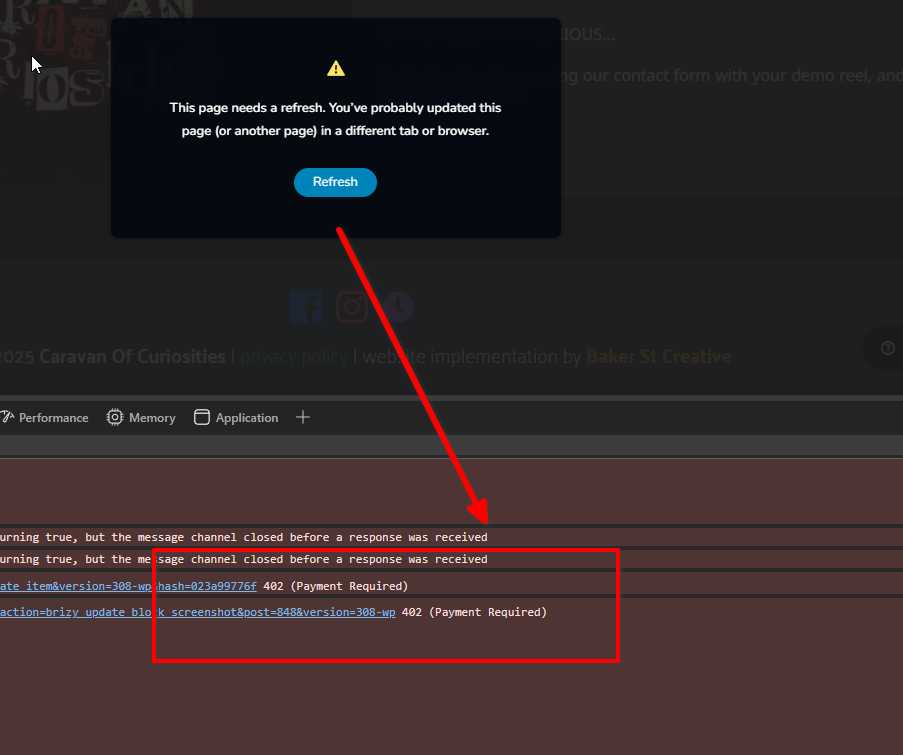
Since this is my first time encountering this, I will need to check with some of my colleagues as well. I’ll get back to you as soon as I have an update.
Best regards,
Ariel H.0 -
Hi Scott,
I’m following up on this issue, and it seems it may be related to your Brizy Pro license. We've replaced it with a new key, but I’m unable to test further as your site has become unresponsive. It looks like your site’s security might have blocked my access, or it has hit some limits.
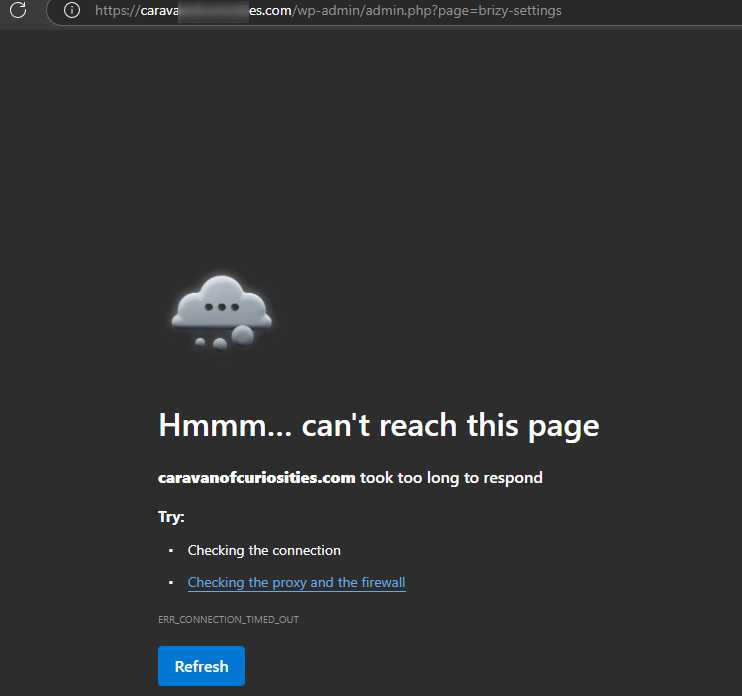
Could you please try on your end and let me know how it goes?
Best regards,
Ariel H.0 -
Hi Scott,
Just following up — I sent a message about this 11 days ago but haven’t heard back.
It seems the issue may be related to your Brizy Pro license. We replaced it with a new key, and we briefly had access to your site for a few minutes, but access was lost again shortly after. It’s likely that security settings or server limits are blocking further access.
To help us investigate further, please provide access to your cPanel or hosting console. You can send the credentials to communitysupport@brizy.io with the subject line: 25938119019282
Looking forward to your response.
Best regards,
Ariel H.0 -
Hi Scott,
It looks like some of your previous messages may have been filtered out by our Zendesk system — our apologies if any of them didn’t come through.
It’s also possible that access to your WordPress Admin page is being blocked due to geo-location restrictions on your server, which could explain why we weren’t able to access your WP Admin page at one point.
One of our colleagues inspected your website and ran a few tests — they were able to successfully add blocks to the home page and save the changes without any issues.
Could you please try making some edits on your end as well and let us know if everything is working now?
Looking forward to your confirmation.
Best regards,
Ariel H.0 -
Hello? Have you given up? I supported brizy in the first year buying LTD 6 months after launch. Come on guys, this is not cool. I've send a half dozen emails to support about this...
0 -
Hi Scott,
My apologies for the delay. I’ve checked on our end, and it looks like the license was updated correctly, but the issue still persists. This may be due to your server settings preventing communication with Brizy’s licensing server.
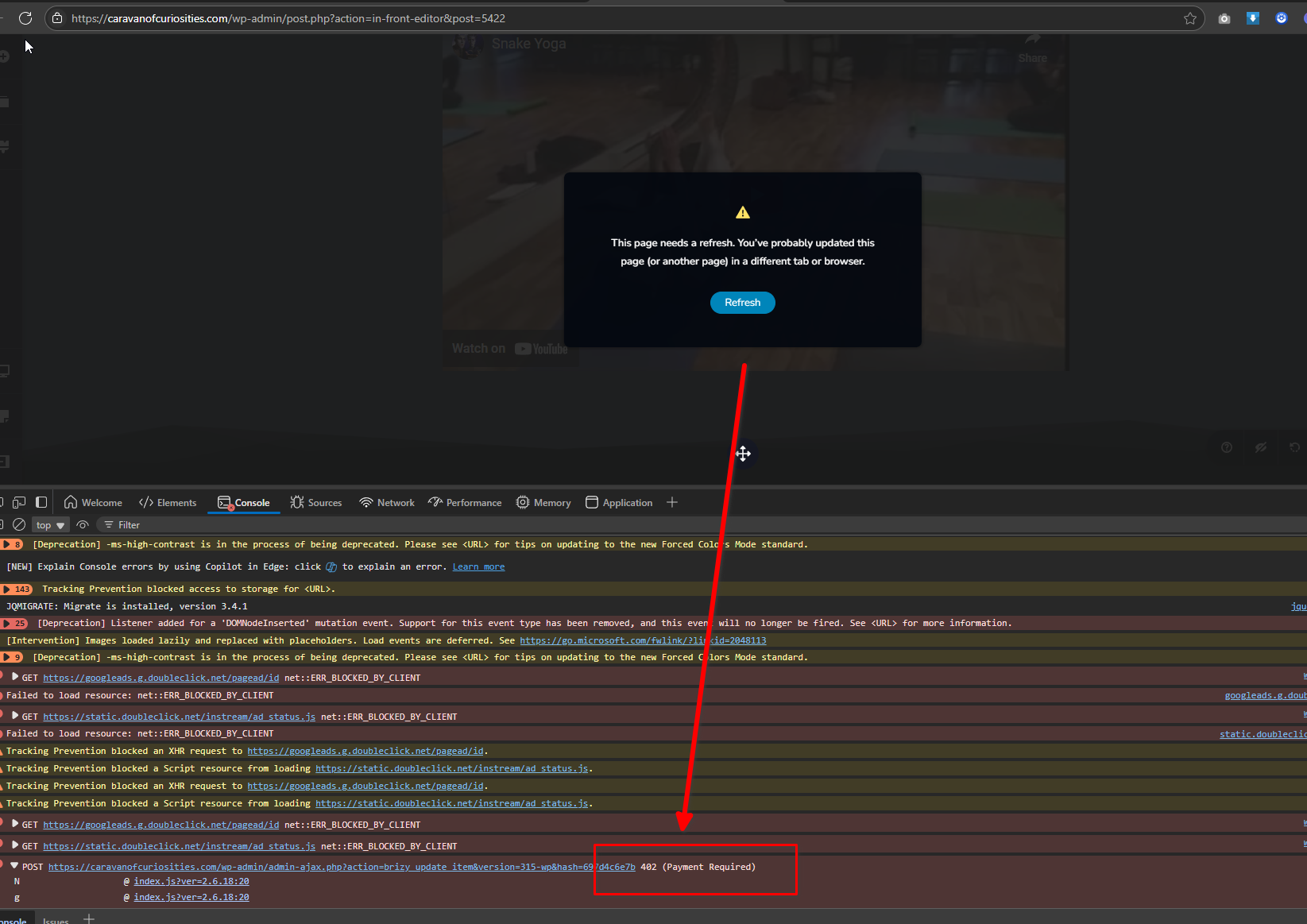
We recommend checking your server logs or reaching out to your hosting provider to ensure that outgoing requests to Brizy’s servers aren’t being blocked.
If you have access to another hosting account, preferably with a different provider, try setting up a copy of your website there. Then, activate your license and attempt to edit your pages to see if the issue still occurs.
Please try this and let me know how it goes.
Kind regards,
Ariel H.0 -
Hi Ariel,
My host has returned back to me and stated that they could 100% confirm the issue was plugin based. They even went as far as to bloat a similar page built on elementor with 300dpi images and far reduced settings, and they could not get the elementor site to malfunction. Should I just switch builders, is Brizy done?0 -
Hi Scott,
We appreciate your patience while we investigated the issue. After replicating the scenario on our testing server, we found that the problem does not occur there, which suggests that your server is reaching certain limits when handling large pages with numerous blocks. This is demonstrated on this screencast - https://youtu.be/j5YOraGakMU
This behavior isn’t unique to Brizy, it can also happen with other page builders when content complexity exceeds specific thresholds. While your host confirmed that the issue is plugin, related, we’ve seen similar cases where server constraints play a significant role.
To address this, we recommend limiting or reducing the number of blocks on the problematic page. A useful approach is to divide the content across multiple pages and link them accordingly, helping to prevent the excessive load that leads to errors.
Alternatively, if you'd prefer to keep the number of blocks intact, you may want to ask your hosting provider about increasing the server's resource limits. Adjustments to execution time and ModSecurity, some rules may trigger false positives, disabling specific ModSecurity rules might help.
We completely understand why you’re considering a switch and respect your decision. If there’s anything further we can do to help or clarify, we’re here for you.
Best regards,
Ariel H.0 -
Ariel, I moved dozens of elements into other blocks, and deleted unneccessary blocks to reduce the number of blocks by about half (to five total), also removing about half a dozen elements. Still would not save. So this page must be rebuilt entirely from scratch and is not salvagable in any way.
Can you advise on what is the maximum number of blocks that brizy can handle? I hoped it could be more than 60 -
Hi Scott,
Thanks for the update, and I’m sorry to hear the page still wouldn’t save after all the changes.
We’ve seen a similar case recently where another user was able to resolve the issue by updating their server settings, specifically, increasing the body size limits in their ModSecurity configuration, which was blocking larger save requests. This may be something you could check with your hosting provider. For more details, please refer to this support thread:
https://support.brizy.io/hc/en-us/community/posts/27240442687378As for the number of blocks Brizy can handle, there isn’t a fixed limit. It mostly depends on the limits set by the server. If you're unsure where the limit might be, one way to test it is by duplicating blocks gradually until the error occurs again. That can give you an idea of your current threshold.
If you have any further questions, please let us know.
Best regards,
Ariel H.0
Please sign in to leave a comment.
Comments
11 comments