"This page needs a refresh. You've probably updated the page in a different tab or browser" Error

Hello, I keep getting this error message when I try to update my website Dewasanzan.com. I saw your troubleshooting article, but I do not have ModSecurity or Wordfence Security installed. I cleared my cache, as elsewhere it said to do that, but to no avail. Are you able to help me?
"This page needs a refresh. You've probably updated the page in a different tab or browser"
-

Hello Timothy,
This error usually occurs when another software in the WordPress environment blocks Brizy editing. Here are a few possible factors that can cause this error.
-
ModSecurity: The maximum size of HTTP requests for your website is set by the "SecRequestBodyLimit" configuration directive in ModSecurity. If the request size for your Brizy page exceeds this upper limit, ModSecurity can block Brizy editing and you will not be able to save you work. Revising the "SecRequestBodyLimit" to 4MB can help resolve the issue. Kindly follow the procedure at https://support.brizy.io/hc/en-us/articles/22590197512210
-
Wordfence: Brizy editing can also get blocked by the Wordfence Security plugin. When a plugin exhibits a behavior that resembles known attack patterns, Wordfence Firewall may block it mistaking it as malicious. Enabling the "Leaning Mode" for the Wordfence Firewall helps resolve this issue. Kindly follow the instructions under the heading "WordFence Security" at https://support.brizy.io/hc/en-us/articles/22590197512210 for the procedure
- Post Max Size: Brizy pages exceeding the the maximum size for your Pages/Posts set in your PHP configurations file can also cause the above issue. Kindly increase the limit to 512MB or 1024 MB following the procedure at https://jmp.sh/2JOiMBXk
If none of the above helps, kindly get back to us. We will help you with troubleshooting.
0 -
ModSecurity: The maximum size of HTTP requests for your website is set by the "SecRequestBodyLimit" configuration directive in ModSecurity. If the request size for your Brizy page exceeds this upper limit, ModSecurity can block Brizy editing and you will not be able to save you work. Revising the "SecRequestBodyLimit" to 4MB can help resolve the issue. Kindly follow the procedure at https://support.brizy.io/hc/en-us/articles/22590197512210
-
Hello, thank you for your suggestions.
Unfortunately, none of this has helped. We don't have ModSecurity or Wordfence, and I tried to change the Post Max Size to both 512MB and 1024, but to no avail. Are you able to help me with troubleshooting?
Kind regards,
Tim.
0 -

Hi Timothy,
We're sorry to hear you're having this issue with Brizy.
Please provide us with temporary access to your WP Admin page so we can take a look. Please add us as an Admin user to your WordPress Dashboard and send the following details to communitysupport@brizy.io.
Community Post link: https://support.brizy.io/hc/en-us/community/posts/25426228068114
WordPress Admin URL:
Username:
Password:Additionally, we will also need temporary access to FTP/cPanel:
FTP / cPanel host address:
Username:
Password:Best regards,
Ariel H.0 -
Hello,
Thank you for your email. We don't use cPanel, we use a Japanese server called x-server. I can give you access to that, but it's all in Japanese. Would this be a problem? I'm not sure if you can Google translate. If you need me to, I can tell you where everything is located.
I have established a new wordpress admin already, but am not sure what to do about cPanel.
0 -
Hi Timothy,I appreciate your cooperation.
I checked your site but couldn't replicate the issue, as shown in this screencast – https://youtu.be/L3TEA3ag7EY
I used Firefox to edit the pages, so please try using a different browser and see if that works.
Additionally, I recommend asking your hosting provider to increase the PHP max input variables to 10,000, as this can help with saving pages that have large content.
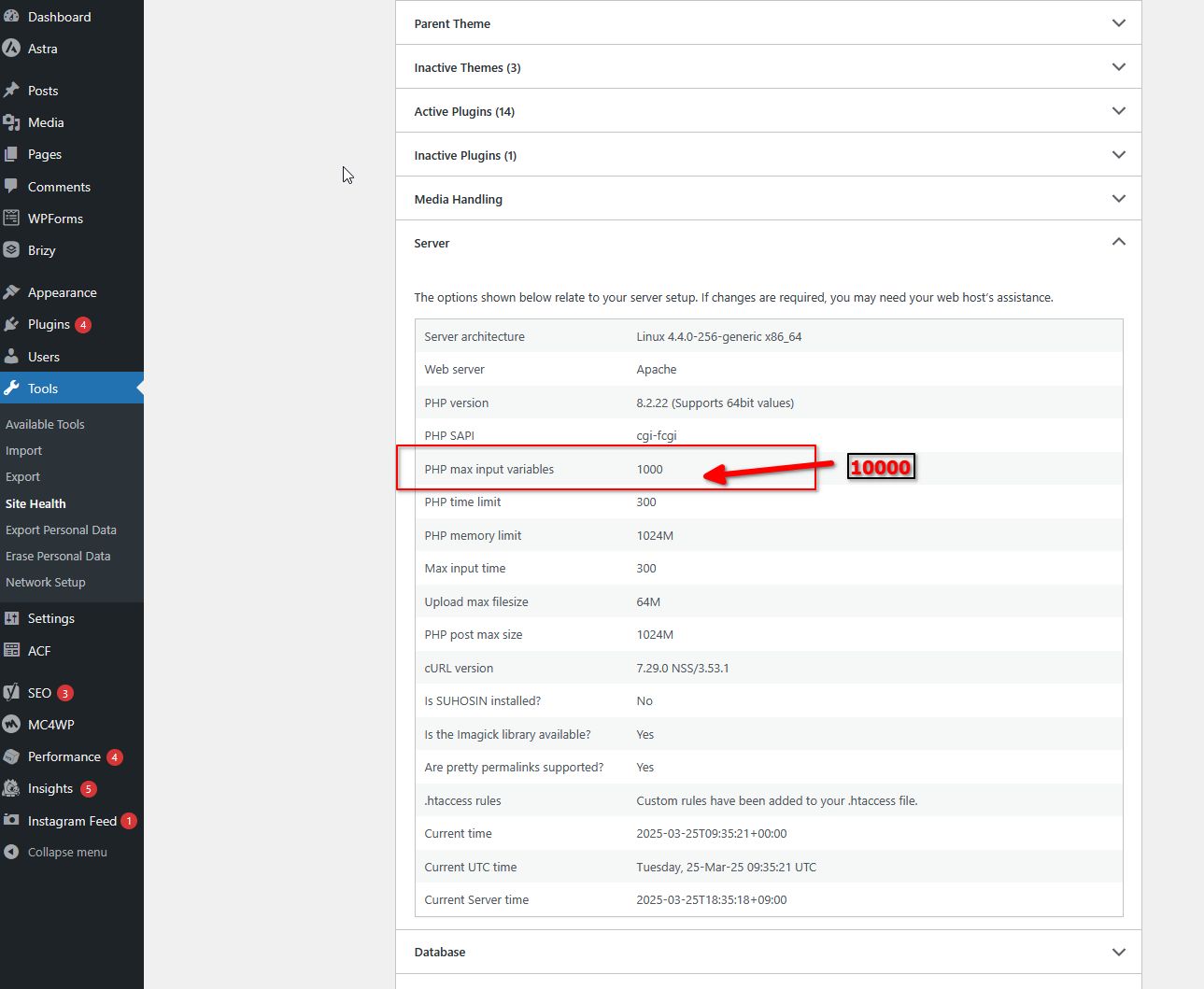
Give it a try and let me know how it goes.
Best regards,
Ariel H.0
Please sign in to leave a comment.
Comments
5 comments