Confirmation on Brizy Update Behavior and Recommended Actions

Dear Brizy Support Team,
We hope you are doing well.
After updating Brizy under the following conditions, we observed certain behaviors that required manual intervention. We would like to confirm whether these behaviors are expected and if there are any recommended solutions.
Environment & Updates:
- PHP Version: 7.2 → 8.2
- Brizy Version: 2.4.45 → 2.6.12
- Brizy Pro Version: 2.4.45 → 2.6.8
- WordPress Version: Not updated
- Plugins: No other plugins were updated
- Server WAF Settings: All disabled to prevent conflicts.
Observed Behaviors & Proposed Solutions:
1. Manual Page & Component Check:
- After the update, all pages and components required manual checking for layout inconsistencies.
- Some icon blocks were hidden after the update.
- Q1: Is this a known issue in Brizy 2.6.12 and Brizy Pro 2.6.8?
- Q2: Is it expected that manual checking will always be necessary after an update, or could this be an unintended issue?
2. Fixing Broken Parts:
- Opening the editor and saving without changes appears to restore some broken components.
- Q3: Is this the correct approach, or is there a more effective way to resolve these issues?
3. Global Parts Issue:
- Fixing a global part, then navigating to another page with unviewed broken components, causes the global part to break again.
- Q4: Is this a known issue? If so, is there a way to prevent global parts from breaking repeatedly?
4. Cache & Optimization Plugins:
- Running WP-Optimize and similar cleaning tools did not resolve the issue.
- Q5: Are there any recommended cache settings for Brizy after an update to avoid these problems?
5. Testing & Deployment Considerations:
- Both test and production environments need manual verification across all installations using Brizy.
- Q6: Do you have any official recommended workflow for updating Brizy in multi-environment setups?
We would greatly appreciate any insights you can provide, as well as any official recommendations on best practices for handling updates.
Looking forward to your response.
Best regards,
Yamakawa
-

Hi Yamakawa,
Thank you for reaching out.
Before updating Brizy and Brizy Pro, could you confirm if the issue persists when all other plugins are disabled? This will help determine if there’s a conflict affecting the update process.
You may also provide us Admin access to one of your affected sites s we can take a closer look. Kindly add us as an Admin user in your WordPress Dashboard and send the details to communitysupport@brizy.io:
Community Post link: https://support.brizy.io/hc/en-us/community/posts/25312866296850
WordPress Admin URL:
Username:
Password:Best regards,
Ariel H.0 -
Hi Ariel,
Thank you for your response.
I'll share the details with you via email shortly.It looks like the update may have changed the ID assignment rules for DOM generation. Previously, these rules were applied during the save process, but with the latest version, it seems they have been modified. Does that sound accurate?
Best regards,
Yamakawa0 -
Hi Yamakawa,
Thank you for the update.
We’ll need to confirm this with our developers to verify any changes in ID assignment rules for DOM generation.
Additionally, please share the credentials for your site so we can escalate the issue if needed.
Best regards,
Ariel H.0 -
Hi Ariel,
I have just sent you an email.
Could you please check it when you have a moment?
Best regards,
Takuya YAMAKAWA0 -
Hi Takuya,
Thank you for your cooperation.
Unfortunately, we’re unable to log in to your WordPress Admin dashboard. Could you please temporarily disable your security plugin or allow access from the following countries: India, Philippines, and Moldova?
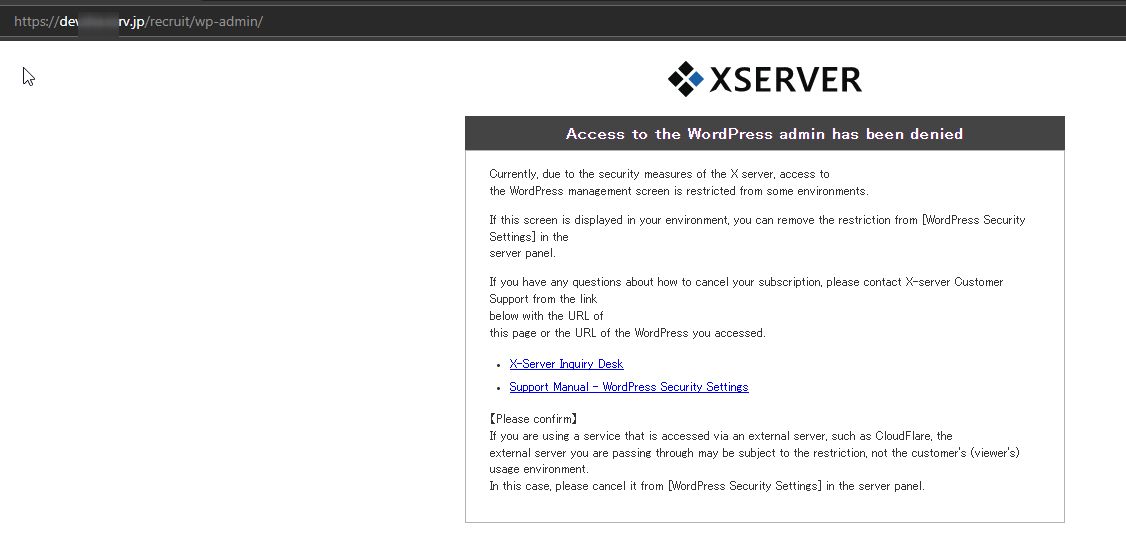
Looking forward to your response.
Best regards,
Ariel H.0 -
Hi Ariel,
Thank you for your response.
I have temporarily lifted the dashboard access restriction for foreign access.
Could you please try connecting again and let me know if you still encounter any issues?
Best regards,
Takuya0 -
Hi Ariel,
I hope you're doing well. Apologies for the additional email before receiving your response to my previous one. I had an additional security-related question regarding Brizy that I wanted to ask.
I am using XServer, but I have encountered compatibility issues between Brizy and the server's WAF (Web Application Firewall) feature. When the WAF is enabled, an error occurs during the saving process after editing a page, preventing successful saving.
Currently, I have disabled all WAF settings on the server to allow Brizy to function properly. However, there are six different mod_security settings available, and enabling even one of them results in an error related to mod_security when saving Brizy pages.
To compensate for disabling the server-side WAF, I would like to enhance security using a WordPress security plugin instead. Could you recommend a WordPress security plugin that is compatible with Brizy?
Looking forward to your advice.
Best regards,
Takuya0 -
Hi Takuya,
Thank you for the update, and no worries at all, we're glad to help.
Wordfence is a solid choice for enhancing your site’s security and is generally compatible with Brizy. To ensure smooth operation, I recommend enabling Learning Mode in Wordfence for a couple of days after installing it. This allows Wordfence to observe and learn Brizy’s actions (such as saving pages and editing content) so it won’t mistakenly block them.
Once Wordfence has learned the typical behavior, you can switch it back to Enabled and Protecting mode for ongoing security.
Best regards,
Ariel H.0 -
Hi, Ariel
Thank you for your swift response.
Regarding the initial question I asked, will the following matter be investigated moving forward?
I would greatly appreciate it if you could provide a reply.
Environment & Updates:
- PHP Version: 7.2 → 8.2
- Brizy Version: 2.4.45 → 2.6.12
- Brizy Pro Version: 2.4.45 → 2.6.8
- WordPress Version: Not updated
- Plugins: No other plugins were updated
- Server WAF Settings: All disabled to prevent conflicts.
Observed Behaviors & Proposed Solutions:
1. Manual Page & Component Check:
- After the update, all pages and components required manual checking for layout inconsistencies.
- Some icon blocks were hidden after the update.
- Q1: Is this a known issue in Brizy 2.6.12 and Brizy Pro 2.6.8?
- Q2: Is it expected that manual checking will always be necessary after an update, or could this be an unintended issue?
2. Fixing Broken Parts:
- Opening the editor and saving without changes appears to restore some broken components.
- Q3: Is this the correct approach, or is there a more effective way to resolve these issues?
3. Global Parts Issue:
- Fixing a global part, then navigating to another page with unviewed broken components, causes the global part to break again.
- Q4: Is this a known issue? If so, is there a way to prevent global parts from breaking repeatedly?
4. Cache & Optimization Plugins:
- Running WP-Optimize and similar cleaning tools did not resolve the issue.
- Q5: Are there any recommended cache settings for Brizy after an update to avoid these problems?
5. Testing & Deployment Considerations:
- Both test and production environments need manual verification across all installations using Brizy.
- Q6: Do you have any official recommended workflow for updating Brizy in multi-environment setups?
Best regards,
Takuya
0 -
Hi Takuya,
Thank you for the update.
Just to share a bit of context, we don’t have control over your server setup, and every website is unique. Things like your hosting environment, PHP version, and especially third-party plugins can all affect how Brizy behaves. Because of this, there’s no single fix we can recommend that would apply to all cases.
The best approach we can suggest is to create a staging version of your site — basically a copy of your site where you can safely test updates without affecting your live website.
In the staging environment, before updating Brizy and Brizy Pro:
1. Temporarily disable all third-party plugins.
2. Update Brizy and Brizy Pro.
3. Gradually re-enable your plugins one by one while checking the site to see if any issues appear.
4. If you encounter any broken layouts, try making a small change on the page, like adding a text or setting a block’s padding to 1px — then save. After that, you can undo the change and save again. This will force Brizy to recompile the page, which often helps fix layout issues.This step-by-step process will help you identify if a specific plugin or setting is causing a conflict. Once everything looks good on staging, you can confidently apply the same updates to your live site.
If you have any further questions, please let us know.
Best regards,
Ariel H.0 -
Hi Ariel
Thank you for your response.
Indeed, we are experiencing a large number of cases that require step 4, which has become a significant issue for us. Is there any way to prevent this step from being necessary in the first place?Also, is step 4 related to steps 1, 2, and 3? Or is it independent of them?
We would also like to understand the potential causes or conditions that make step 4 necessary. In other words, what are the reasons or conditions that might lead to layout issues?
We apologize for the continued questions, but we would greatly appreciate your further assistance.
Best regards,
Takuya0 -
Hi Takuya,
Thank you for the update.
Step 4 can be performed independently, and in many cases, it helps address layout issues directly without needing to go through steps 1–3. However, if step 4 alone doesn't resolve the issue, then it's best to proceed with steps 1–3 as a more thorough approach.
As for what causes step 4 to become necessary, layout issues can stem from a few different factors, including:
- Cached data not refreshing correctly after changes are made.
- Incomplete rendering, where the page needs to be recompiled. You can read more about this here: https://www.brizy.io/new-compiler-200-loading-performance-boostThank you again for your patience, and feel free to reach out anytime if you have more questions.
Best regards,
Ariel H.0 -
HI Ariel
Thank you for your response, and also for sharing the URL.
It helped us better understand the background of the issue.Manually triggering the recompilation process for every single page has become an enormous burden for us, and it’s turning into a serious concern.
To give you a sense of the scale — imagine having to do this process for 100 pages, one by one…So, we’d like to ask:
Do you think the issue could potentially be avoided by performing the update in the following way?With all other plugins deactivated,
first update Brizy from version 2.4 to 2.5,
then update to 2.6 —
do you think this approach could help prevent the layout issues?If there’s a chance this method could work, would it be possible for you to provide both the standard and Pro versions of Brizy 2.5 so that we can test it?
Also, if you have any other suggestions or alternative solutions, we would greatly appreciate your advice.
Best regards,
Takuya0 -
Hi Takuya,
Thank you for the update.
We haven’t tried that exact update path yet, but it’s worth a try. That said, please note that it won’t skip the need for recompilation, as the compiler change introduced in Brizy Pro 2.5 requires existing pages to be manually recompiled regardless of the update method.
I’ll send over the standard and Pro versions of Brizy Pro 2.5 here so you can test the update process.
For the Brizy Free version, you can install the latest release and use the WP Rollback plugin to revert it to version 2.5.1.
I completely understand where you're coming from, especially when managing a large number of pages. Unfortunately, we don’t currently have a shortcut to address this.
However, I highly recommend posting this suggestion on our Ideas and Roadmap page. Our developers actively monitor this platform, and it helps them prioritize improvements based on real user needs. A bulk recompile feature would be a valuable feature.
Best regards,
Ariel H.0 -
Hi, Ariel
Thank you for your response.
From the compilation page you shared, my understanding is that the process involves making a minor change, saving, then reverting the change and saving again.
However, our engineer is concerned that a much more extensive process might be required, such as:
• Identifying the missing components and performing this process for each component.
• Checking every component on every page across all sites (production, testing, etc.) and across all devices (PC, tablet, smartphone).Background:
• When we updated a portion of a global part, an element that had not been displaying within that global part suddenly appeared.
• Later, because some elements within a section were still not displaying, we performed a similar update there, and all the elements in that section were fixed.
• Finally, when the internal link navigation area was not displaying, we performed the same update.Based on these experiences, we suspect that the files being compiled might differ by broader segments.
Therefore, don’t you think it might be necessary to verify whether there are indeed any elements that are not displaying?
Best regards,
Takuya0 -
Hi Takuya,
Thank you for the detailed explanation. It does seem like the system is reloading larger parts of the site during the update process, which may explain why other elements started appearing after a small change.
One of my colleagues also suggested a helpful approach, updating all plugins in a staging site, then pushing those changes to the live site. This can also trigger a full recompile of the pages and help resolve missing elements in one go.
Best regards,
Ariel H.0 -
Hi Ariel
I’d like to try the helpful approach you mentioned, but I have a question.
You suggested updating all plugins in a staging environment and then pushing the changes to the live site—could you kindly clarify what specific steps you have in mind for this process?Just to note, we are not using Git for this service.
Looking forward to your response.
Best regards,
Takuya
0 -
Hi Takuya,
Thank you for contacting us.
You can use plugins like WPVivid or All-in-One WP Migration, which offer features to sync or migrate from a staging site to a production site.
If your hosting provider includes Softaculous, you can use it to create a staging site, then use the Push to Live feature to sync all changes to the live site:
https://www.softaculous.com/docs/enduser/create-staging/
https://www.softaculous.com/docs/enduser/push-to-live/I hope this helps.
Best regards,
Ariel0 -
Hi Ariel,
Thank you for your advice.
Little by little, I feel like we're starting to see some light at the end of the tunnel.Regarding your previous advice, I’d like to confirm one point just to be sure.
When using plugins like WPVivid or All-in-One WP Migration, is it correct to assume that a full Brizy recompilation is triggered at the time of restore?Best regards,
Takuya0 -
Hi Takuya,
Thank you for the update.
Yes, that's correct, when restoring a site using WPVivid or All-in-One WP Migration, Brizy will recompile the pages automatically on the first visit after the restore. This ensures everything loads properly with the restored environment.
Best regards,
Ariel H.0 -
Hi Ariel,
Thank you again for your helpful support.
I’d like to ask for clarification regarding the term "first visit" in your previous message.
Could you please let me know exactly what kind of visit triggers the recompilation process in Brizy after restoring a site? For example, does it refer to:
-
Logging into the WordPress admin panel?
-
Opening the page in edit mode within the admin panel?
-
A general (public) user accessing the page on the live site?
I’d appreciate it if you could provide more details on what Brizy considers as the "first visit" that initiates the page recompilation.
Thanks again for your support!
Best regards,
Takuya0 -
-
Hi Takuya,
The first visit refers to when someone (either a logged-in user or a general visitor) accesses the page on the live site. That’s what triggers Brizy to recompile the page in the background.
During that first load, the page may be slightly slower than usual due to the compilation. After that, it will load faster on subsequent visits.
Best regards,
Ariel H.0 -
Hi Ariel,
Thank you so much for all the communication over the past month.
I’m going to try out what you’ve kindly shared.
Since it’s been a long journey, let me write the rest in Japanese:MOROMORO ARIGATO, MOROMORO TAMESHITEMIRUYO 😊
I'll be sure to share the results with you once I’ve tried everything out.
Truly, thank you! I might reach out again if I run into anything else,
so I’d really appreciate your continued support.Your support was speedy and truly wonderful.
Best regards,
Takuya0
Please sign in to leave a comment.
Comments
23 comments