An error happened while trying to display this element. You can open and issue or remove this element.

I am trying to upload an image but that is the error that brizzy brings and unfortunately i can not upload or update or change an image.
Also, if you try to save a page after edits, it brings an error of requiring a refresh for every change made.
please fix this
-
Has this been resolved because i am still facing this challenge.
0 -

Hello Edgar,
This error usually occurs when using incompatible Brizy and Brizy Pro versions. Kindly check if you have these versions.
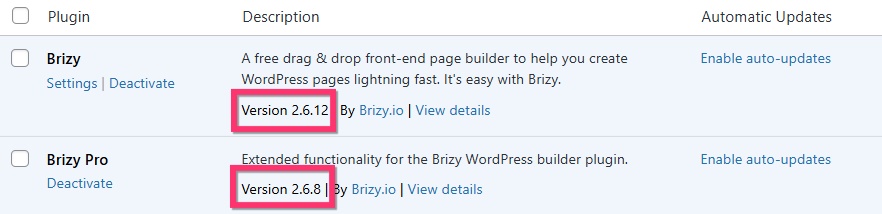
If you do not, please update to these versions to fix the above error.
0 -

Hi there, im facing the same problem. But how can update my Brizy versions? There is not a button to update it, and automatic updates is turned on. My Brizy is version 2.5.10 and my pro version is 2.6.8.
0 -

Hi Stan,
Thank you for reaching out.
Brizy version 2.5.10 has already been removed from the WordPress.org repository. To update, please delete the existing version and reinstall it as usual. This is demonstrated on this screencast - https://youtu.be/48Pv5rklLsE
Let us know if you have any questions.
Best regards,
Ariel H.0 -
Wont this delete my current work with brizy? Of when I reinstall the plugin everything will be back?
0 -
Hi Stan,
Thank you for the update.
Deleting Brizy or Brizy Pro won’t remove your content. Your data remains safe, but the website layout may temporarily break. Once you reinstall Brizy, everything will be back to normal.
Let me know if you need further clarification.
Best regards,
Ariel H.0 -
It worked, thanks!
0 -

Hello, I have the same problem. When I uninstall and reinstall Brizy, it still installs version 2.510. Why not download the latest one? Please help urgently
0 -
Hi,
Your version on wp repository is always 2.5.10
I downloaded and installed the latest version brizy free from your site (2.6.17). I also deleted and reinstalled brizy Pro (2.6.11) as in your demonstrate. The problem persists.
0 -
Hi Fatih,
We're sorry to hear you're having this issue with Brizy.
Could you please provide us with temporary access to your website so we can take a closer look? Kindly add us as an Admin user in your WordPress Dashboard and send the details to communitysupport@brizy.io:
Community Post link: https://support.brizy.io/hc/en-us/community/posts/25035682322834
WordPress Admin URL:
Username:
Password:Please make a full backup of your site as a precaution.
Best regards,
Ariel H.0
Please sign in to leave a comment.
Comments
10 comments