Refresh Page Error

I am getting the refresh page error when editing a specific page on my website. https://colinscotland.com/discovery-call/
I tried disabling all plugins, enabling learning mode in wordfence, purging cache, incognito browser, nothing works?
Please advise. Thanks
-

Hi Colin,
Could you please provide temporary access to your WP Admin so we can take a closer look at your site? Kindly add us as an Admin user in your WordPress Dashboard and send the details to communitysupport@brizy.io:
Community Post link: https://support.brizy.io/hc/en-us/community/posts/24668690471058
WordPress Admin URL:
Username:
Password:Best regards,
Ariel H.0 -
Hi Colin,
Thank you for your cooperation.
Could you please try optimizing your database by following the steps in this guide:
https://www.wpbeginner.com/plugins/optimize-your-wordpress-database-with-one-click/
Once done, go back to the page and test it again.If that doesn’t help, please try temporarily setting CloudFlare to development mode and see if it resolves the issue:
https://developers.cloudflare.com/cache/reference/development-mode/Also try to temporarily disable ModSecurity as described on this article:
https://support.brizy.io/hc/en-us/articles/22590197512210Please try this and let me know how it goes.
Best regards,
Ariel H.0 -
Hi Colin,
I appreciate your cooperation.
It looks like the issue is related to mixed content. Updating your home and site URL should help resolve it.
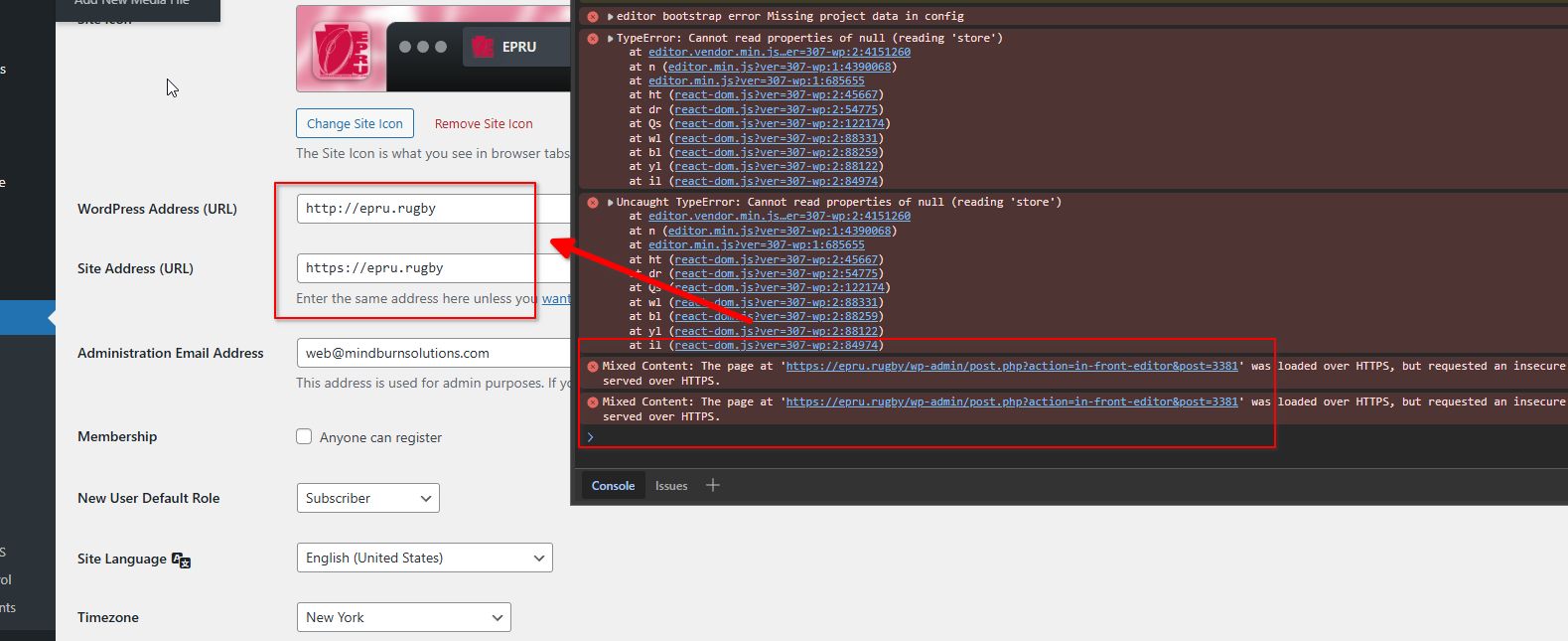
Best regards,
Ariel H.0
Please sign in to leave a comment.
Comments
3 comments