Mobile menu not appearing

The website is https://norzer.me. If you click in that area, a menu will come up, however, it's not displaying. See here:

As you can see in the Brizy builder itself, it shows fine:

I've tried changing colors, resizing, etc. and it doesn't seem to work.
I can create you an account to login if you want to have a look. Thanks
-

Hi Ryan,
Could you please provide temporary access to your WP Admin so we can take a closer look at your site? Kindly add us as an Admin user in your WordPress Dashboard and send the details to communitysupport@brizy.io:
- Community Post link: https://support.brizy.io/hc/en-us/community/posts/24634224617618
- WordPress Admin URL:
- Username:
- Password:
Best regards,
Ariel H.0 -
done. i forgot to put the login URL in the email so I sent in a second email. Its norzer dot me slash newlogin
thanks
0 -
Hi Ryan,
Thank you for your cooperation.
It looks like this issue is more complex than we initially expected. Would you be able to create a staging version of your website so we can troubleshoot without affecting your live site? Alternatively, you may allow us to make a copy of your site and investigate the issue in a local test environment.
Looking forward to your response.
Best regards,
Ariel H.0 -
Hey sure you can make a copy of it? do you need anything else on my end? I can create you a hosting account for my hosting provider.
0 -
btw. im 95% sure it worked for a long time. i just happened to notice it. thanks
0 -
Hi Ryan,
Thank you for the update.
I’ve set up a testing environment for your site and will delete it once we’ve identified a fix. We received similar issues before, but the fixes that worked for those sites didn’t resolve the issue on yours, so we’ll need a separate testing environment to investigate further. I will get back to you with an update as soon as possible.
Best regards,
Ariel H.0 -
Thanks. I'll check back. Is there an ETA? This is a live site. thanks
0 -
Hi Ryan,
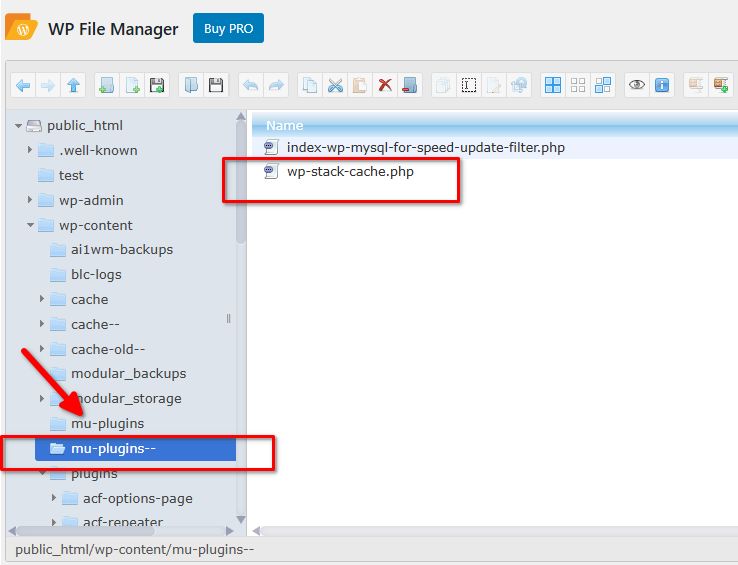
Thank you for the update. After checking, the issue appears to be caused by the 'wp-stack-cache.php' file located in the 'mu-plugins' folder. To resolve this, we renamed the folder, and WordPress automatically generated a new one without this file.

It’s likely that your hosting provider has its own caching system that creates 'wp-stack-cache.php'.
Best regards,
Ariel H.0 -
ahh thanks. i will find out.
0
Please sign in to leave a comment.
Comments
9 comments