Latest update broke my site

After updating Brizy pro to 2.6.6, a form on the homepage of my client's website with a dropdown menu is broken. how do I rollback the brizy pro update?? `please help, client is on my neck!!
-

Hi Oswald,
Thank you for contacting us.
Please try editing the affected block that contains your menu by adding 1px padding on all sides. Then, save your changes and preview the page. This step forces Brizy to recompile the page, which may resolve the issue. You can revert the change afterward.
If the issue continues, please provide temporary access to your WP Admin so we can take a closer look at your site. Kindly add us as an Admin user in your WordPress Dashboard and send the details to communitysupport@brizy.io.
Community Post link: https://support.brizy.io/hc/en-us/community/posts/24513206706322
WordPress Admin URL:
Username:
Password:Best regards,
Ariel H.0 -
Hello, I fixed this issue earlier using your advice. but it happened again yesterday, I applied the fix but it's happened again today. I have created an admin account and sent to the email provided.
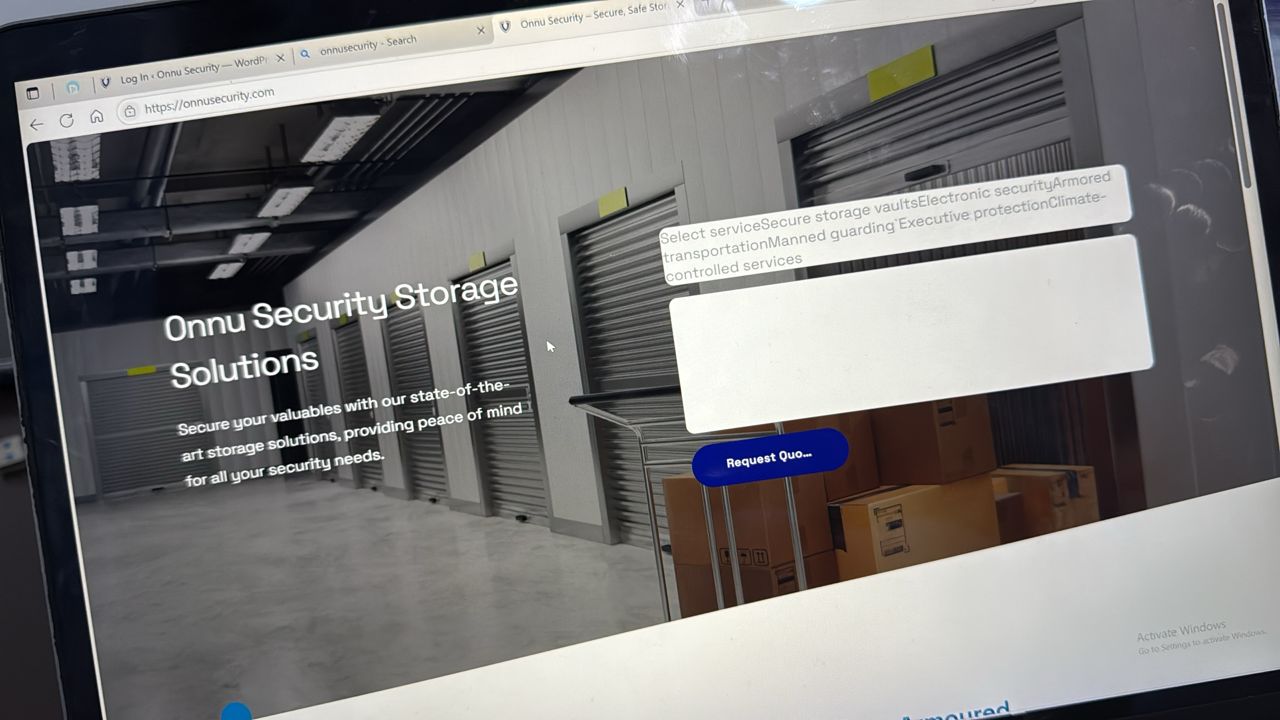 0
0 -
Hi Oswald, the issue appears to have been fixed after we've installed Brizy Version 2.7.3. Please try it at your end and let me know how it goes.
0
Please sign in to leave a comment.
Comments
3 comments