Notifications to gmail acc

Have a problem with one site not delivering to some user@gmail acc.
Standard form to send email and shows email was sent, however it is not in inbox or spam folder. Added filter to keep all emails from notifications@brizy.cloud in inbox as important - still nothing, not in spam, nothing in inbox.
When changed to other gmail works fine, so my guess is that whatever service you use to send notifications is blocking emails to that email - you can check the email by editing the form (for now added 2nd email to send txt to tmobile for now) the one with problem is al****.mik***yk@gmail.com
-

Hello Tom,
Kindly check the SPAM folder of the specific Gmail address and if you find an email kindly click the "Report not Spam" button.
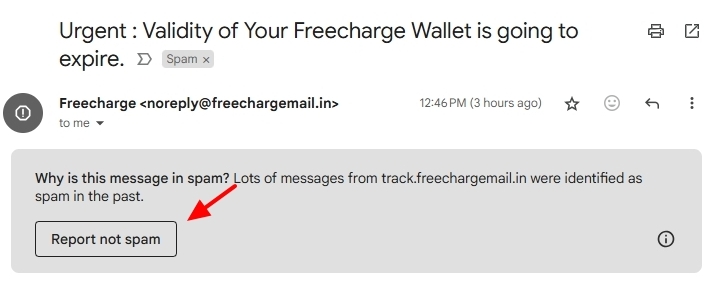
Kindly let us know the preview URL of your project; we will take a look at your project as well.
0 -
George,
As stated in original message :
"Added filter to keep all emails from notifications@brizy.cloud in inbox as important - still nothing, not in spam, nothing in inbox."
so there is no way for me to click NOT spam because email sent are never delivered.notifications@brizy.cloud is NOT in blocked email list nothing like that - yet, all emails sent to this gmail account are not delivered.
0 -

Hi Tom, I have replied to you on this support thread - https://support.brizy.io/hc/en-us/community/posts/24447471652242
0 -
Ariel, email are sent to gmail acc (not custom domain email) so your reply doesn't help. If something records you wrote about should be set on brizy side...

Anyway, today i have ANOTHER user calling that not all emails sent thru form are delivered to his GMAIL acc. In his case some are delivered some are not - nothing in spam0 -
Hi Tom,
Thank you for the update.
I've asked a team member to look into this issue. I'll get back to you as soon as I have an update. I've also merged your two concerns into this thread, so feel free to reply here if you have any other questions to keep everything organized.
Best regards,
Ariel H.0 -
Hi Tom,
Just following up to let you know that this issue has been escalated to our senior support team. I’ll keep you updated here as soon as I have any news.
Best regards,
Ariel H.0 -
Ariel,
Thank you - let me know when you know something.This post is about brizy.cloud notifications problem, but i have another account (white label one) and just noticed that initial setup did not require setting up SPF, DKIM, DMARC for that white label acc.
I think initial setup (welcome email with instructions) should have info that it uses amazon to send email and steps to setup SPF, DKIM, DMARC records for that white label domain. I opened acc. long time ago so maybe things changed and now you provide that info, but my domain is missing it :(
0 -
Hi Tom,
Thank you for the update.
I was informed that this is already available for white-label accounts, and I’ll also share your concern with the team.
Best regards,
Ariel0
Please sign in to leave a comment.
Comments
8 comments