Brizy page cannot edit after add several hidden section

Hi,
i found that after adding some hidden section in page (because different layout for tab and mobile phone), save and refresh, the page become infinity load and cannot edit. How to solve this problem?
-

Hi Hafize,
Thank you for contacting us.
Could you try disabling all plugins except Brizy and Brizy Pro to check if the issue still occurs? Also, does this happen only on this specific page, or have you tested other pages as well?
If the issue continues, please provide us with temporary access to your WP Admin page so we can take a look. Please add us as an Admin user to your WordPress Dashboard and send the following details to communitysupport@brizy.io.
Community Post link: https://support.brizy.io/hc/en-us/community/posts/24403683189522
WordPress Admin URL:
Username:
Password:Best regards,
Ariel H.0 -
Hi Ariel,
I have provided the credential to the email.
Below are some of pages effected:Page affected:-3. https://tcasia.guru/education/
4. https://tcasia.guru/special-bonus/kickstart-2025-bonus-live/
5. https://tcasia.guru/special-bonus/kickstart-2025-bonus/0 -
Hi Hafize,
Thank you for your cooperation.
I noticed a 500 error in the console, which led me to assume that a conflict between Brizy and another plugin might be causing the issue.
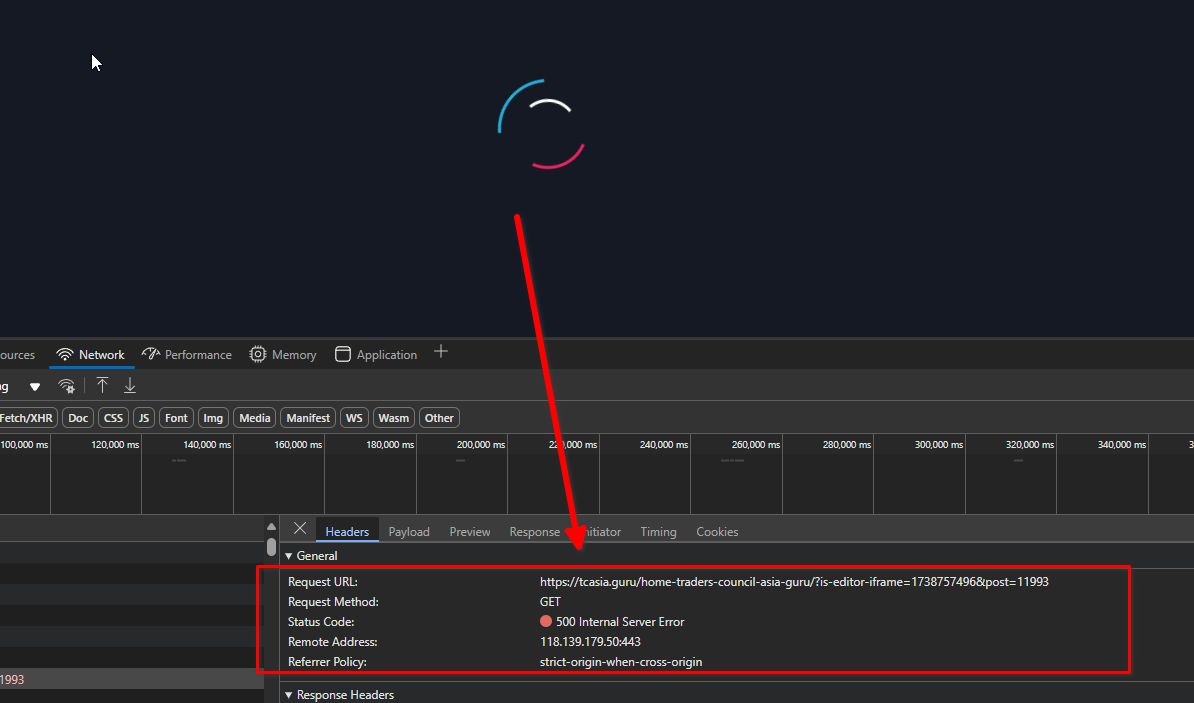
Unfortunately, due to the large number of plugins running on your site (52 plugins), we are hesitant to proceed with further troubleshooting, as it would require disabling plugins and could disrupt your live website. Would it be possible for you to create a staging version of the site so we can investigate the issue safely?
Best regards,
Ariel H.0 -
Hi,
1. I suspected error 500 due to "Edit with Brizy" inside posts. So i have deleted all Brizied posts and recreate a normal wordpress posts.
2. I tried to use Brizy Template for all posts, and I found once create cannot do editiing (become infinite loading).
3. I have deactivate all plugins except Brizy free and Brizy PRO, the new page become infinite loading, cannot make any new page or template.
4. I deactivate Brizy Pro, and left Brizy Free activated, the new page and template can create again (of course without PRO elements).
5. The latest Brizy PRO is version 2.6.6, Brizy Free is version 2.6.10
6. FYI my website is using ACF (I choose Brizy in the 1st place because before is compatible with ACF), if ACF is not compatible (for now), any alternative to replace ACF?0 -
Hi Hafize,
Thank you for the update.
ACF should be compatible with Brizy. Could you kindly provide us with temporary access to cPanel so we can investigate the issue further?
Best regards,
Ariel H.0 -
Hi,
I have sent the cPanel credential to communitysupport@brizy.io.
You may disable the plugins to do investigation.Thank you
0 -
Hi Hafize,
Thank you for your cooperation.
We're still investigating the issue. In the meantime, could you check with your hosting provider to see if they can temporarily disable ModSecurity on your server for troubleshooting? Unfortunately, this option isn't available in cPanel.
If I'm unable to resolve it on my end, I may need to escalate the issue to our senior support team.
Apologies for the inconvenience.
Best regards,
Ariel H.0 -
Hi,
i have contacted my hosting provider to disable the ModSecurity, and after do some setting on .htaccess, the Brizy PRO can use again. At the moment this issue is solved. thank you for your support.0
Please sign in to leave a comment.
Comments
8 comments