Brizy keeps loading and loading - both with twenty twenty five theme and blocksy

The past 2 days Brizy Version 2.6.8 keeps loading and loading without ever editing - both with twenty twenty five theme and blocksy enabled. I even deleted Brizy 2.6.8 and Brizy Pro 2.6.4 and reinstalled them with Blocksy 2.0.86. It also won't create a new WordPress page on its own. Editing the theme via Blocksy (free version) still works and the changes show immediately after publishing, but it's impossible to add new pages.
Next I removed just blocksy and tried to load Brizy and Brizy Pro with Twenty Twenty Five theme enabled. This didn't work. I purged all cache plugins, purged my CloudFlare several times and made sure only Brizy and Brizy Pro remained besides my normal list of plugins. I then uninstalled Blocksy and manually removed all of my remaining Blocksy folders via my webhost file manage. This didn't work either. Then I deactivated WordFence. Next, I moved from PHP 8.3 to PHP 8.1 to see if it was a compatibility issue. This didn't work either. I then disabled all asynchronous javascript and css/html. Didn't work. Then I deactivated and removed all caching plugins and reinstalled Brizy. I then tried WordFence in learning mode. I also looked at my CloudFlare WAF in the period that I was testing, and so far only blacklisted IPs have been blocked (MXToolbox/Spamhaus). My normal wp-cron IPs from hostinger, automattic, gravatar, wordpress, etc all working fine and not getting blocked.
My current WordPress version is 6.7.1 and I have WordFence, WP Armour, Dark Visitors, Converter for Media, PostSMTP, ShortPixel, WooCommerce, Woo Payments, WP Forms Lite (deactivated), Autoptimize (deactivated), LiteSpeed Cache no settings enabled yet (deactivated).
-

Hi Nathan,
We're sorry to hear you're having this issue with Brizy.
Please provide us with temporary access to your WP Admin page so we can take a look. Please add us as an Admin user to your WordPress Dashboard and send the following details to communitysupport@brizy.io.
Community Post link: https://support.brizy.io/hc/en-us/community/posts/24288987420050
WordPress Admin URL:
Username:
Password:Additionally, we will also need temporary access to FTP/cPanel:
FTP / cPanel host address:
Username:
Password:Best regards,
Ariel H.0 -
Hi Ariel,
I think I found the troublemaker: I also have the Defender security plugin installed and I had not disabled it yet. After I did, Brizy loaded seamlessly. In all of 2024 I haven't had issues with both WordFence and Defender running at the same time because I use them for different parts (I use Defender's login security but not their WAF and I do use WordFence's WAF) and because of their modularity you can turn off these parts. So I had the feeling that it was not just this. And lo and behold, even after I deleted WordFence this issue kept persisting. So this is an incompatibility between Defender Security and Brizy. This issue persists for both PHP8.2 and PHP8.1.
But I will send you the login now, so you can take a look.
0 -
Hi Nathan,
Thank you for the update.
It looks like we haven’t received your site’s credentials yet. Additionally, please ensure that the directives added by WordFence in your .htaccess file have been removed, along with the wordfence-waf.php file in your site’s root directory. Even if WordFence is deactivated, these files can still interfere with Brizy.
For more details, you can refer to this guide: https://www.wordfence.com/help/firewall/optimizing-the-firewall/#removing-the-optimization
Best regards,
Ariel H.0 -
Okay, I have repeatedly sent my login info to the support email, but past the first reaction I have not had any responses. I have checked and I have definitely sent the right password for the guest admin account. I would like a refund because it's been totally radio silent since.
I can check the WordFence files for myself, but I rather have someone from support look at it.
0 -
Hi Nathan,
Thank you for the update. I just wanted to check if you’ve had a chance to send your site credentials and cPanel/FTP details as mentioned earlier. If not, I’ll share the instructions again below:
Please provide us with temporary access to your WP Admin page so we can take a look. Please add us as an Admin user to your WordPress Dashboard and send the following details to communitysupport@brizy.io.
Community Post link: https://support.brizy.io/hc/en-us/community/posts/24288987420050
WordPress Admin URL:
Username:
Password:Additionally, we will also need temporary access to FTP/cPanel:
FTP / cPanel host address:
Username:
Password:Since we receive multiple site credentials through this email, adding these details will help us locate your request quickly and assist you as soon as possible.
Looking forward to your response.
Best regards,
Ariel H.0 -
Hi, I did what you requested in your support email. There are no traces of WordFence anywhere in my file system, I followed your steps and also checked .htaccess. Brizy editor still doesn't load.
This time I will also give you FTP access, so you can take a look yourself at the files.
Please troubleshoot this, because I really want to use Brizy normally and nothing helps.
0 -
Hi Nathan,
Thank you for the update.
I attempted to replicate the issue but didn’t encounter any problems when making changes to the test page. Initially, we disabled the WP Defender plugin via FTP since it was preventing access to the plugins area. To bypass the issue, we temporarily renamed it via FTP to disable the plugin. You can see the process in this screencast: https://youtu.be/O-SofMKC70k
It appears that the plugin may be causing the issue on your end. I recommend disabling it while working on your pages and re-enabling it after publishing your changes.
Give it a try and let me know if you need any further assistance.
Best regards,
Ariel H.0 -
Hi Ariel,
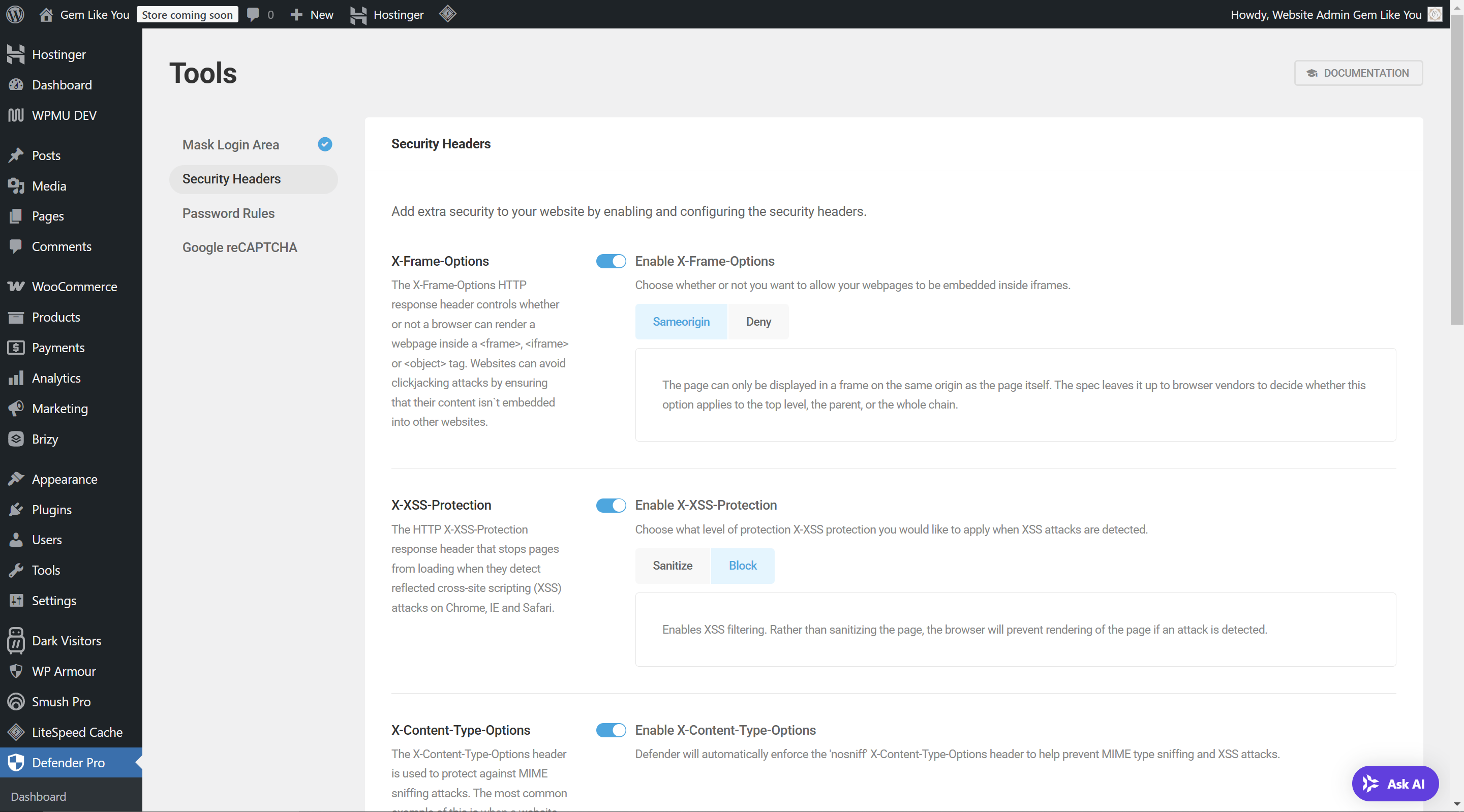
I contacted WPMU Defender Pro support, and apparently the conflict was caused by my strict X-frame settings, which I had originally set to "deny." I didn't know Brizy has iframe and object tags.
After I changed this setting and set it it to "same origin," everything worked perfectly and I could edit pages while Defender was running. Because Defender also masks my admin login, protects against brute-force and adds WAF and malicious agent banning, I feel a lot better now that I can edit my website while Defender is on.
Thanks for your support and screencast, I appreciate it. Brizy Site builder loads quickly, edits quickly and saves/publishes quickly. I am very satisfied with how responsive it is compared to Elementor Pro and I am glad the issue is resolved.
 0
0 -
Hi Nathan,
Thanks for sharing your solution. This will definitely be helpful for other users facing the same issue.
Best Regards,
Ariel H.0
Please sign in to leave a comment.
Comments
9 comments