Images are not loading

Good afternoon.
When importing full markup or saved blocks from my own collection, images are not loaded. Here is a screenshot https://skr.sh/sTjqH3U1tU0 . Example of a website https://new.formula4seo.ru/
-
Brizy Version 2.6.8
Brizy Pro Version 2.6.4
WordPress Version 6.7.1
0 -

Hi Evgeny,
Thank you for contacting us.
To address this issue, please contact your hosting provide and adjust the following settings in your server.
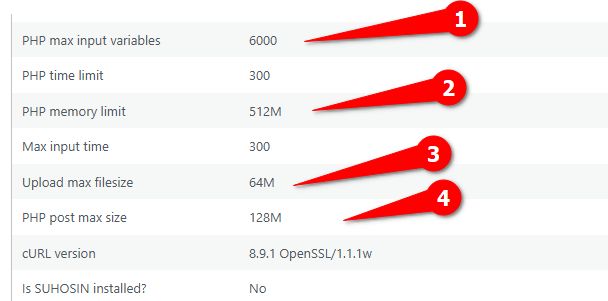
If the issue persists, try these steps:
1. Deactivate all other plugins except Brizy and Brizy Pro. If the problem goes away, reactivate plugins one by one to find the conflicting plugin.
2. Also, try switching to a default WordPress theme to see if that resolves the issue.If neither deactivating other plugins nor switching themes resolves the issue, we may need to investigate further by accessing your WordPress admin area. To ensure your website's security, please create a temporary admin user account specifically for our support team. Once created, please send the following information to communitysupport@brizy.io:
Community Post link: https://support.brizy.io/hc/en-us/community/posts/23992779254162
WordPress Admin URL:
Username:
Password:Before granting us access, we strongly recommend creating a full backup of your website as a precaution.
Best regards,
Ariel H.0 -
I have set the required PHP settings. Here is the current configuration https://new.formula4seo.ru/info.php
1. Disabling third-party plugins did not help
2. Changed the theme of the website to Twenty Twenty-One
The problem persists.
I have sent access to the site to your email.
0 -
I also noticed that the blocks saved to my account don't have names https://skr.sh/sTm6qDB2wgf . Although I asked them when saving on another site.
0 -
Hi Evgeny,
Thank you for your cooperation.
Could you also please provide us temporary access to FTP so we will have direct access to your WordPress files?
Best regards,
Ariel H.0 -
I sent access to FTP in new email.
0 -
Hi Evgeny,
Thank you for your cooperation. I’ve asked a colleague to look into the issue further and will update you as soon as I have more information.
Apologies for the inconvenience.
Best regards,
Ariel H.0 -

even im facing the same issue. kindly let us know , how to fix the issue
0 -
Hi,
We apologize for the inconvenience you're experiencing. Please use these versions temporarily while we finalize a fix (currently in beta testing).
Brizy 2.6.4 : https://jmp.sh/hTF2g1V8
Brizy Pro 2.6.3 : https://jmp.sh/3FPsswmyFollow the below procedure to roll back.
1. Deactivate and delete Brizy Pro
2. Deactivate and delete Brizy
3. In your WordPress Dashboard under Plugins - Add New - Upload Plugin, upload Brizy 2.6.4
4. In your WordPress Dashboard under Plugins - Add New - Upload Plugin, upload Brizy Pro 2.6.3Best regards,
Ariel H.0 -
Thank you. In which version of Brizy and Brizy PRO will the bug be fixed? So that I don't upgrade sooner than necessary.
0 -
Hi Evgeny,
Thank you for reaching out to us.
The update to resolve the issue is Brizy v2.6.9, which is currently in beta testing and should be released soon.
We apologize for any inconvenience caused.
Best regards,
Ariel H0
Please sign in to leave a comment.
Comments
11 comments