Form Fields No Longer Lining Up

I am on a new site project and adding a form. Previously, I could set the field width to 50%, duplicate it, and would be able to put First Name, Last Name on the same line. This has stopped working.
-

Hi Michael,
We have not removed the option to set a percentage width for the form fields. Click on the "Text" field, select the "Cog" icon and set the width percentage. What issue are you facing when trying to set percentage width?
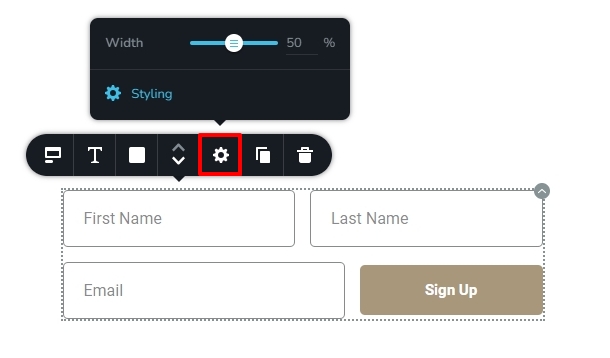 0
0 -
This is what I am seeing.
 0
0 -
I have also shut down every other plugin (except Classic Editor) and it made no difference.
0 -
Hello Michael,
The combined width percentage of the First Name and Last Name fields should not exceed 100 for them to fit into the same line. Have you tried reducing the width of the First Name to something between 50 and 40%?
0 -
I should have mentioned that I had long since reviewed those settings. I have used this function tens and tens of times and have never had this happen.
0 -
I have now tried everything. I have shut down all plugins, I have cleared the cache, I have set each field to 33% and still those two fields will NOT go on the same line.
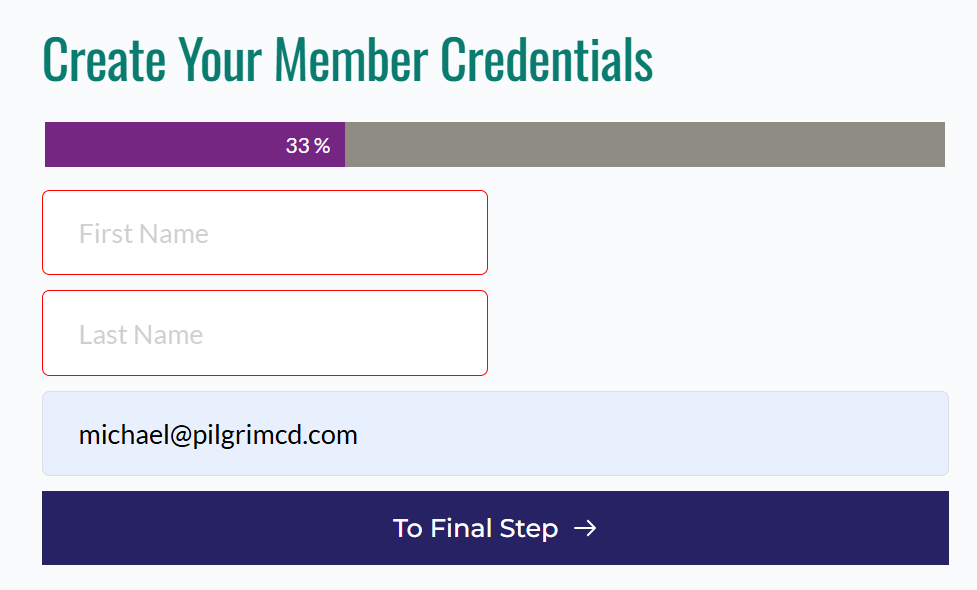 0
0 -
Hello Michael,
Can we take a look at your project to troubleshoot this issue for you? Please add a new user to your WordPress Dashboard and send the following details to our email: communitysupport@brizy.io
- Support Forum link: https://support.brizy.io/hc/en-us/community/posts/23627205531538
- WordPress Admin URL:
- Username
- Password
Please let us know in this forum when you send us the email.
0 -
K C George -
I have discovered that the issue is related to the use of a Multi-Step with Progress Bar. The moment I switched to that format, the fields would no longer line up at 50% or any % width.
0 -
Hello Michael,
I could reproduce the issue at our end. This is due to a bug with the Multi Step form. We will work on fixing it. In the meantime, kindly set 100% width for both the First Name and Last Name fields.
0
Please sign in to leave a comment.
Comments
9 comments