Page refresh, can't save

I can't save page, it ask me always to refresh page. I try to disable all plugin but problem still.
What i can do?
Thanks
Francesco
-

Hello Francesco,
One of the possible reasons for the error "This page needs a refresh. You've probably updated this page (or another page) in a different tab or browser." is the upper limit set for HTTP requests in ModSecurity software in cPanel. Please check if ModSecurity is turned on in your cPanel hosting account.
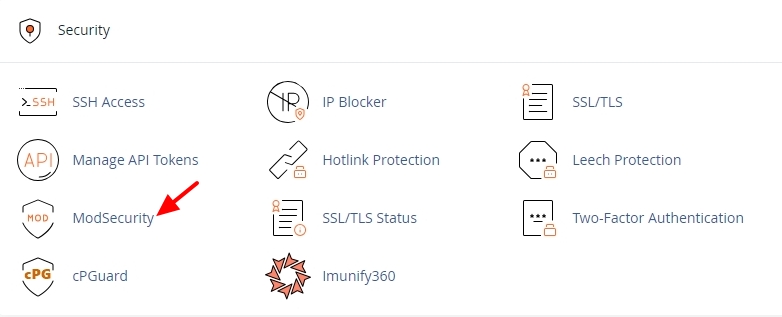
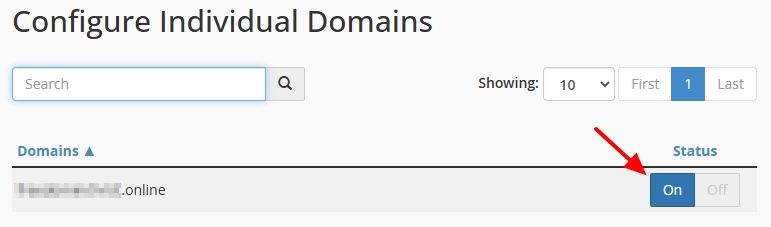
Kindly add these directives to your .htaccess file at the website root to increases the upper limits for HTTP requests. You can add it just before the "# END WordPress" line.
<IfModule mod_security.c>
    SecRequestBodyLimit 4194304
    SecRequestBodyNoFilesLimit 2097152
</IfModule>
Your .htaccess may look like this after adding the ModSecurity directives.
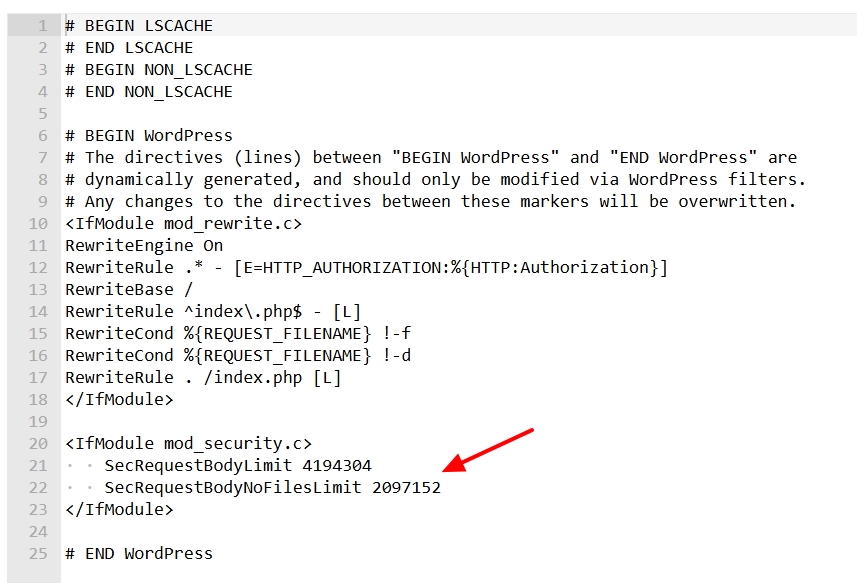
After making the above changes, please check if you are able to save changes to a Brizy page.
0 -
Hello George, i don't use cpanel and i don't have ModSecurity enable, i use simple nginx with standard configuration. I try to downgrade to version 2.5 and now it works, but i would use newer version. Any suggest?
0 -
Hello Francesco,
We are open to look at your WordPress Dashboard to troubleshoot this issue. Please add a new user to your WordPress Dashboard and send the following details to our email: communitysupport@brizy.io
- Support Forum link: https://support.brizy.io/hc/en-us/community/posts/22855323180690
- WordPress Admin URL:
- Username
- Password
Please let us know in this forum when you send us the email.
0 -

Brizy Editor Issue: 403 Forbidden Error Caused by Wordfence Firewall
I experienced a similar issue (403 Forbidden error) caused by the Wordfence plugin's firewall. I was getting frustrated trying to understand why mod_security wasn't responsible for blocking my attempts to save changes when editing pages with Brizy.
I wanted to share this here to help others, as Wordfence is certainly a very popular (and highly recommended) security tool for WordPress.
Details of the Block
The specific URL that Wordfence was blocking was:
text/wp-admin/admin-ajax.php?action=brizy_update_item&version=308-wp&hash=412fefa86eThe reason for the block was identified as:
textBlocked by the firewall for XSS: Cross Site Scripting in the POST body: compiled=%7B%22html%22%3A%22PGRpdiBjbGFzcz0iYnJ6LXJvb3RfX2NvbnRhaW5lciBicnotcmVzZXQtYWxsIGJyeiBicnotcm9vdF9fY… in https://mywebsite.com/wp-admin/admin-ajax.php?action=brizy_update_item&version=308-wp&hash=412fefa86e...Solution
The solution was simply to click the button "Add parameter to the firewall's allowed list" in the Wordfence notification panel.
Hope this helps anyone experiencing similar issues!
0
Please sign in to leave a comment.
Comments
4 comments