Brizy template and Sermon post plugin

I am trying to organize my church's sermons (youtube and audio) and have tried multiple plugins. Each allows me to easily organize it, however, the problem I am facing in integrating it with my Brizy template. Unfortunately, the plugins by default places the dynamic content on say http://websitename/sermon, with an inability to customize the page to look like the rest of my site.
Examples are below.
-

Hello David,
There are three broad options to display plugin content on a Brizy page
- Using plugin shortcode: Check if the plugins you are using to organize the sermons have shortcodes. Kindly display the playlists on a Brizy page by dragging the Brizy Shortcode element to the page and pasting the plugin shortcode
- Using plugin Widgets: In your WordPress Dashboard under Appearance - Widgets, check if you see a widget provided by the plugins. Kindly display the playlist on a Brizy page by dragging the Brizy Sidebar element to the page and selecting an appropriate widget area where the plugin widget is added
- Using Brizy Page Template: If the video/audio playlists are developed using a Gutenberg page, you can add a Brizy Page Template under Brizy - Templates to display the page with the Brizy header and footer.
Kindly let us know the plugins you have selected to display sermon audio and video? We will then make a screen recording to demonstrate how you can display the playlists on a Brizy page.
0 -
Hi KC George,
The plugins I am using to display audio and video is CP Sermon Library,
https://churchplugins.com/wordpress-plugins/cp-sermons/
0 -

Hi David,
Thank you for the update. Unfortunately, we don’t have access to this premium plugin, so we’ll need to investigate the issue directly on your website.
Could you please provide us with temporary access to your WP Admin? Simply add us as an Admin user to your WordPress Dashboard and send the following details to communitysupport@brizy.io.
Community Post link: https://support.brizy.io/hc/en-us/community/posts/22824202735506
WordPress Admin URL:
Username:
Password:As a precaution, we recommend creating a full backup of your site.
Best regards,
Ariel H.0 -
Hello Ariel,
I just sent the login info to the above email.
I have already backed up the site. In addition, the plugin does use the Gutenberg page.
Thanks,
David
0 -
Hi David,
Thank you for your cooperation.
We’ve enabled Brizy with Templates, and it seems to be working, but the page isn’t displaying in the front-end, possibly due to insufficient memory.
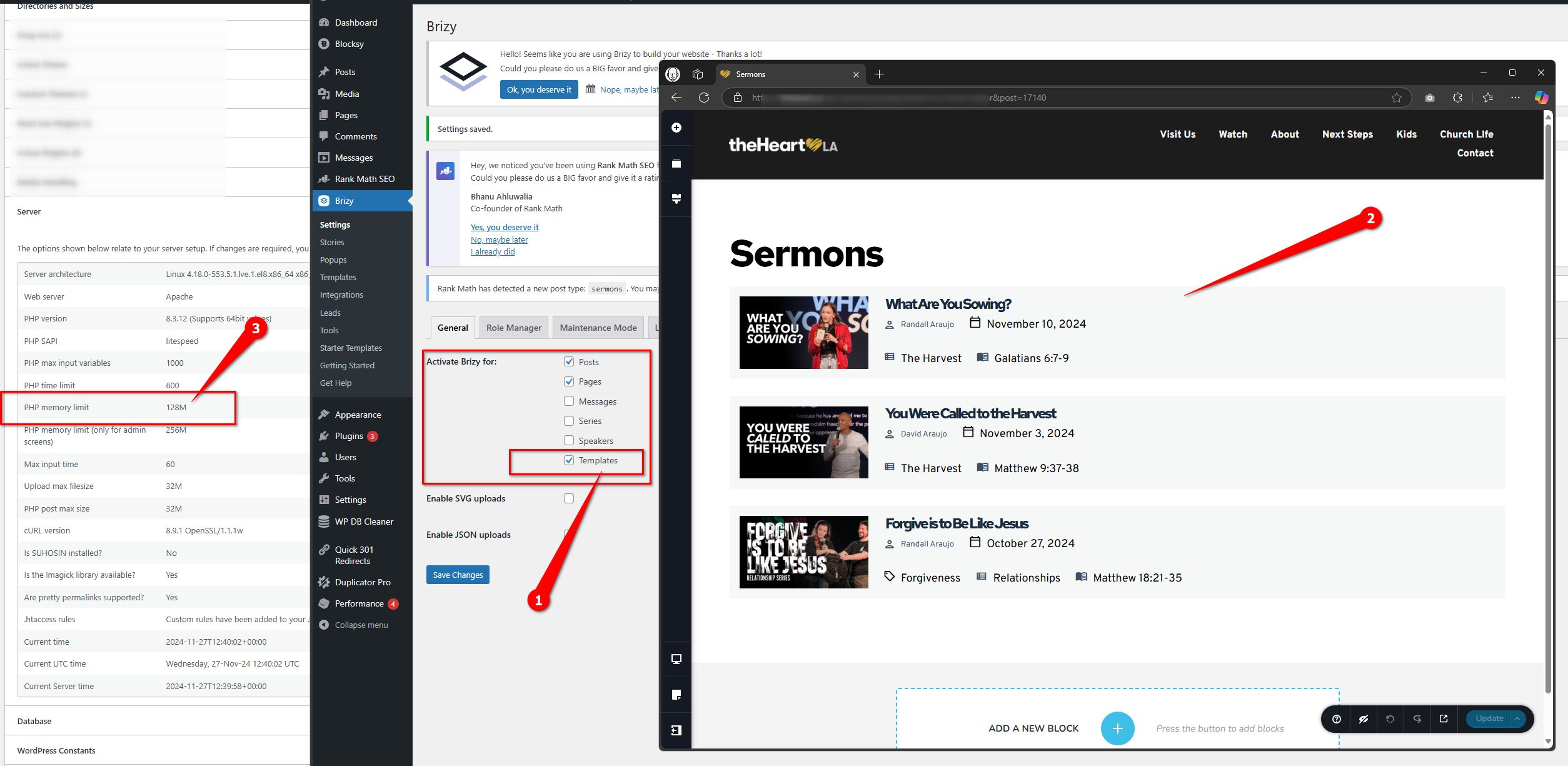
To resolve this, please follow the steps outlined in this guide:
https://www.wpbeginner.com/wp-tutorials/fix-wordpress-memory-exhausted-error-increase-php-memory/
I recommend increasing the PHP memory limit to 512M or higher for optimal performance.It also looks like the plugin is designed to work with Gutenberg Blocks, allowing you to create Patterns for Messages and generate a shortcode that you can use in Brizy with the shortcode element. To enable this feature, you will need to disable the Classic Editor plugin and switch to Gutenberg. Here’s a helpful video tutorial from the plugin developers: https://youtu.be/MT0IGQ-RIiE?si=SDksPNKiRPkl3zWl&t=196
I hope this resolves the issue.
Best regards,
Ariel H.0 -
Hi Ariel,
Thank you for the help. I increased the PHP memory usage to 512 m. I also I created a page called /watch to display the Brizy template. Unfortunately, it worked once and it went back to displaying the page without the template. Are there any other options?
David
0 -
Hi David,
Thank you for the update.
It seems that the template might not be fully compatible with Brizy. I recommend using the shortcode as an alternative. However, to proceed, you will need to disable the Classic Editor in order to access Gutenberg Blocks and create Patterns, which will allow you to generate the shortcode, as shown in the video tutorial above.
Best regards,
Ariel H.0
Please sign in to leave a comment.
Comments
7 comments