Sticky Menus stopped working

This problem has occurred various times in the past, but recently it has started with my site. All options in the database pertain to years past.
The menus work correctly in the editor, but not in the standard browsers. Can this issue be fixed? The site is fcgweb.com.
It most likely is Brizy Pro, because I have not changed anything else on my site.
My website Blog no longer works on my iPhone. The burger menus don't work, and my blog page does not display at all. Looks like Brizy has gotten out of hand - no longer reliable!
-

Hello Forrest,
Open one of the pages and make a minor change to the header block (like increasing the padding by 1 pixel), save your work by clicking on the "Update" button at the bottom right corner. If you are hosting with Hostinger, kindly also purge all server cache following the instructions at https://www.hostinger.in/tutorials/website-cache
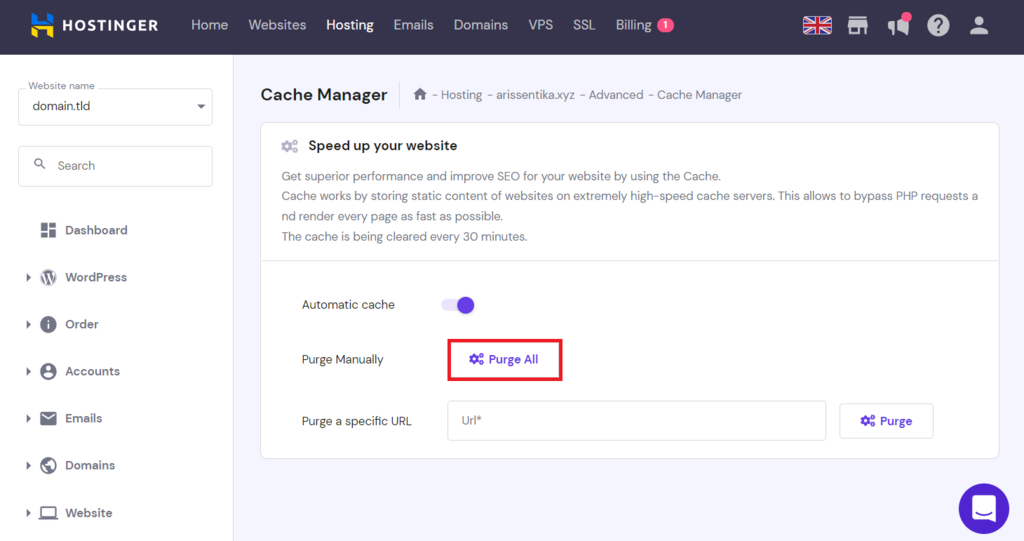
If this does not help, we will take a look at your WordPress Dashboard to fix this issue.
0 -

I did that was recommended in this post. The sticky menu is showing again... but we are now getting the following message "This page needs a refresh. You’ve probably updated this page (or another page) in a different tab or browser." and need to refresh the page. We cannot update the page!
On three websites created with Brizy, we needed to completely rebuilt the sites. Even downloading the sections, or block causes the new site to error out.
Is there a fix? Or, do we need to plan on rebuilding many, many sites?
At this point, I want to stay on the old Brizy... but love the new features added... which is why we've rebuilt 3 of the sites.
Thank you.
0 -

Hi Michael,
Thanks for contacting us.
This issue often occurs on sites using security plugins like Wordfence. A quick fix is to either disable the firewall or switch it to "learning mode" - https://help.elegantthemes.com/en/articles/2395855-how-to-fix-saving-issues-while-wordfence-plugin-is-enabled
If that doesn’t help, try disabling all plugins except Brizy and Brizy Pro to check for any conflicts. If the issue resolves, you can re-enable your plugins one by one to find which one might be causing the problem.
Additionally, you can adjust the following settings in your php.ini file, or reach out to your hosting provider for assistance:
max_execution_time: 300
max_input_vars: 6000
memory_limit: 512M (or higher)
post_max_size: 128M
upload_max_filesize: 128M
If you have access to cPanel, go to "Select PHP Version,"" click on the "Options" tab, and you should be able to make these changes there.
If the issue continues, could you please provide us with temporary WP Admin access so we can investigate further? Add us as an Admin user and send the details to communitysupport@brizy.io:
Community Post link: https://support.brizy.io/hc/en-us/community/posts/22488417038994
WordPress Admin URL
Username
PasswordPlease make a full backup of your site as a precaution.
Best regards,
Ariel H.0
Please sign in to leave a comment.
Comments
3 comments