content issue

Hey team i have some unprofessional style issue in brizy templete can you please watch this videos so you can understand
Here is the table look like on brizy:
and here is how is table look like on Gutenberg;
-

Hi Ossama,
Thank you for reaching out.
To change this layout on mobile view, you can add the following custom CSS:
@media only screen and (max-width: 767px) {
  .wp-block-table {
    display: inline;
  }
}
You can add this in Appearance > Customize > Additional CSS.
I also read your blog post, 'Brizy vs Elementor Review 2024: Making the Right Choice.' It offers a balanced comparison and effectively highlights Brizy's simple, user-friendly UI, making it an excellent choice for users seeking ease of use.
Best regards,
Ariel H.0 -
Thanks Ariel, can you pls just share with me a video, that can show me how i will add the css and where, because i don't want to broke anything I'm still new to this lol and thanks
best regards
tbili
0 -

Hello Tbili,
Kindly follow the procedure at https://jmp.sh/WZkgerk9 to add the above code to your website.
0 -
thanks George, but check here its still not work
CSS page;
My Mobile screen:
waiting your reply guys pls i want fix this its not look good
0 -
Hi Tbili,
Could you try adding !important to the CSS and see if that resolves the issue?@media only screen and (max-width: 767px) {
.wp-block-table {
display: inline !important;
}
}If this doesn’t work, please also check if you have any caching plugins or server-side caching enabled and clear those caches.
Best regards,
Ariel H.0 -
Hi Ariel, i don't know what is caching plugs mean can i give you access to my site pls and when fix it record a video so i can know how to solve the issue in future, pls how can i send you the access to my site let me know
0 -
it still the same i add this new css but noting changes
0 -
Hi Tbili,
Thank you for the update.
Could you please provide us with temporary access to your WP Admin page so we can inspect your site? Kindly add us as an Admin user to your WordPress Dashboard and send the following details to communitysupport@brizy.io:
Community Post link: https://support.brizy.io/hc/en-us/community/posts/22451499766162
WordPress Admin URL:
Username:
Password:Please make a full backup of your site as a precaution.
Best regards,
Ariel H.0 -
done i sent to you the user and pass,
but dont forget guys to record screen so i will know how you solve it thanks
0 -
Hi Tbili,
Thank you for your cooperation. The issue was resolved by clearing both the Site Cache and the URL Cache.
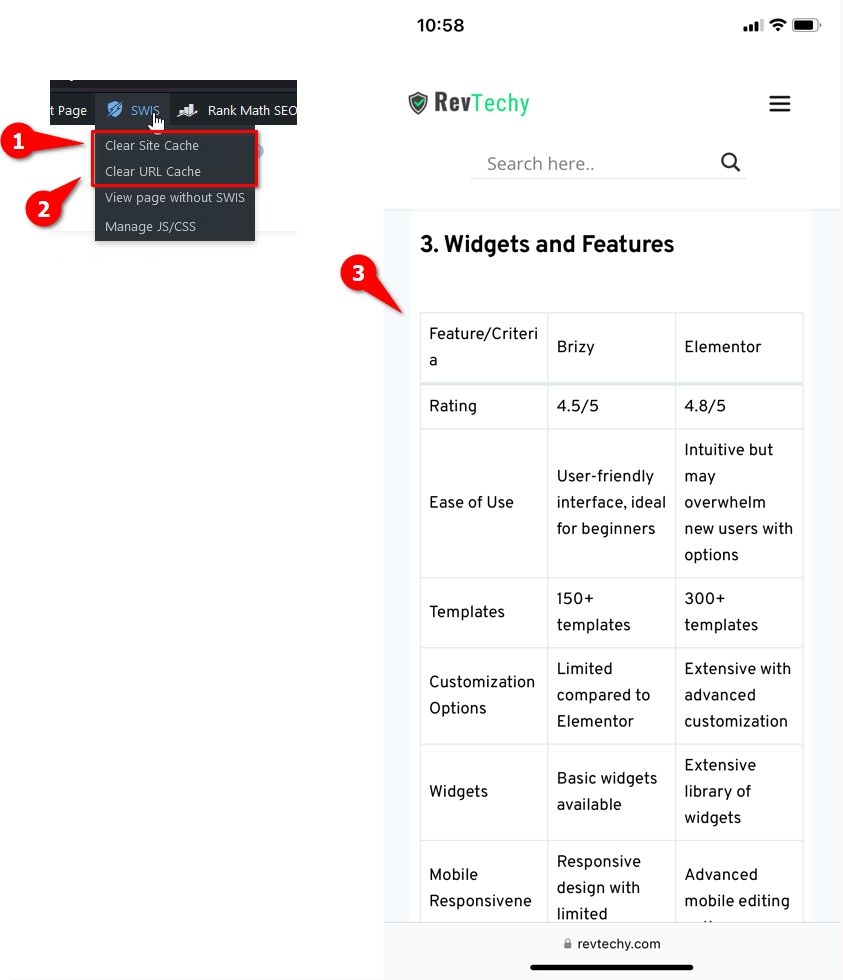
Please check it again on your mobile device—you may need to clear your mobile cache or try another browser.
Best regards,
Ariel H.0 -
Thank you Ariel, it's really fix appreciate, so it will not happen again right, or if is it happen I just have to go Swiss and clear url cache and site cache and is done,?
0 -
Hi Tbili,
This issue shouldn’t reoccur unless the CSS is updated. However, if it does, you can simply clear the cache as I demonstrated.
Best regards,
Ariel H.0 -
Thank you so much Ariel, for helping me solve this issue 😊
0
Please sign in to leave a comment.
Comments
13 comments