Unable to Save Homepage

When I open a page in Brizy WordPress and make a change, I am unable to save the page. I just get a endlessly spinning icon when I click update.
-

Hi John,
Thank you for reaching out.
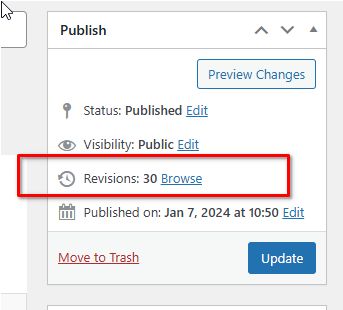
This issue often occurs when there are too many revisions on a page, which can lead to performance problems and make it challenging to edit with Brizy Builder. To check revisions on a specific page, navigate to the "Pages" section, select the desired page, and view the revisions displayed on the right sidebar, as shown in this screenshot:
To help resolve this, I recommend following the steps outlined in this guide: https://www.elegantthemes.com/blog/wordpress/how-to-manage-wordpress-revisions-to-optimize-site-performance.
This article covers manual revision management through PHPMyAdmin or the simpler WP Optimize plugin.Additionally, this issue could also occur if the page exceeds the maximum HTTP request size. In this case, please contact your hosting provider to increase both SecRequestBodyLimit and SecRequestBodyNoFilesLimit in the ModSecurity configuration:
<IfModule mod_security.c>
SecRequestBodyLimit 4194304
SecRequestBodyNoFilesLimit 2097152
</IfModule>Please give this a try and let me know the outcome.
Best regards,
Ariel H.0 -
I deleted all revisions using WP-Optimize, which did not work.
We're hosting on Cloudways.com, which doesn't use ModSecurity.
Any other ideas?
John
0 -
Hi John,
We're sorry to hear you're having this issue with Brizy
Please provide us with temporary access to your WP Admin page so we can take a look. Please add us as an Admin user to your WordPress Dashboard and send the following details to communitysupport@brizy.io.
Community Post link: https://support.brizy.io/hc/en-us/community/posts/22212843486098
WordPress Admin URL:
Username:
Password:Additionally, we will also need temporary access to cPanel/FTP:
cPanel/FTP host address:
Username:
Password:As a precaution, we recommend creating a full backup of your site.
Best regards,
Ariel H.0 -
Hi Ariel,
We were able to get this resolved with Cloudways.com support. Turns out the ModSecurity settings were the issue, but they use Imunify360 instead of ModSecurity and needed to change the settings on their end.
Thank you,
John
0
Please sign in to leave a comment.
Comments
4 comments