Layout Design works in Safari but not in Chrome

Hello, I designed my website with the unicorn design. I started in Safari, saved everything and later started to work in Chrome. If I open the builder now, the design is somehow lost.


-

Hi Dustin,
Thank you for reaching out to us.
If the design displays correctly in Safari, this could indicate a rendering issue specific to Chrome.
Clearing the cache in Chrome and refreshing the page could help.If the issue continues, please provide us the URL so we can inspect your site.
Best regards,
Ariel H.0 -
Hey, thanks for the quick response. I tried that but it still doesn't work. Here is my URL: https://neun-sechs.de/sop-overview-page/?preview_id=27428&preview_nonce=7024854f83&preview=true
0 -
Hi,
Thank you for the update.
Unfortunately, we are unable to view the page because your site is currently in development mode.
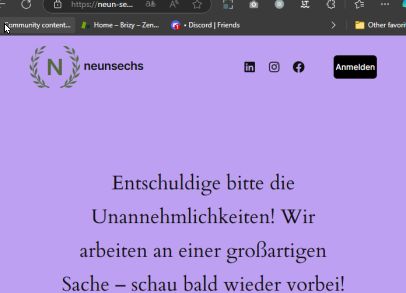
Please provide us with temporary access to your WP Admin page so we can take a look. Please add us as an Admin user to your WordPress Dashboard and send the following details to communitysupport@brizy.io.
Community Post link: https://support.brizy.io/hc/en-us/community/posts/22175887882514
WordPress Admin URL:
Username:
Password:As a precaution, we recommend creating a full backup of your site.
Best regards,
Ariel H.0 -
Okay, thank you. Just done that
0 -
Hi Dustin,
Thank you for your cooperation.
I have inspected your site, and everything appears to be working properly. It is rendering the page in Chrome, as demonstrated on this screen recording:
https://go.screenpal.com/watch/cZ6Z2ZnciidIf the issue continues at your end, please try resetting Chrome to factory defaults.
https://support.google.com/chrome/answer/3296214?hl=enBest regards,
Ariel H.0 -
Can you please see and check the sop overview page? The start page works in my chrome as well. It’s just that page that is not working
0 -
Hi Dustin,
Thank you for the update.
It looks like this page is unfinished. Could you please try rebuilding the page, saving it, and then closing Safari? After that, try editing it in Chrome and see if you can replicate the issue.
Please try this and let me know how it goes.
Best regards,
Ariel H.0
Please sign in to leave a comment.
Comments
7 comments