latest Brizy Wordpress Plugin issue with Apache Server

Hi.
Supposed this is a big issue due to i am paid for Brizy PRO.
Currently, latest Wordpress Plugin Brizy version 2.5.5 and Brizy PRO 2.5.9 have issue with Apache server Security Mod.
I am using shared hosting and there is no customized function for Security Mod in the Cpanel. The problem is the current Apache server not cause the Brizy latest version give a Warning line on read setting in wordpress homepage. I have to revert to previous version and some design already break out.
-

Hello Hafize,
You are right; on a shared hosting there is no customized function for ModSecurity in the cPanel. Kindly request your hosting provider to add these configurations in the ModSecurity configuration file to avoid the block and let us know what they say.
- SecRequestBodyLimit 4194304 # Limit request bodies to 4 MB
- SecRequestBodyNoFilesLimit 2097152 # Limit non-file request bodies to 2 MB
Additionally also request them to set the post_max_size to at least 2MB. This should help fix the issue with the latest Brizy versions.
0 -
Hi K C George,
The hosting provider just give me these:
Use .htaccess for Custom Rules: For Apache servers, you can use the .htaccess file to implement custom security directives. This includes blocking specific IP addresses, redirecting users based on browser type, or setting up custom error pages.
Implement Content Security Policy (CSP): CSP helps prevent XSS attacks by allowing you to specify which domains your site can load resources from. You can set up a CSP policy by adding the appropriate HTTP header in your web application or through .htaccess.
Secure Directories and Files: Ensure that your directory and file permissions are correctly set to prevent unauthorized access. Typically, directories should be set to 755, and files should be 644.
Use HTTPS: If you haven't already, install an SSL certificate to encrypt data transferred between the user's browser and your website, protecting sensitive information.
Update Software Regularly: Keep your CMS (like WordPress, Joomla, etc.), plugins, and themes updated to the latest versions. Many updates contain security patches.
Disable Directory Browsing: Prevent users from seeing a listing of files within a directory that doesn't have an index file by adding Options -Indexes in your .htaccess file.
Limit Login Attempts: To protect against brute force attacks, limit the number of login attempts from a single IP address. This can be done through plugins or custom code in your application.
Use Strong Passwords and Authentication Measures: Encourage the use of strong passwords and consider implementing two-factor authentication for admin areas.
Backups: Regularly back up your site. While this is not a preventative measure, it ensures you can quickly restore your site in case of a security breach.
Web Application Firewall (WAF): Consider using a third-party WAF service that can help protect your site from common threats and vulnerabilities.0 -
current
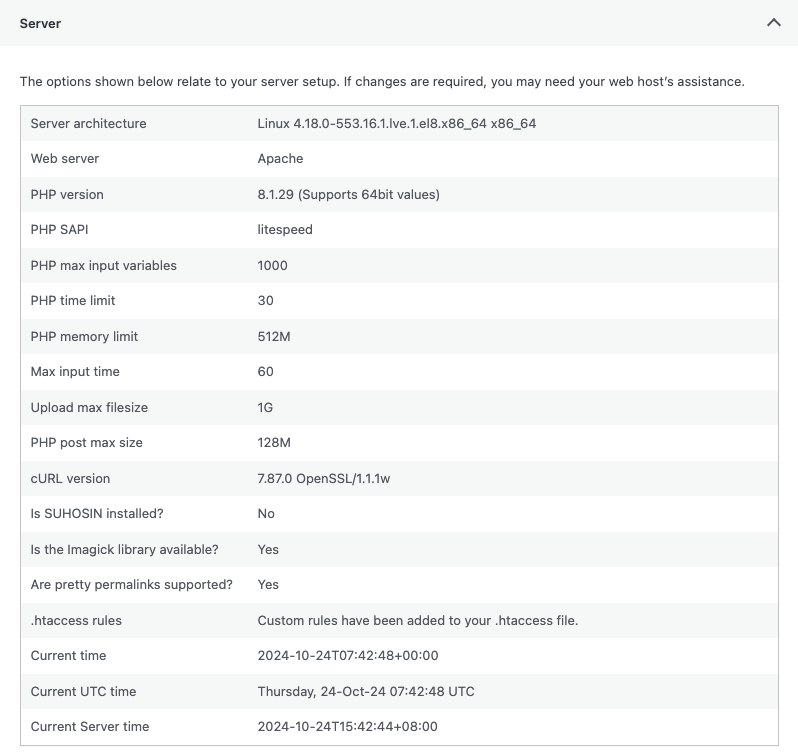 post_max_size is 128MB0
 -
the latest Brizy also give me infinite loading while editing page or post created last week
0 -
Hello Hafize,
Kindly add these lines to your .htaccess file in your website root. You can add it just before the "# END WordPress" line.
<IfModule mod_security.c>
    SecRequestBodyLimit 4194304
    SecRequestBodyNoFilesLimit 2097152
</IfModule>
Once you have added the above lines, your .htaccess file may look like this
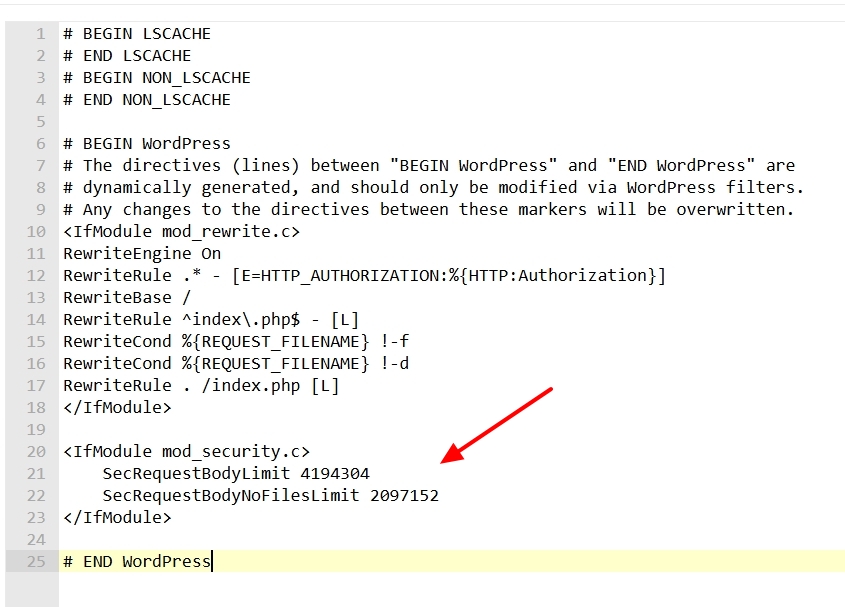
Kindly also look at this screen recording for the procedure. https://jmp.sh/cC73uAPN
0 -
Hello Hafize,
If you have access to cPanel, kindly follow the procedure in this screen recording to set Post Max Size to 2M. https://jmp.sh/1ChVRWj5
0 -
Hi Kc George,
I confused. The Post Max Size is need to be 2M or minimum 2M?
0 -
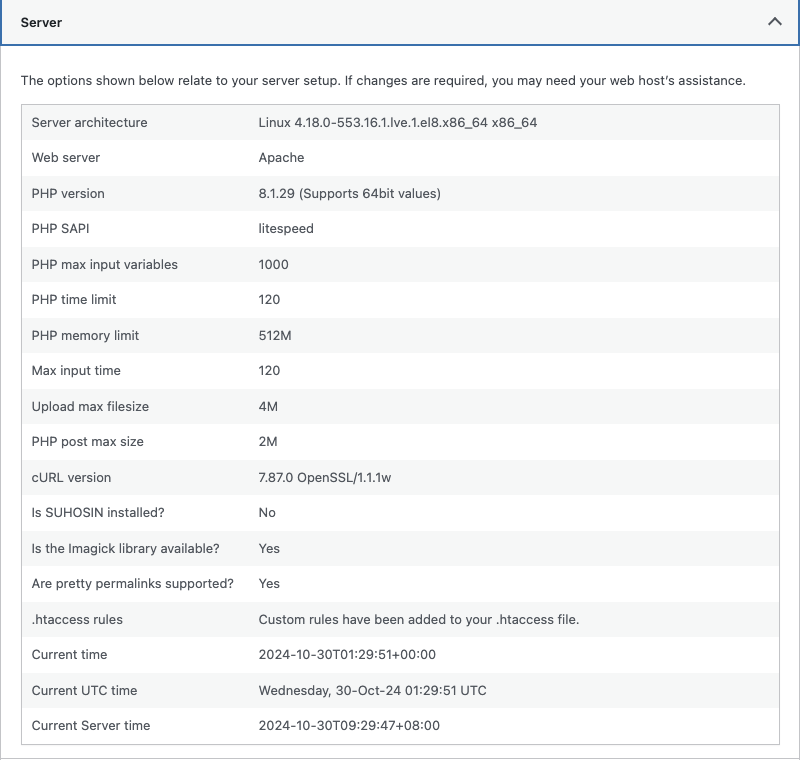
this is my latest server setting
 0
0 -
Hello Hafize,
Your settings look correct. Post max size of 2M is good. Are you able to save changes to your Brizy pages with the above server configurations?
0 -
Hi K C George,
The changes can be saved. The new issue came up, some of my posts cannot edit due to infinite loading (Error 500).0 -

Hi Hafize,
Thank you for the update.
Could you please check if the issue still occurs with only Brizy and Brizy Pro enabled? If disabling other plugins resolves the issue, try reactivating them one by one while testing your site to identify which plugin may be causing the problem.
Please give this a try and let me know the results.
Best regards,
Ariel H.0 -
hi Ariel H.
Yes the problem still occurs after only Brizy & Brizy Pro plugin activate.
0 -
Hi Hafize,
We're sorry to hear you're having this issue with Brizy
Please provide us with temporary access to your WP Admin page so we can take a look. Please add us as an Admin user to your WordPress Dashboard and send the following details to communitysupport@brizy.io.
Community Post link: https://support.brizy.io/hc/en-us/community/posts/22152316506258
WordPress Admin URL:
Username:
Password:Additionally, we will also need temporary access to cPanel/FTP:
cPanel/FTP host address:
Username:
Password:As a precaution, we recommend creating a full backup of your site.
Best regards,
Ariel H.0 -
Hi Ariel H.,
I have send the credential to communitysupport@brizy.io.
0 -
Hi Hafize,
Thank you for the update.
Unfortunately, we’re having trouble accessing the email with your credentials due to an encryption issue. Could you please resend the credentials in plain text format? Rest assured, we don’t store credentials in this email account and delete them immediately after use.
Best regards,
Ariel H.0 -
Hi Ariel H.,
I have resend the plain text credential to communitysupport@brizy.io.
0 -
Hi Hafize,
Thank you for your cooperation. I attempted to replicate the issue, but I was unable to do so as described – here’s a screencast for reference: https://youtu.be/iseJzuILrjs.
Could you please try clearing your browser cache or using a different browser to see if that resolves the issue?
Best regards,
Ariel H.0 -
Hi Ariel H.,
Thanks for your checking.
1. The warning line 207 & 208 is appear again;
2. Please refer to image attached for the infinite loading. It's happend to all page with membership setting. I think it's a permission issue after updating to latest Brizy & Brizy PRO.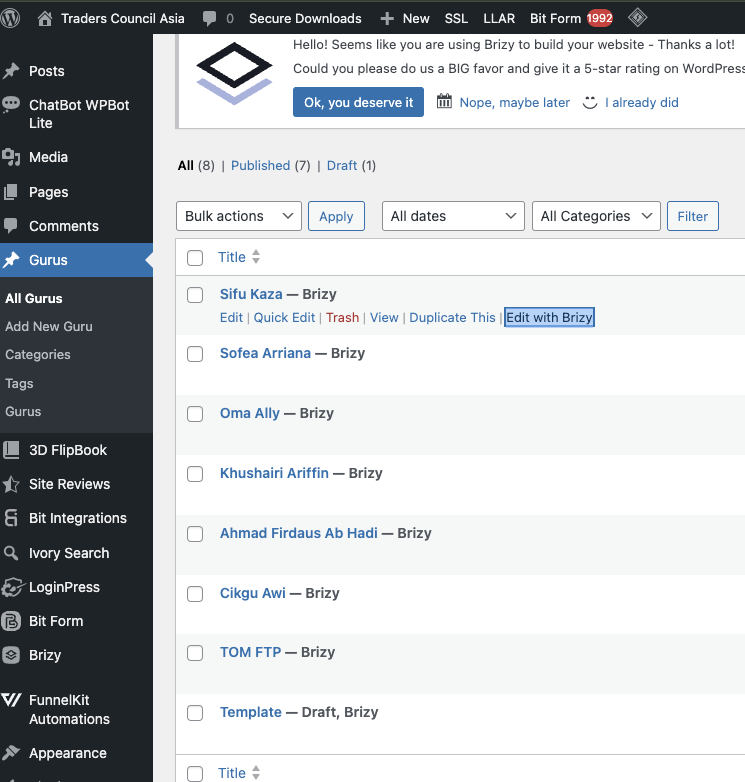 0
0 -
Hi Hafize,
Thank you for keeping in touch.
The issue seems to be related to CORS:
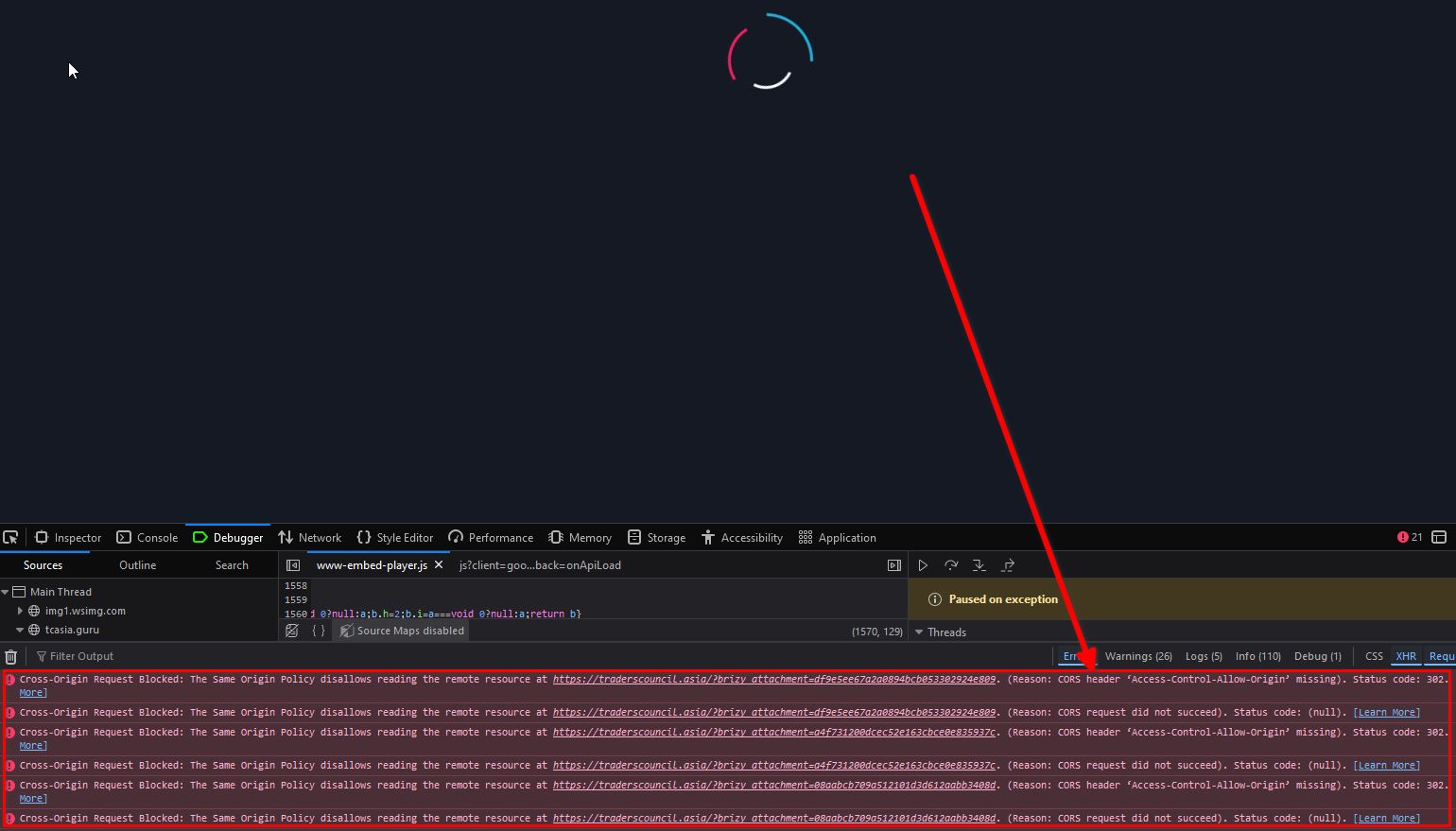
To resolve it, please refer to this guide:
https://developer.mozilla.org/en-US/docs/Web/HTTP/Headers/Access-Control-Allow-Origin
If you’re not comfortable handling this yourself, please contact your hosting provider for assistance.For the linked URL (traderscouncil.asia), please update the wp-config file by following the steps in this support thread:
https://support.brizy.io/hc/en-us/community/posts/22370530396818
This will temporarily hide the warnings until we roll out an update to fully address this issue soon.Best regards,
Ariel H.0 -
Hi Ariel H.
Thanks for your checking. Regarding CORS related issue, do you have any instruction how to resolve this? I have no idea what to do with the document you share and how to explain to my hosting provider.
0 -
Hi Hafize,
CORS or Cross-Origin Resource Sharing is a security feature that regulates how websites can share data. If the CORS settings on your site are too restrictive, they might prevent Brizy's editor from working properly, especially if it needs to access resources from a different site.
To resolve this, you can update the CORS settings on your server, as outlined in the article above, or reach out to your hosting provider for assistance with the changes.
Best regards,
Ariel H.0 -
Hi Ariel H.
I have check with my hosting provider, and it not showing it's from CORS server issue. The tcasia.com page is a clone from traderscouncil.com. Is it possible the issue comes from cloning activity? because the problem is same for both domain.
0 -
Hi,
Thank you for the update.
Yes, the issue could be related to the site cloning process. When cloning a site, some URLs may not update correctly, which can cause problems like the one you're experiencing. To fix this, we recommend using the Replace URL tool. However, before proceeding with this, please ensure that you back up your database.
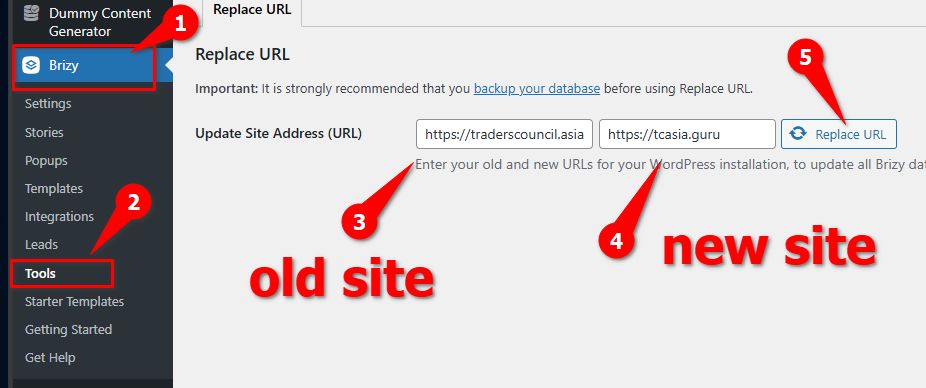
Let us know if you need further assistance.
Best regards,
Ariel H.0
Please sign in to leave a comment.
Comments
23 comments