issue of this: "The rule is already used"

first time i face this issue, after i create post i want to create template for the content in brizy like before but i face this issue "The rule is already used"
-

Hi Ossama,
You normally see this error message when attempting to add the same Display Condition in two different Brizy Templates. A specific display condition like "Include - Posts - All" can be added only to a single Brizy template. If you have created multiple Brizy Templates, open each template and check if you have already added this Display Condition to another template.
Have a look at Dynamic Template Creation with Brizy | Lesson 19 for a tutorial on developing Brizy blog post template.
0 -
Hello Ossama,
You may not have lost any data based on the video you have shared. The blog post content is added to the Gutenberg editor. You need to access the blog post in the Gutenberg editor to verify whether the blog post data is still available.
The learning curve associated with using WordPress and Brizy could make it take longer to finish this project. If you're seeking for faster resolution to your problems, you could consider these options
- Give us access to your WordPress Dashboard and we will fix the blog post template issues for you.
- Schedule a Zoom call so we can walk you through the creation of Brizy Templates.
You could also look at another more detailed tutorial Part 3 WordPress Blogging: Templates in Gutenberg Posts Please let us know how you want to proceed and we will give you further instructions.
0 -
Hi yes i can give you the access if you can fix the issues, how i can share with you my user and ps privately?
0 -
Hi Ossama,
Please add a new user to your WordPress Dashboard and send the following details to our email: communitysupport@brizy.io.
- Support Forum link: https://support.brizy.io/hc/en-us/community/posts/22029318867474
- WordPress Admin URL:
- Username
- Password
Please let us know in this forum when you send us the email.
0 -
ok i will do it now, or if possible to have a zoom call that will be better let me know?
0 -
Done I sent you the username and password for access, but I still preferre zoom meeting so I have some questions, to make it clear and thanks
0 -
Hello Ossama,
I have created a Blog post template for you. A single blog post template is sufficient for all your blog posts. You don't need to create a independent templates for each blog post. I have trashed the Brizy vs elementor template you had created. All three blog posts will take its design from this template. Please check.
0 -
how about the Archive do i need it or not because i did not seen it there?
0 -
Hi Ossama,
Have a look at these two tutorials and attempt to setup a Blog Archive template yourself. If you can't, we are here to assist you.
- Part 3 WordPress Blogging: Templates in Gutenberg Posts
- Dynamic Template Creation with Brizy | Lesson 19
0 -
ok thanks i will check it
0 -
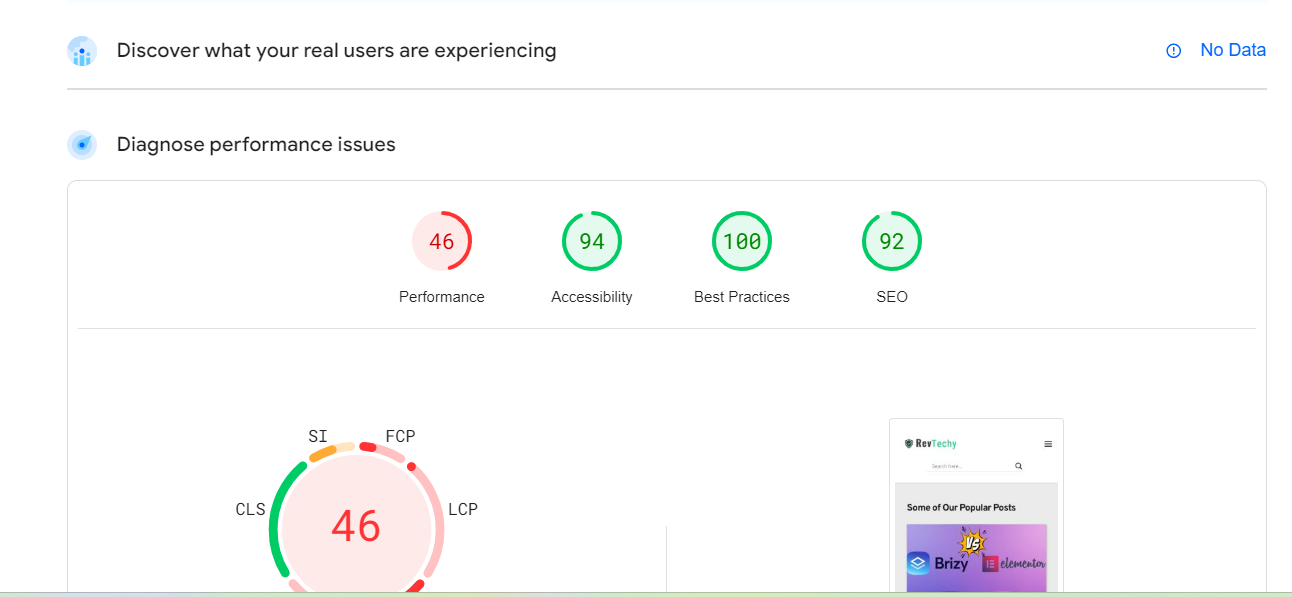
Hi team is there any video about how to fix this?
 0
0 -
Hi Ossama,
Unfortunately we do not have a video tutorial on how to improve your Pagespeed Insights score.
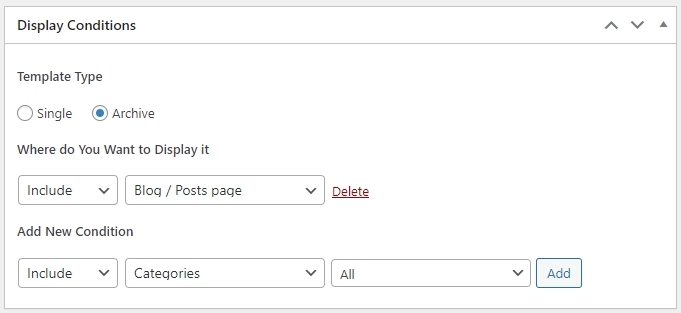
To display all blog posts, the following "Display Condition" must be used. I have added this Display Condition to your Archive Categories template and all blog posts display in the editor. The blog page gives a critical error in the website frontend. Administrative access to your website is required to fix this issue.
The blog post navigation element provides navigation to other blog posts within the same category. If you have added more than one blog post in a specific category, kindly visit blog posts within the category and the navigation for blog posts should be visible.
0 -
Hi George good morning and thanks for the reply. about the error i already give you a Administrator role so pls fix it or we can fix it together,
about navigation element i just able to edit it form the single page so i alraedy did but its doesn't display to other post?
im witting for your reply George pls.
0 -
Hi Ossama,
Your blog page is now working. https://www.revtechy.com/blog/
Each blog category has only a single blog post in your project. When you add a second blog post under one of your categories, blog posts within the category will show the Post Navigation element.
0 -
Hello Ossama,
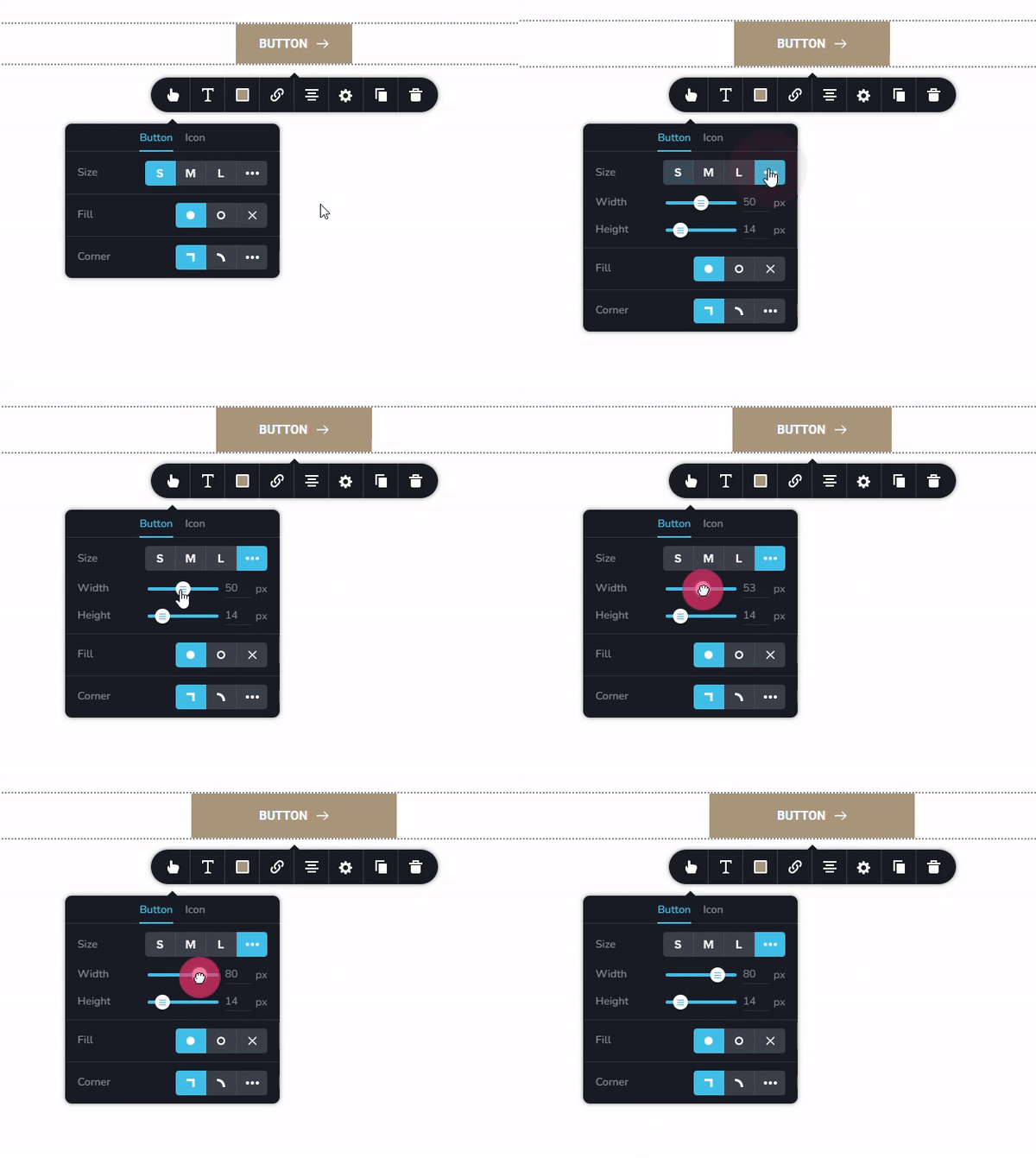
To fix the problem with the button on the mobile screen, kindly increase the width of the button
Please follow the procedure at https://jmp.sh/Y7uxE8ab to add a Brizy Search Template. Once you add the search template, when a when a user searches for a keyword, they will see a Brizy Search Results page.
Your blog is available at https://www.revtechy.com/blog/ and it is already added to your navigational menu. When you are on your website, click on "Blog" menu to visit your blog. Did I understand your question? If not, please elaborate.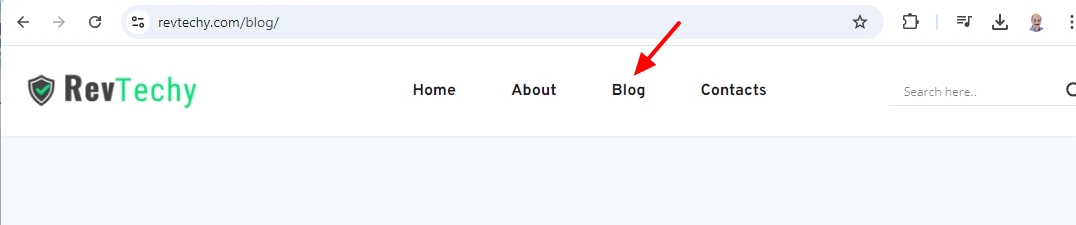 0
0 -
i will start with the blog you say its available sir is not, im not talk about the blog page im talk about archive blog page that i create in brizy template why is it not there anyway George i will share with you a website example so maybe you can understand what i need,
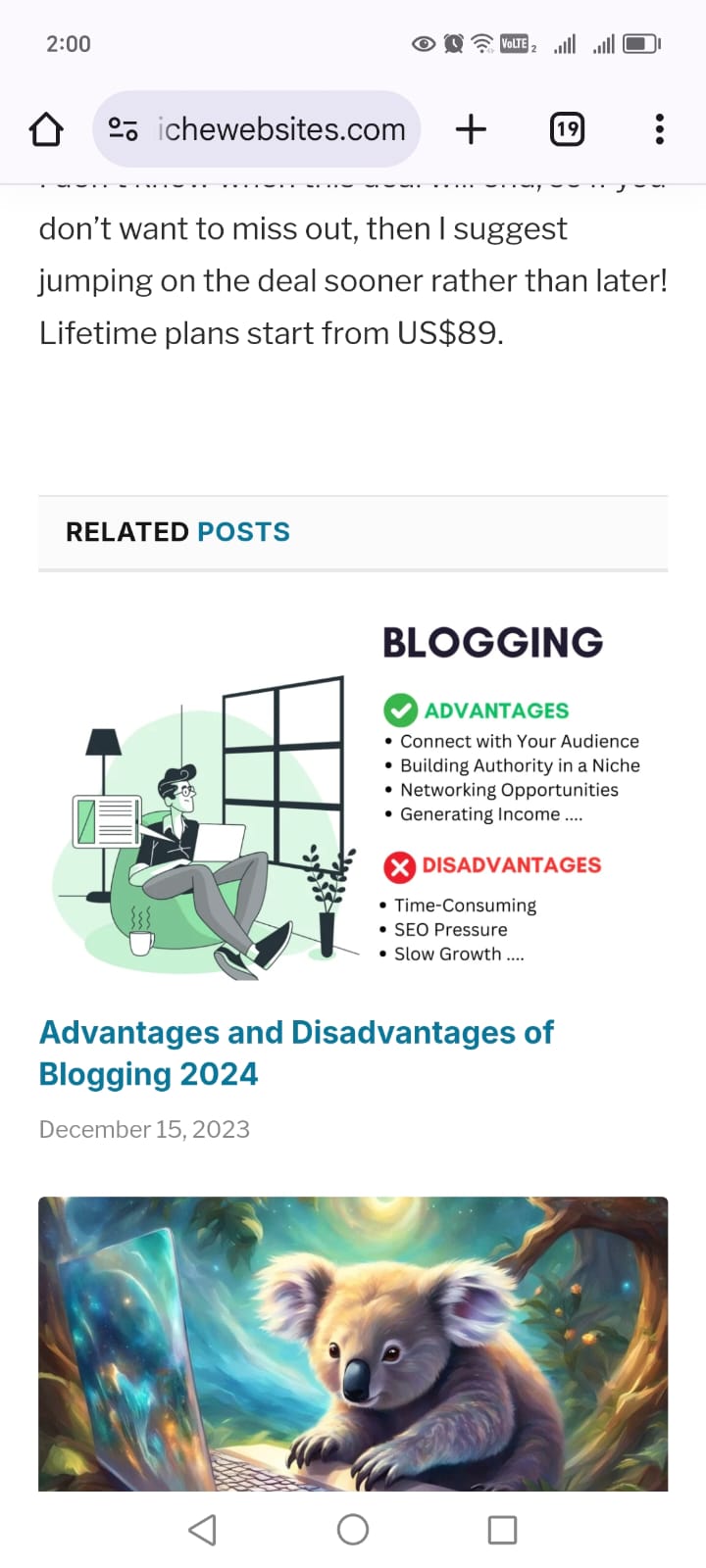
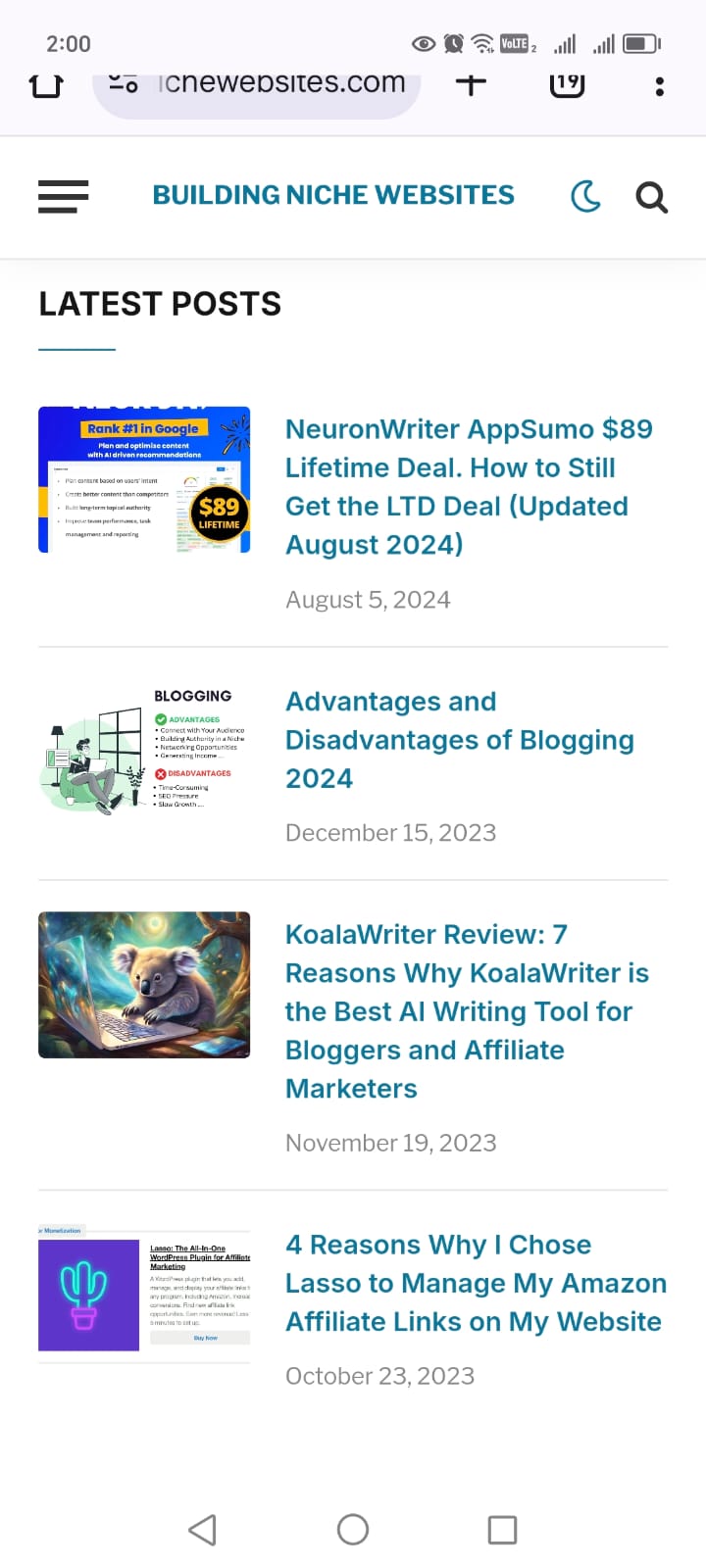
first i want the Home page to be a archive page mean i want in the top after the headline i want to have the latest posts show there automatic like what i will show you know,
look at this site example to understand what i need.
and here also the site link if you want to take a look. https://www.buildingnichewebsites.com/
and if like this will not be work with brizy so i have to move to other plugin, and thanks
 0
0 -
Hi Ossama,
The website https://www.buildingnichewebsites.com/, displays the blog on its homepage. Are you wanting to display your blog on your homepage as well?
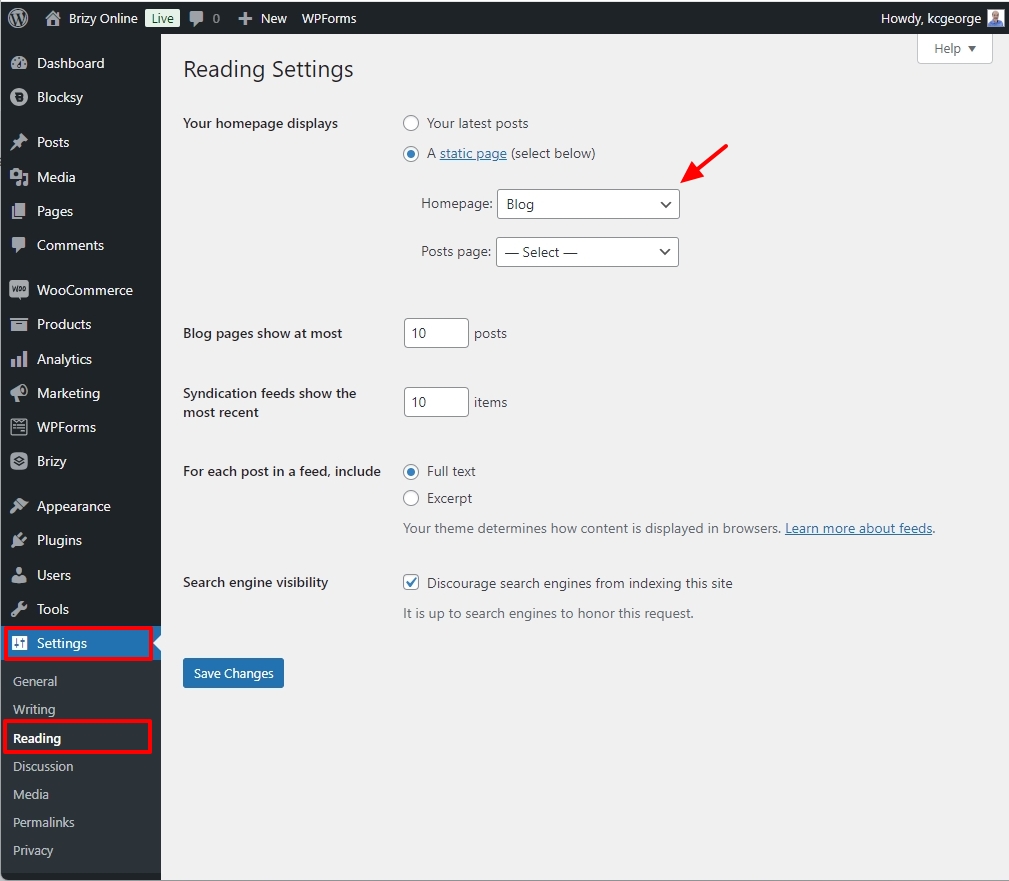
In your WordPress Dashboard, under Settings - Reading, set Blog as your homepage
 0
0 -
Yes George i want the blog to display in the home page but with archive so i will be able to to see the latest post do you understand what i want, i want the latest post to be in the top of the home page i believe this is work with archive but when i want to add archive to home page i did not find it in the element section?
0 -
Yes: my answer is related to your question. When you carry out a search on your website, you see the search results on a Blocksy page because you have not setup a Search Template in Brizy. Once you setup a Brizy Search Template, search results will be displayed on a Brizy page. Kindly setup a Brizy Search Template following the procedure I have suggested above.
0 -
Please do not add the Archive element to the homepage, instead set the Blog as your homepage as suggested above
0 -
1. thanks for the search bar
2. so when i just make the changes in reading and set blog to the home page i will be able to see the latest post in the top is that right?
0 -
Yes; the blog design at https://www.revtechy.com/blog/ will be available on your homepage. To add more content to your homepage, you can then edit the Brizy Blog template.
0 -
thanks George appreciate and sorry for this long issue
0 -
Hi Ossama
Kindly watch the screen recording at https://jmp.sh/WhyB90tC for a video explanation of why the blog post navigation element does not work on your project.
0 -
thank you so much George, now understand how navigations work appreciate
0 -
George sorry but i have some problem can you check the video pls, https://www.loom.com/share/3adba17f9a5a4670a0770f14be20b895?sid=a07093b9-a0d5-4154-ba81-a9d949599ca4
i add new post but doesn't display like the others.
0 -
Hello Ossama
For the blog post "What Makes AppSumo Essential for Business Software Savings" you have added a manual Excerpt (maybe by mistake). See the screenshot at https://jmp.sh/tUdVE1ac Kindly remove the manually added excerpt. WordPress will then auto generate an excerpt for you.
0 -
Thanks George appreciate your help man I fox it
0
Please sign in to leave a comment.
Comments
28 comments