When saving the menu wp_postmeta seems missing

This error occurs when I try to save the main menu. Not sure what is causing this or how to resolve it. Any ideas would be very much appreciated!
WordPress database error: [Table 'dbtekkogmapt1a.wp_postmeta' doesn't exist]
UPDATE wp_postmeta pm JOIN wp_postmeta m ON m.post_id=pm.post_id and m.meta_key="brizy_enabled" and m.meta_value=1 LEFT JOIN wp_postmeta mm ON mm.post_id=pm.post_id and mm.meta_key="brizy-post-compiler-version" SET pm.meta_value=1 WHERE pm.meta_key="brizy-need-compile" and pm.meta_value=0 and CONVERT(REPLACE(IF(STRCMP(mm.meta_value,"dev") = 0, 0, mm.meta_value), " - wp", "") ,UNSIGNED )<294
Warning: Cannot modify header information - headers already sent by (output started at /home/customer/www/CLIENTWEBSITE.COM/public_html/wp-includes/class-wpdb.php:1849) in /home/customer/www/CLIENTWEBSITE.COM/public_html/wp-admin/admin-header.php on line 9
-

Hi Bryan,
Thank you for reaching out to us.
Please try temporarily switching to another theme and see if this resolves the issue.
If this doesn't help, see if you can replicate the issue by disabling all plugins except Brizy and Brizy Pro. If that fixes the issue, start enabling other plugins one at a time and see if the problem comes back. This can help you find any conflicting plugins.
Please try these steps and let me know how it goes.
Best regards,
Ariel H.0 -
Hi Ariel,
ok I tried OceanWP theme, and disabled all plugins except Brizy and Brizy Pro. Same error when saving the Wordpress menu. No change.
0 -
I also tried copy a new class-wpdb.php file and admin-header.php file from another fresh Brizy install. Cleared cache. Still have the error when saving the menu.
0 -
Hi Bryan,
Thank you for the update.
Please provide us with temporary access to your WP Admin page so we can look into this issue. Kindly add us as an Admin user to your WordPress Dashboard and send the following details to communitysupport@brizy.io:
Community Post link: https://support.brizy.io/hc/en-us/community/posts/21855653188754
WordPress Admin URL:
Username:
Password:Please make a full backup of your site as a precaution.
Best regards,
Ariel H.0 -
Ok I just emailed you a login to the site. Let me know what you find. Thank you
0 -
Hi Bryan,
Thank you for your cooperation.
Upon checking, this issue only occurs when Brizy Pro is enabled. I will need to escalate this issue to our senior support team so they can further investigate it.
I will get back to you as soon as I receive an update.
Best regards,
Ariel H.0 -
Ok, please do let me know. As you can see it's a new client website so I prefer they don't see errors on the back end. Thanks!
0 -
Hi Bryan,
Thank you for waiting.
Could you also please provide FTP access to this website so we can further investigate this issue? I look forward to your response.
Best regards,
Ariel H.0 -
Hi Ariel, ok I'm working on that now. I assume email it to you?
0 -
Hi Bryan,
Please send it to communitysupport@brizy.io, including this reference number in the subject line: 21855653188754.
I look forward to your response.
Best regards,
Ariel H.0 -
Ok will do.
0 -
I just sent the FTP info. Let me know what you find. Thanks
0 -
Hi Bryan,
Thank you for the update.
The error you're seeing during menu updates may be due to a mismatch in database queries, where your custom table prefix 'voy_' is being used, but the query references the default 'wp_postmeta' table. This triggers a warning, but it doesn’t affect the site’s functionality.
While it doesn’t seem directly related to Brizy, you can disable `WP_DEBUG` to hide the warning.
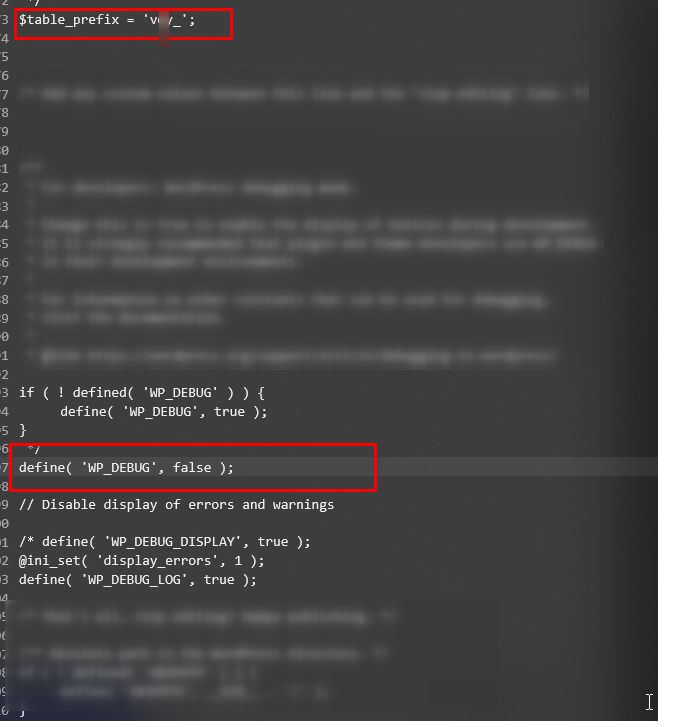
I suggest testing this in a staging environment to further investigate without affecting the live site.
Best regards,
Ariel H.0 -
Ok thanks for investigating this. I will try that. You can closet this ticket. Cheers
0
Please sign in to leave a comment.
Comments
14 comments