JavaScript SyntaxError after last update

Hi
I've just updated to the latest version (Brizy 2.5.8 and Brizy Pro 2.5.4) and I'm now getting this in the JS console:
VM2029:1 Uncaught SyntaxError: Unexpected end of JSON input
    at JSON.parse (<anonymous>)
    at f (preview.pro.min.js?ver=169-wp:2:427129)
    at preview.pro.min.js?ver=169-wp:2:282837
    at NodeList.forEach (<anonymous>)
    at z (preview.pro.min.js?ver=169-wp:2:282722)
    at preview.pro.min.js?ver=169-wp:2:558548
    at Array.forEach (<anonymous>)
    at preview.pro.min.js?ver=169-wp:2:558527
    at preview.pro.min.js?ver=169-wp:2:534387
    at Array.forEach (<anonymous>)
Any ideas?
Many thanks
-

Hi Martin,
Thank you for reaching out to us.
Could you kindly verify if you can replicate the issue when all other plugins, except for Brizy and Brizy Pro, are disabled? It's possible that this issue is coming from a conflict with another plugin. Also, try switching to another theme and see if this makes any difference.
If the issue continues, please provide us with temporary access to your WP Admin credentials so we can replicate the issue. Please add us as an Admin user to your WordPress Dashboard and send the following details to communitysupport@brizy.io:
Community Post link: https://support.brizy.io/hc/en-us/community/posts/21523866795282
WordPress Admin URL:
Username:
Password:Please make a full backup of your site as a precaution.
Best regards,
Ariel H.0 -
Hi Ariel
I've done as you've suggested - disabled all plugins (other than Brizy and Brizy Pro) and also tried switching themes but neither of these made any difference.
I'll give you temporary access and send you details as suggested.
Many thanks.
0 -
Hi Martin,
Thank you for your cooperation.
Please also temporarily disable two-factor authentication.
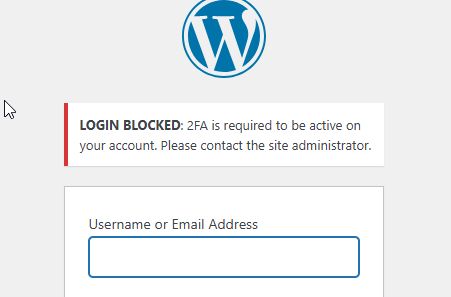
Best regards,
Ariel H.0 -
Hi Ariel.
OK, that's temporarily disabled.
0 -

Hi Martin,
We enabled the Wordfence Firewall's learning mode, made a minor change to the header, and reversed it, and the error "Uncaught SyntaxError: Unexpected end of JSON input" no longer appears. We've then disabled Wordfence Firewall's learning mode.
Please check to see whether the error has also disappeared on your end.
0 -
Hi K C
Thanks. Yes, I can confirm that's fixed it. What was the nature of the problem then?
0 -
Hi Martin,
The Wordfence firewall blocks requests to your site that match specific patterns. Sometimes WordPress plugins and themes will exhibit behavior that resembles known attack patterns, which may then result in the firewall blocking something that is not actually malicious. This is called a false positive.
To prevent false positives from causing problems with the functionality of your site, the Wordfence firewall has a feature called “Learning Mode”. When Learning Mode is active, Wordfence will add any requests that resemble attack patterns to the allowlist. When a request is added to the allowlist it is considered safe and will not be blocked. By enabling the learning mode, Wodfence has now learned that Brizy JS files are safe.
0 -
Hi K C
Thanks for the detailed explanation. Got it. So essentially Wordfence created a false positive for some JS functionality that had slightly changed in the latest Brizy release. Makes sense.
Thanks again for your speedy response, excellent explanation and for resolving the issue.
0 -
Hi KC
Just related to this, my top navigation no longer seems to work. The layout has changes and clicking on the items in the mega menus don't seem to work any more.
Any ideas?
Thanks
0 -
Hi Martin,
Please allow us temporary access to your WordPress Dashboard again. We'll have another look.
0 -
Hi Martin,
This is about the mega menu issue you're experiencing on your website.
We've tried to access your site, but we're getting an error message. Could you please temporarily disable WordFence so we can take a look?
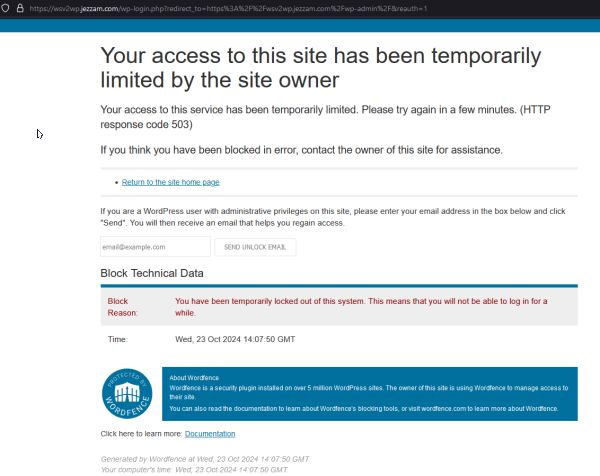
Best regards,
Ariel H.0
Please sign in to leave a comment.
Comments
11 comments