Global block not removed from WP multisite

Hello
After updating Brizy and Brizy PRO to the latest version, my WP multisite site has problems. When I go to the Global Blocks settings, in the settings on which pages to show the global block, I specify not to show the block on certain pages anymore. I click save, after reloading the page, these blocks continue to be shown on these pages. Deleting the global block also does not help, the global block reappears on all the pages where it was. This only happens with my WP multisite, I tried to create a global block on a clean site using brizy, on the new site there are no such problems.
If I export the site from WP multisite to a new WP installation, the problems with the inability to delete the global block appear on the clean WP installation as well.
---
Здравствуйте
После обновления Brizy и Brizy PRO до последней версии, на моем сайте WP multisite возникли проблемы. Когда я захожу в настройки Глобальных блоков, в настройки на каких страницах показывать глобальный блок, я указываю больше не показывать блок на определенных страницах. Нажимаю сохранить, после перезагрузки страницы эти блоки продолжают показываться на этих страницах. Удаление глобального блока так же не помогает, глобальный блок снова появляется на всех страницах где он был. Это происходит только с моим WP multisite, я попробовал создать глобальный блок на чистом сайте с помощью brizy, на новом сайте этих проблем нет.
Если я экспортирую сайт из WP multisite в новую установку WP, проблемы с невозможностью удалить глобальный блок появляются и на чистой установкой WP.
-

Hi Timur,
Thank you for reaching out to us.
Before deleting the global block, please remove the display conditions first. Click the "Bin" icon, as shown in this example, and then save your changes. This should remove the global block.
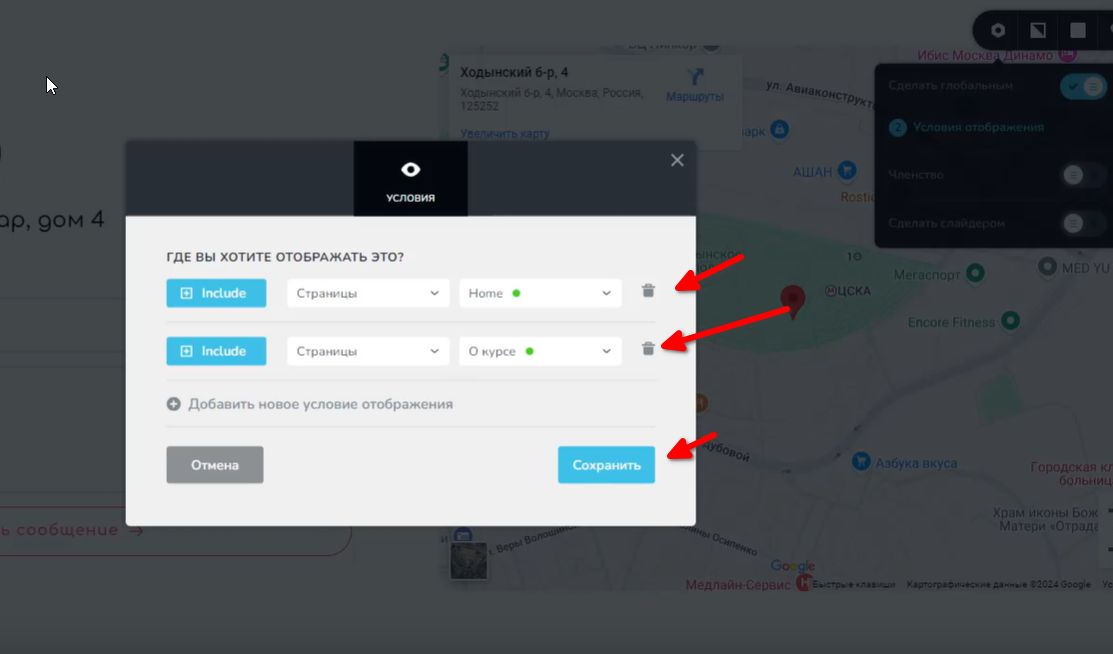
Please try this and let me know how it goes.
Best regards,
Ariel H.0 -
Hello
Removing block display conditions, delete the block in the page builder. Then I save the page. After reopening the page in the page builder, the block reappears with the same settings. This block is not in the global block collection, since I have already deleted the block.
0 -
Hi Timur,
Please provide us with temporary access to your WP Admin credentials so we can inspect your site. Kindly add us as an Admin user to your WordPress Dashboard and send the following details to communitysupport@brizy.io:
Community Post link: https://support.brizy.io/hc/en-us/community/posts/21377680070162
WordPress Admin URL:
Username:
Password:Also include the URL of this page that you are working on.
Make a full backup of your site as a precaution.
Best regards,
Ariel H.0
Please sign in to leave a comment.
Comments
4 comments