Starter Template issues

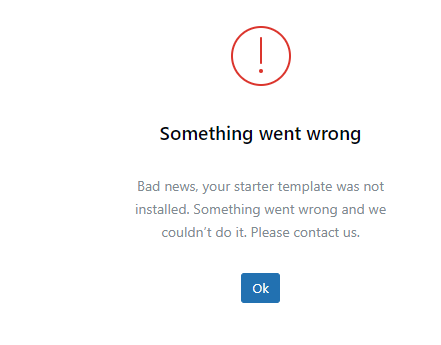
Hello,
I hope you are doing well !
I have a situation on downloading a template, I tried to restructure my website and found that the format used before was compromised and went to Brizy and have been very happy however I noticed that it would be easier to start from a clean start. But things haven't worked as planned since I even went to the extent to deleting a license key and putting new one on the website site and still I received this error message and I am having problems in creating a new page.
Thank you for your time and consideration in dealing with this matter and willingness to at least read this request.
Hope to hear from you soon on options on how I can move forward.
Joseph
-

Hi Joseph,
Kindly make the below changes.
- If you are using the Wordfence Security plugin, kindly deactivate it
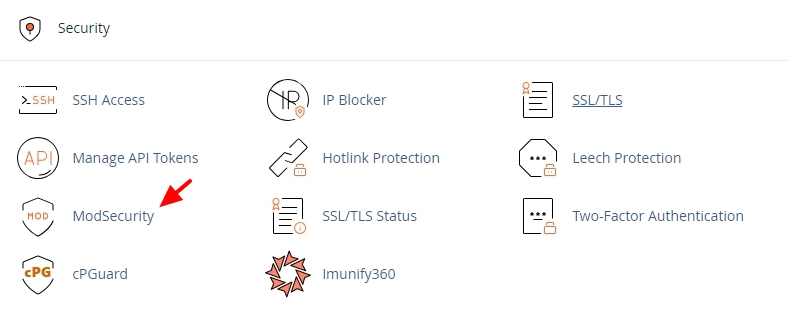
- If you are using cPanel in your hosting account, kindly sign in and deactivate ModSecurity
- In your cPanel under Tools - Software - "Select PHP Version" - "Options" tab, set PHP Memory Limit to 512M
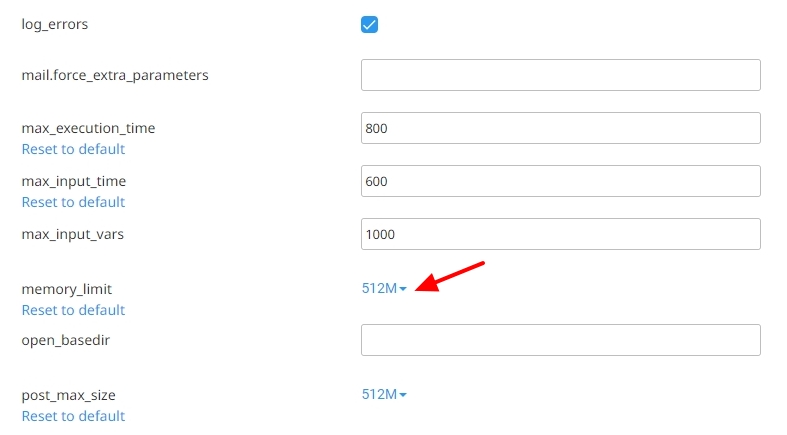
After making the above changes, check if you are able to install a new design template using the Brizy Starter Templates. If this does not help, kindly get back to us
0 -
Hello,
I went into Cpanel and the issue is still not resolved, I have everything with name cheap, easywp, and brizy. I do have other websites that are working just fine. However for some reason this one is not wanting to co-operate.
Do you have any other suggestions on this issue?
0 -
Hello Joseph,
I have replied to you at https://support.brizy.io/hc/en-us/community/posts/26638652073874
0
Please sign in to leave a comment.
Comments
3 comments