Changes not saving

Dear Support Team,
I’m experiencing an issue with my WordPress site where changes made in the Brizy Builder are not saving. I’ve tried the following steps:
- Cleared the cache.
- Made sure all plugins are up to date.
- Used different browsers.
- Deactivated other plugins to check for conflicts.
- Tried increasing the PHP memory limit.
Despite these efforts, the issue persists. Could you please help me resolve this? I’m not very comfortable with technical adjustments, so any support or direct assistance would be greatly appreciated.
Thank you for your help!
Best regards,
Nana Bempong www.bempongtalkingtherapy,com
-

Hello Nana,
When you say "I'm not very comfortable with technical adjustments, so any support or direct assistance would be greatly appreciated," do you mean you'd rather we fix the problem in your WordPress Dashboard than go back and forth attempting different troubleshooting options?
If you prefer this approach, kindly add a new user to your WordPress Dashboard and send the following details to our email: communitysupport@brizy.io
- Support Forum link: https://support.brizy.io/hc/en-us/community/posts/21060872575890
- WordPress Admin URL:
- Username
- Password
Please let us know in this forum when you send us the email.
0 -
Hello K C George,
Thank you for your assistance. I’ve created the user account for you with the username
BrizySupportand sent the password reset link to your email address atcommunitysupport@brizy.io.Please let me know if you need any further details or if there’s anything else I can do to assist.
Best regards,
Nana Bempong0 -
Can anyone help me with this?
0 -
Hello can anyone help?
0 -
Dear Support Team,
Following up on the previous issue with changes not saving in the Brizy Builder:
- PHP Memory Limit Increased: I have successfully increased the PHP memory limit, but the issue persists.
-
Encountered Errors:
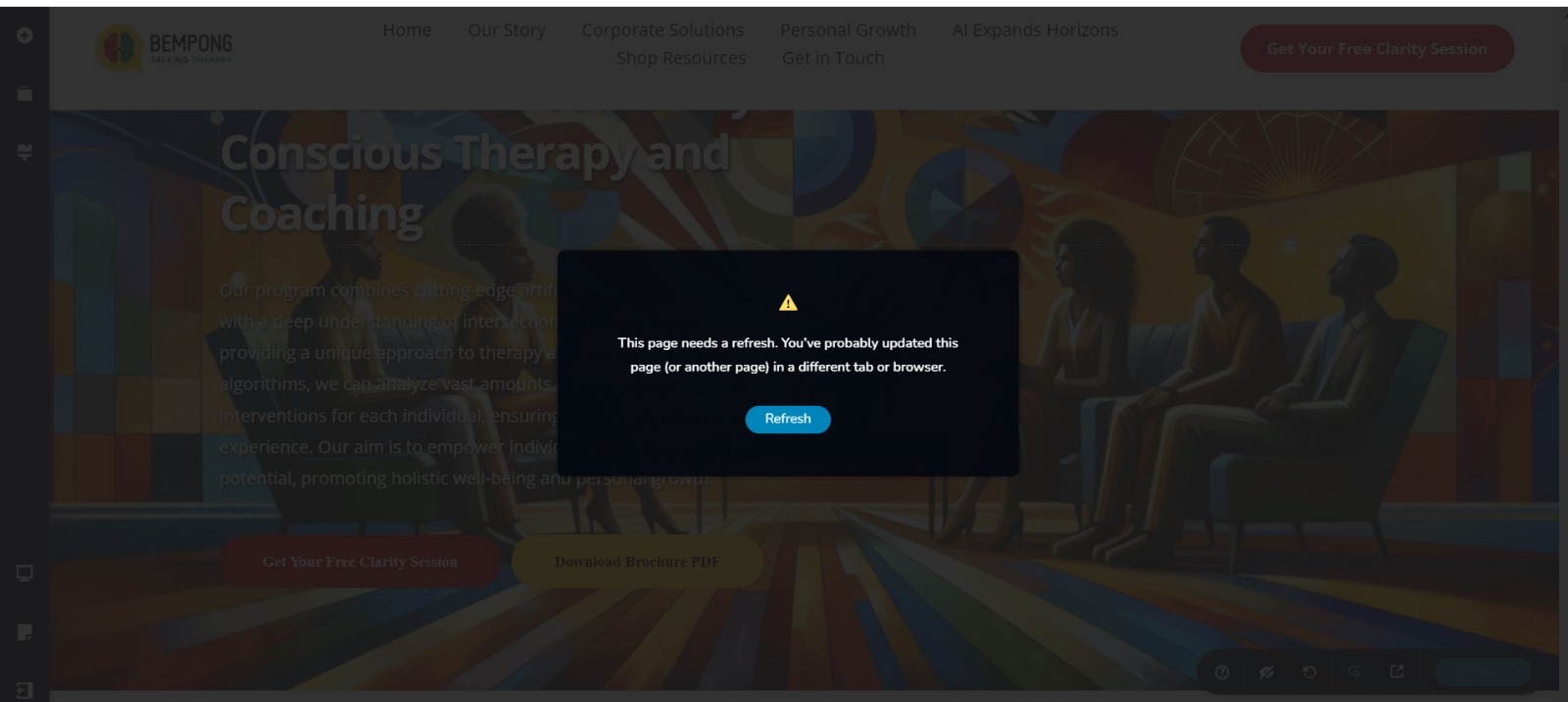
- Page Refresh Needed: "This page needs a refresh. You've probably updated this page (or another page) in a different tab or browser."
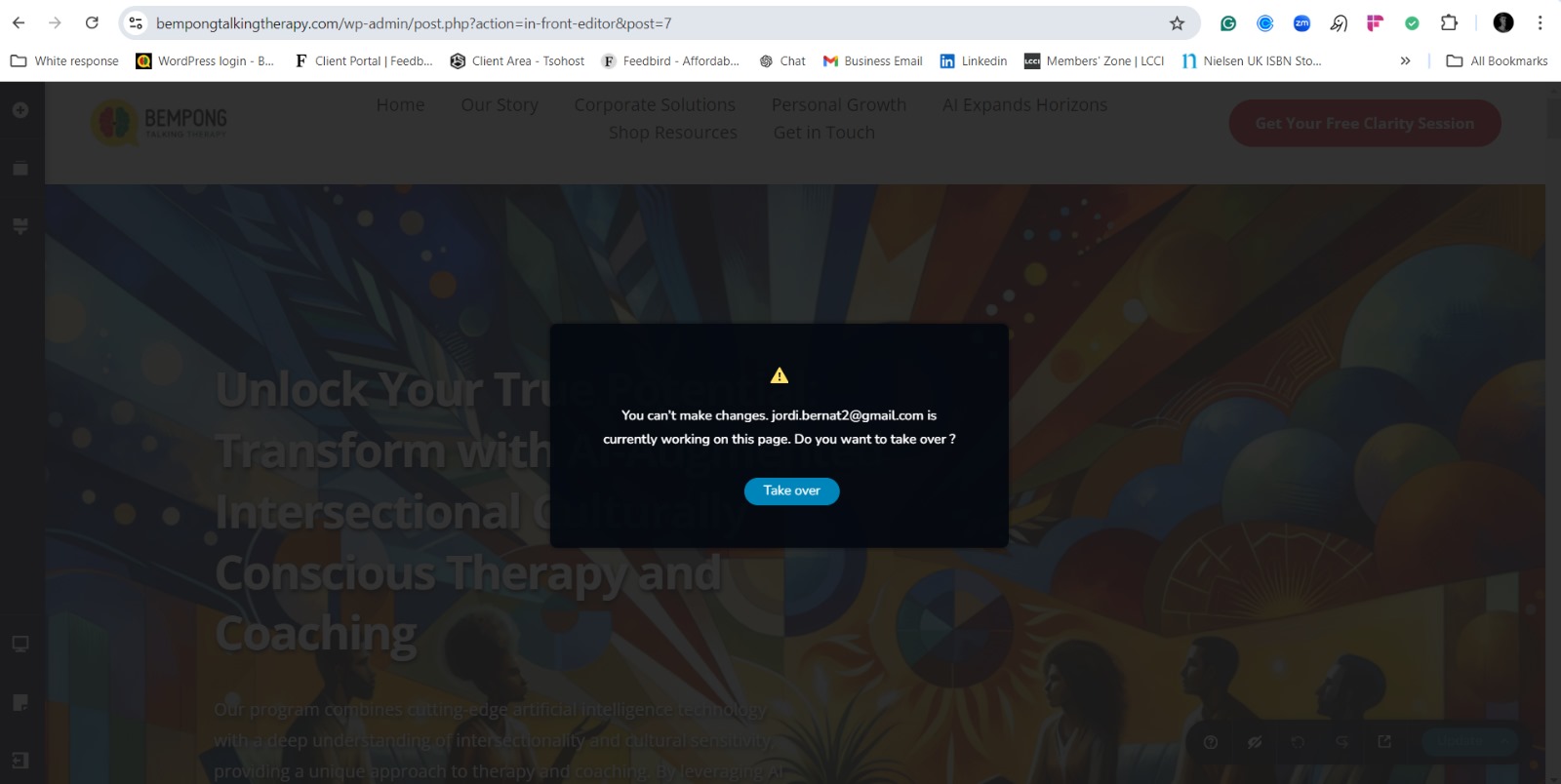
- User Conflict: "You can't make changes. jordi.bernat2@gmail.com is currently working on this page. Do you want to take over?"
All users have logged out and rebooted their devices, but only Jordi can save changes; I still cannot. I appreciate any direct assistance you can provide.
Thank you for your support.
Best regards,
Nana Bempong
www.bempongtalkingtherapy.com0 -
 0
0 -
Hi Nana,
Kindly increase the post max size in the PHP Configuration to 512M following the procedure provided at https://wpastra.com/docs/modify-your-php-configuration/ After making this change, please check if the issue resolves.
post_max_size = 512M;
0 -
Here’s how you can respond to Brizy support:
Hello K C George,
Thank you for your suggestion. I followed the instructions and successfully increased the post max size to 512M in the PHP configuration. Unfortunately, the issue still persists, and I am unable to save changes in the Brizy Builder.
I've also cleared the cache, updated plugins, and followed all previous troubleshooting steps, but the problem continues.
Could you please advise on any further steps I can take or provide direct assistance to resolve this?
Thank you for your support!
Best regards,
Nana Bempong
www.bempongtalkingtherapy.com0 -

Hi Nana,
Thank you for the update.
I tried inspecting your site, however, the user account no longer has administrative access. Could you please update "communitysupport@brizy.io" and set it as an Admin user so we can further investigate the issue?
I am looking forward to your response.
Best regards,
Ariel H.0 -
Hello Ariel,
My apologies. Iv provided admin access so you should be able investigate the issue now. I hope we are able to find a solution as this has taken a long while to try and trouble shoot and its my business website.
Thank you
0 -
Hi Nana,
Even though you have increased the post max size to 512M in PHP Configuration, the change you have made does not reflect in your project. Kindly watch this screen recording https://jmp.sh/6w99EItK
1 -

I am having the same issue with one of my websites, never had it before and it only happened since the lastest update.
0 -
Hi Philip,
Thank you for contacting us.
Could you please try the steps suggested in this support link and see if it helps resolve the issue:
https://support.brizy.io/hc/en-us/community/posts/21069820941074If the issue persists, please follow the steps provided above to send us your WP Admin credentials so we can inspect your site.
Best regards,
Ariel H.0 -
Hello K C George,
Thank you for your continued support. After following your instructions and working with my hosting provider (Tsohost), the PHP configuration has now been updated as requested:
- PHP max input variables: 1000
- PHP time limit: 5000
- PHP memory limit: 512M
- Max input time: 900
- Upload max filesize: 512M
- PHP post max size: 1024M
Despite these changes, I am still unable to save any changes in the Brizy Builder. At this point, I feel I need to move on from continued troubleshooting, as this issue has been ongoing for over a week. If I had started rebuilding my site from scratch last week, I would have likely completed it by now.
Could you please provide a workaround or a definitive solution? I need to decide if starting over is the best path forward or if there’s another way to resolve this efficiently.
I appreciate your guidance on the next steps, as I would like to avoid further delays.
Thank you for your support.
Best regards,
Nana Bempong
www.bempongtalkingtherapy.com0 -
Hello Nana,
The latest versions of Brizy have some incompatibilities with Apache web server. However, by increasing PHP configuration values, most users could continue editing Brizy pages.
Since the PHP configuration changes did not help in your case, I have rolled back to previous versions of Brizy and Brizy Pro to help you update your project. Please do not update Brizy plugins until we roll out a fix for this issue.
 0
0 -
Urgent: Persistent Issue with Brizy Builder – Request for Immediate Direct Assistance
Dear Brizy Support Team,
I hope this message finds you well. I’m reaching out with an urgent request for direct assistance regarding an ongoing issue with the Brizy Builder on my WordPress site (www.bempongtalkingtherapy.com). This issue has severely impacted my ability to make updates to my site for several weeks now, and despite numerous troubleshooting attempts, the problem persists.
Summary of the Issue:
The Brizy Builder is consistently failing to save changes on various pages of my site. I have followed all the recommended steps, including but not limited to:
- Clearing cache (both browser and site-level).
- Updating all plugins to their latest versions.
- Deactivating other plugins to rule out conflicts.
- Increasing PHP memory and post max size (as per Brizy’s instructions).
- Switching to default WordPress themes temporarily.
- Reinstalling Brizy and Brizy Pro (after rolling back versions).
-
Working with my hosting provider (Tsohost) to ensure all PHP configurations are set correctly:
- PHP memory limit: 512M
- Post max size: 1024M
- PHP max input time: 900, etc.
Despite these efforts, the issue remains unresolved. Additionally, I've encountered repeated errors like:
- “This page needs a refresh. You’ve probably updated this page (or another page) in a different tab or browser.”
- “You can’t make changes. Another user is working on this page.”
Impact on My Business:
This ongoing issue is severely affecting my ability to maintain my business website. As a mental health professional and solopreneur, my website is critical to my operations, including providing AI-augmented therapy and coaching services. The time I’ve spent troubleshooting has not only consumed valuable hours but has also delayed key updates and new client engagement on my site.
Request for Immediate Support:
At this stage, I kindly request direct assistance from your team to resolve this issue promptly. I would greatly appreciate it if you could access my WordPress dashboard and investigate the matter directly, as the back-and-forth troubleshooting has not yielded a solution. I have already created an admin account for Brizy Support and can provide any additional details needed.
This situation has been ongoing for far too long, and I urgently need to find a solution. If there are any further steps I can take from my end, please provide clear, actionable guidance.
Thank you for your attention to this matter and for your continued support. I am hopeful that with your direct assistance, we can quickly resolve this issue and prevent further disruption to my business.
Best regards,
Nana Bempong
www.bempongtalkingtherapy.com0 -
Hi Nana
We apologize for the inconvenience.
I have rolled back to the previous versions of Brizy and I am able to save changes to your Brizy pages. Kindly see my test at https://jmp.sh/UekcvKEm
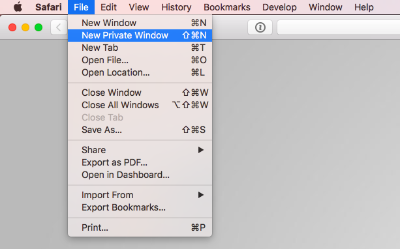
If you are unable to save your project when using Brizy 2.4.45 and Brizy Pro 2.4.38, it could be due to cached images and files in your browser. Kindly sign in to your WordPress Dashboard from a new private (Incognito) window of your browser and check if you are able to save your edits.
 0
0 -
Persistent Issue with Brizy Builder – Request for Immediate Resolution and Direct Assistance
Dear K C George and Brizy Support Team,
Thank you for your continued assistance; however, I am writing to express my increasing frustration and the urgency of resolving this ongoing issue with the Brizy Builder. For several months now, I have been unable to save changes reliably on my website, www.bempongtalkingtherapy.com, despite following every troubleshooting instruction provided, including the recent recommendation to use an Incognito window. Unfortunately, the issue remains unresolved.
Summary of Steps Already Taken
I have completed all recommended troubleshooting steps multiple times, including but not limited to:
- Clearing Cache: Cleared both browser and site-level cache.
- Updating Plugins: Ensured all plugins, themes, and WordPress are up-to-date.
- Plugin Conflict Check: Deactivated other plugins to check for conflicts with Brizy.
- PHP Configuration Adjustments: Increased the PHP memory limit to 512M, post max size to 1024M, max input time to 900, and other configuration values as advised.
- Browser and Device Changes: Tried multiple browsers and devices, including using private/incognito windows.
- User Account Creation: Granted admin access to Brizy Support for direct inspection.
Recurring Issues
Despite all these measures, I continue to experience:
- Persistent Saving Failure: Changes made in Brizy are often not saved, with an error message instructing me to refresh.
- User Conflict Error: Frequent notifications stating, “Another user is working on this page,” even when no other users are active.
- Rollback Instability: While rolling back to earlier versions of Brizy temporarily allowed some saving, the issue quickly recurred, even after clearing all cached data.
Impact on My Business
As a mental health professional, my website is essential for client engagement, especially as I offer AI-augmented therapy and intersectional cultural coaching services. This prolonged issue has disrupted my business operations, delayed updates, and impacted client acquisition. Weeks of attempted troubleshooting have consumed valuable time, with significant consequences for my business.
Request for Immediate, Direct Action
Given the history of troubleshooting attempts and the critical nature of this issue, I am requesting immediate direct assistance. I would appreciate it if your team could:
- Investigate Directly: Please use the admin access I provided to examine the backend and identify the underlying cause of this issue.
- Implement a Solution: I kindly request a robust, long-term fix rather than temporary workarounds or rollbacks.
- Provide a Clear Timeline: Given the urgency, I would appreciate an estimated timeline for a resolution, so I can plan accordingly.
If Brizy has known compatibility issues with my hosting environment or specific server configurations, please inform me, as I am willing to collaborate with my hosting provider to implement any necessary changes.
Urgent Need for Resolution
This issue has been ongoing for far too long, and the prolonged troubleshooting without resolution has reached a point of critical urgency. I would like to avoid rebuilding my site from scratch, but I am now at a point where I may need to consider alternatives if a resolution is not achieved promptly.
Thank you for your attention to this matter. I am hopeful that, with your team’s direct intervention, we can resolve this issue once and for all and prevent further disruption to my business.
Best regards,
Nana Bempong
www.bempongtalkingtherapy.com0 -
Hello Nana,
The solution provided at https://support.brizy.io/hc/en-us/community/posts/22181911460242 has resolved similar issues for several other Brizy users who have their websites hosted on Apache webservers. If you implement the same solution, the above issues can be resolved permanently.
If you give us access to your cPanel, we are happy to implement the above solution on your websites or you could follow the same instructions in the above thread and implement the ModSecurity configuration changes yourself.
Kindly let us know how would like to proceed.
0 -

Hi there, We run a global consulting website on Brizy pro website.
https://www.adaptovate.comWe have identified similar issues to above: We are updating previous posts, and not seeing those updates come through to our live site. We see the changes on our backend wordpress.
We have done :- disabled plugins
- tried different browsers
- tried private browser
- cleared all caches both on local pc and our hosts (Siteground)
We don't have a external web developer anymore and our marketing department try to troubleshoot most things.
However this is a step beyond our knowledge base.
Can we please request assistance?
Thanks very much
Katie Cordes0 -
Hello Katie,
We are happy to take a look at your WordPress Dashboard to troubleshoot why the changes you are making to your blog posts do not reflect in the live site. Please add a new user to your WordPress Dashboard and send the following details to our email: communitysupport@brizy.io
- Support Forum link: https://support.brizy.io/hc/en-us/community/posts/21060872575890
- WordPress Admin URL:
- Username
- Password
Please let us know in this forum when you send us the email.
0 -
Hi there - I have sent an email as requested to above.
0 -
Further to above - our site is now not displaying correctly. Menu has gone array, and the carousel not working ,and our drop downs (Footer locations, don't expand). No one has been in the site over the weekend - yet this is now occuring. What's going on? Thanks very much and really really need some urgent assistance with this please.
0 -
Ok - Further to above - we have been able to get the site running again, by purging our cache via the Cloudflare side of things. -
No more action required.I will change password on the admin details i sent in email.
0 -
Ok - everything has now been rectified. -
We have also changed admin details that we sent to above.0
Please sign in to leave a comment.
Comments
25 comments