Posts not showing text

on my website with Brizy plugins being up to date with the latest not showing the text at all.
-

Hello Tatsiana,
Kindly share the URL of your website where blog post content is not visible
0 -
jo*******gt***ning.com
0 -
There is a blog page as well. And there are posts on home pages as well. And both are not working properly
0 -

Hi Tatsiana,
Thanks for the update.
Could you please confirm if you are having issues with missing blog posts or blog excerpts on your site?
In the meantime, could you make some small changes to your Archive template block container, as well as on the pages where your blog post content is not visible, such as adjusting the padding? After saving these adjustments, check the affected pages to see if the issue is resolved. Other users have experienced similar issues after updating to the latest version. Also, if you're using any cache plugins, please remember to clear the cache before previewing the pages.
Please try these steps and let me know if they solve the problem.
Best regards,
Ariel H.0 -
the problem is with missing blog excerpts. on multiple sites actually.
I tired adjusting the margins on the page. didnt work.
I am not sure where to make some small changes to your Archive template block container
0 -
Hi Tatsiana,
Thank you for the update.
Please provide us temporary access to your WP Admin page so that we can inspect the issue. Kindly add us as an Admin user to your WordPress Dashboard and send the following details to: communitysupport@brizy.io
Community Post link: https://support.brizy.io/hc/en-us/community/posts/20975835585170
WordPress Admin URL:
Username:
Password:Please make a full backup of your site as a precaution.
Best regards,
Ariel H.0 -
Hi Tatsiana,
Thank you for your cooperation.
It appears that you have edited your blog posts directly with Brizy. If this is the case, you will need to manually enter the Post Excerpt. To do this, edit the page using the default editor. On the right side, you should find a link to add an excerpt, as shown in this example:
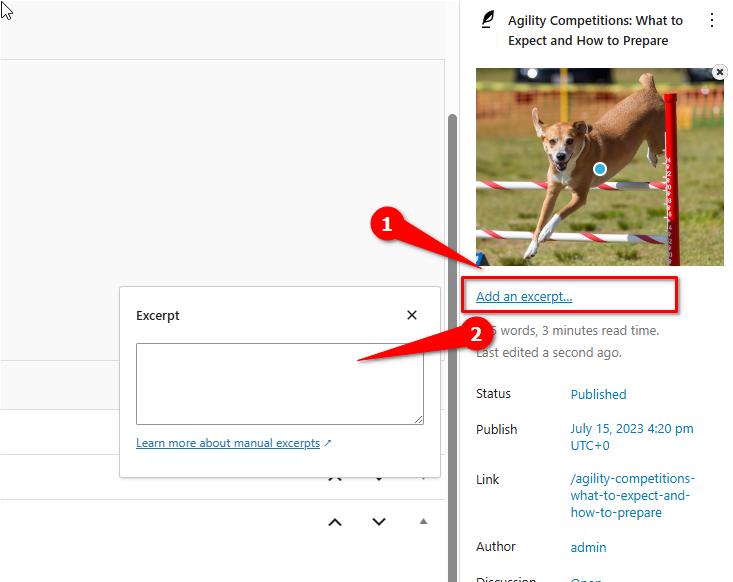
If you have any further questions, please let us know.
Best regards,
Ariel H.0 -
This has never been an issue. I have blogs on many site and I can’t be going in and doing this for all. It used to be populating it right away with no problem. why do I need to do this now? on some sites I have a lot of posts and it will take forever!
0 -
Hi Tatsiana,
You need to implement this change only in projects where you are adding blog post content directly in Brizy.
If you add blog post content in the Gutenberg editor and use a Brizy blog post template to stylize blog posts, auto generated excepts will work. If you added blog post content directly in Brizy (and not in Gutenberg), auto-generated excerpts will not work. In this case, you must manually add excerpts to your blog posts.
0 -
What I don't understand is why I need to do this, when in the last 4 years I didn't need to do any of this and I always edited posts with brizy right away without any other plugin and it never had an issue with the experts showing up how they suppose to.
I have a lot of posts on many sites. what has happened to mess this all up? it will take an enormous amount of time
0 -
Hi Tatsiana,
We understand your situation. We'll look into how we can avoid you having to go back to all of your previous projects' blog posts and add excerpts.
0
Please sign in to leave a comment.
Comments
11 comments