Post formatting gone and header not showing

Hi guys,
Having a problem with blog posts not formatting correctly and also the header not showing. It used to work fine. Have up to date versions, etc.
Happy to provide a login if needed.
Thanks!
-

Hello Craig,
To fix the header issue on your website, kindly follow these 2 steps
- Make a minor change to the header: Navigate to any page within your project, make a small edit in the global header (such as modifying the padding by one pixel), and then revert the change.
- Save the Project: Save your work by clicking on the "Update" button at the bottom right corner and check if the header appears in the website frontend.
Kindly share the blog post URL and a screenshot of the blog post formatting in the Brizy editor for us to understand the issue in more detail
0 -
Hi,
The heading change worked - thanks for that! :)
Regarding the blogs:
Here's an example URL:
https://vegantravel.guide/vegan-lake-tahoe-guide/
Here's how it looks in the editor:
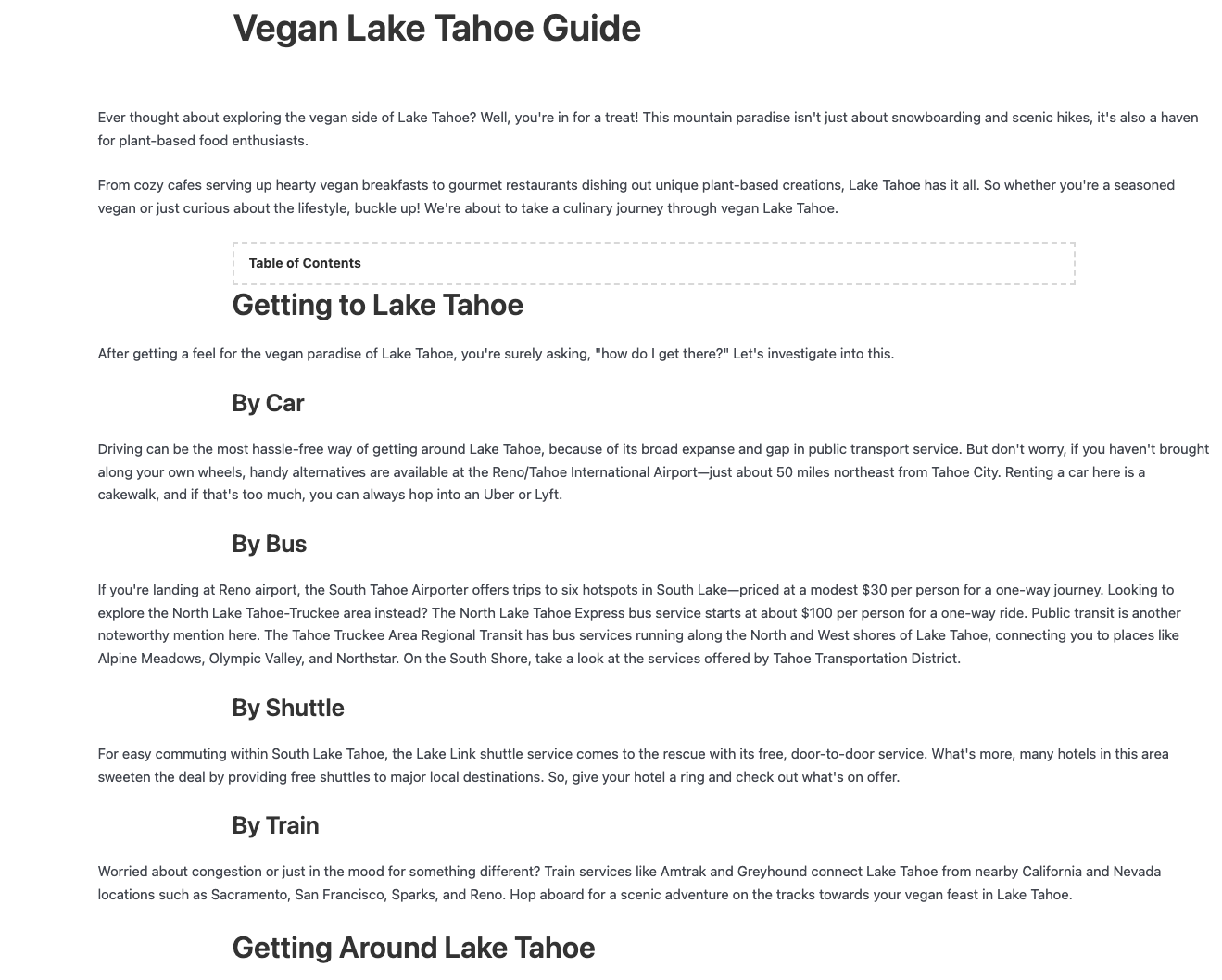
Thanks!
0 -

Hello Craig,
Thank you for the update. Could you please confirm if you are directly editing your blog posts with Brizy, or if you are using a dynamic template to manage the layout of your blog posts?
If you are using a dynamic template, the solution should be similar to what KC suggested, involving minor modifications like adding some paddings to the Post content element container in your dynamic template and updating the template. After completing these steps, check and preview your blog page to see if it resolves the issue.
Please give this a try and let me know the outcome.
Best regards,
Ariel H.0 -
Hi Craig,
Kindly also try this and get back to us with your finding. Temporarily disable the Brizy Blog Posts template by setting the template to "Draft" mode following the below procedure.
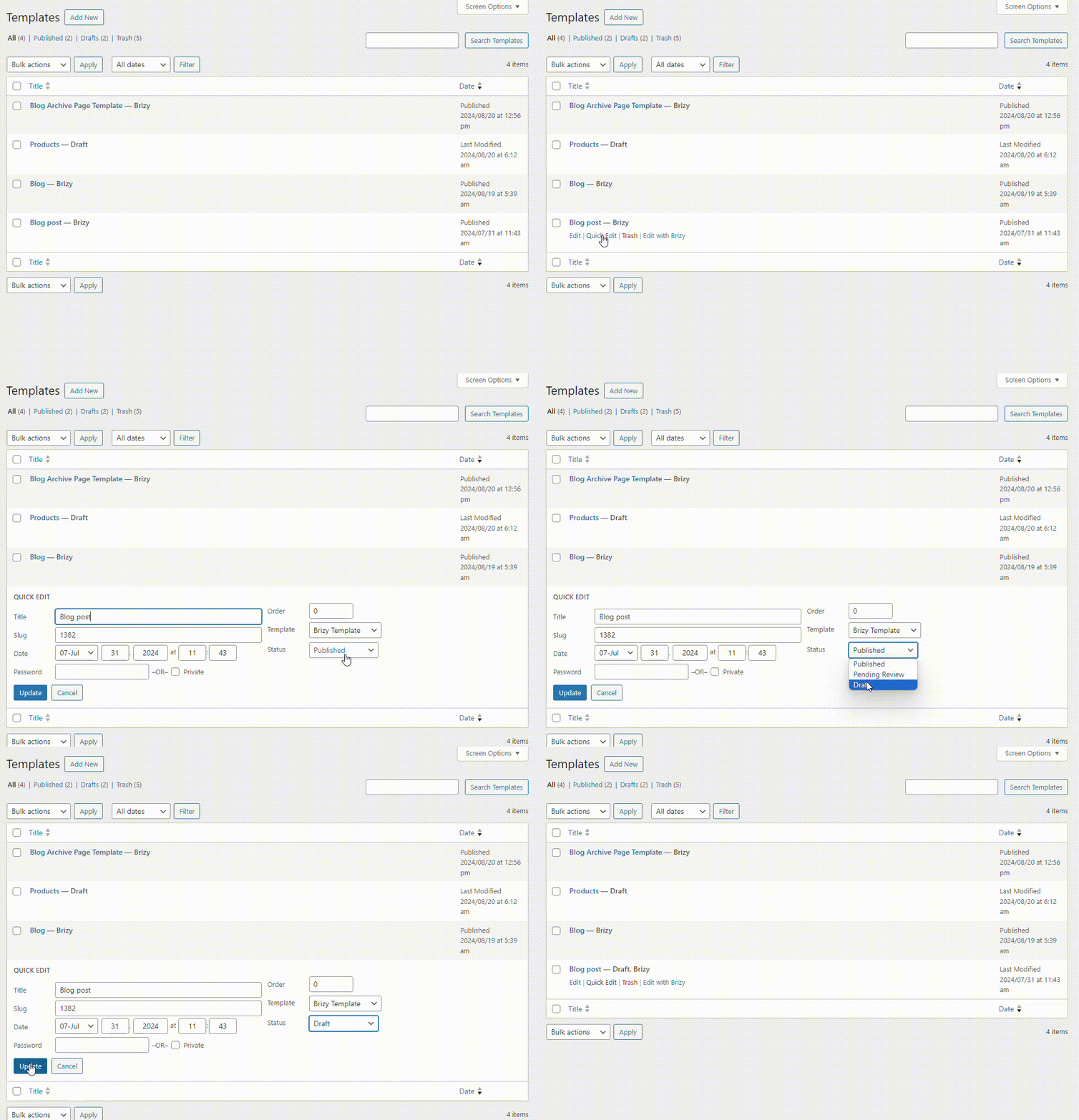
You will then see the blog posts in the theme design without the Brizy design you have added in the template. Please confirm whether the formatting you have added in the Gutenberg editor is visible on the blog post frontend. Kindly get back to us with your finding. If the formatting is lost when using Gutenberg Editor as well, the issue may not be specific to Brizy.
0 -
Hi guys,
Ariel H
I tried this, still didn't work.
K C George
Tried this and the formatting is fine when the template is not active. So looks like it's an issue with Brizy/the template.
Thanks!
0 -
Hi Craig,
To offer further assistance, we will need access to your project. Please add a new user to your WordPress Dashboard and send the following details to our email: communitysupport@brizy.io
- Community Post link: https://support.brizy.io/hc/en-us/community/posts/20861357634578
- WordPress Admin URL:
- Username
- Password
Please let us know in this forum when you send us the email.
0 -
Hi K C George,
I have just sent the requested info.
Thank you for your time, and everyone else in the thread!
0 -
Hi Craig,
I disabled the Brizy Template and looked at one of your blog posts, https://vegantravel.guide/vegan-lake-tahoe-guide/. I see the design at https://jmp.sh/ia8hs7By As you can see in the screenshot, indentations you have added to the headings do not show in the theme blog post frontend as well.
Looks like spaces added to the headings in the Gutenberg editor are ignored in the frontend. Have a look at https://www.wpoven.com/blog/how-to-indent-paragraphs-in-wordpress/ for a few ways you can add indents to your headings.
0 -
Hi K C George,
Looks like whatever you have done has fixed it? Blog posts look normal now?
Thank you so much! What did you do?
EDIT: though i think some formatting things are still not right - hyperlinks, image alignment etc.
0 -
Hi Craig,
For displaying blog post content in the Brizy template, you were using the Text element with #content tag. This is not a recommended method to display blog post content. I have replaced it with the Brizy Content element from the Elements panel.
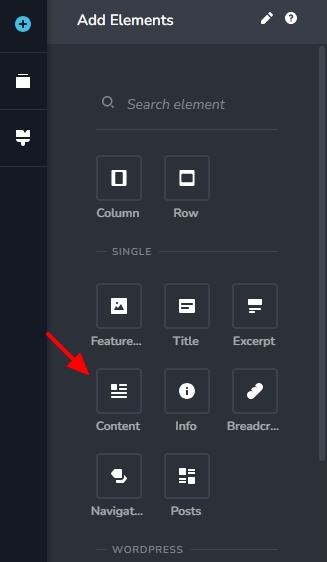 0
0 -
Thank you - any ideas in regards to image alignment and hyperlinks?
Thanks
0 -
Hi Craig,
If you are looking for a way to highlight hyperlinks with a link and hover colors, kindly add this CSS in your WordPress Dashboard under Appearance - Customize - Additional CSS
p a {
color: #05CAB6 !important;
}

p a:hover {
    color: #A170D9 !important;
 }
Currently your images are aligned to the centre in the Gutenberg editor and in the website frontend. How would you like to change the alignment?
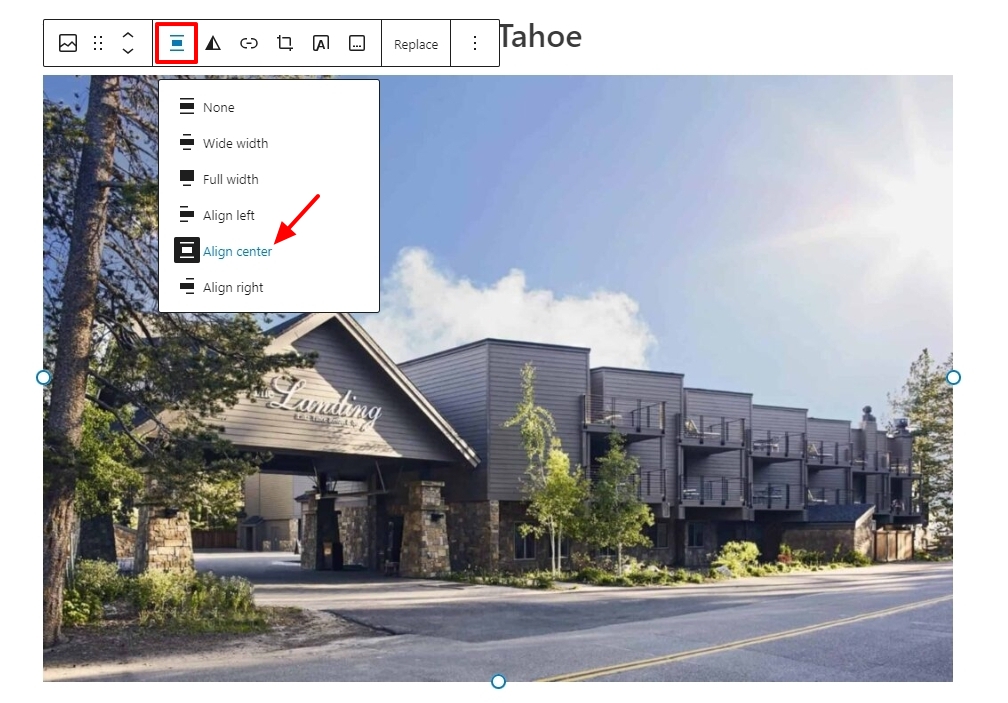 0
0
Please sign in to leave a comment.
Comments
12 comments