Issue with Brizy Accordion after updates

Hi,
I did the updates to Brizy 2.5.3 and Pro 2.5.1 and they have worked okay for the most part. I am having a strange issue with the Accordion on one of my pages however: https://btsireland.com/product/customised-test-kits/
As you can see:
- It is displaying with all the tabs open and they cannot be collapsed.
- The headings of each tab are not following the styling I have implemented in Brizy.
- It has put the page footer into the last few rows of the Accordion.
I have done the fix that has been suggested to others but it has not helped:
- Make a minor change: Make a small edit to every global block (such as modifying the padding by one pixel), and then revert the change.
- Save your work: Save your work by clicking on the "Update" button at the bottom right corner and check if the global blocks are visible in the frontend.
Hopefully you can suggest something to fix this!
Thanks
-

Hi Orla,
Thank you for reaching out to us.
The issue seems to be linked to site optimizations made by the Breeze – WordPress Cache Plugin. Could you please try temporarily disabling it to see if this makes any difference?
Please give this a try and inform me of the outcome.
Best regards,
Ariel H.0 -
Hi Ariel,
I have disabled Breeze and retried but the issue is still happening unfortunately.
The accordion displays normally within the Brizy template but not on the front-end.
Thanks,
Órla
0 -

Hi Órla,
The error on the "Create Your Own Test Kit" product page could be due to a compatibility issue between Brizy and the "Advanced Product Fields For Woocommerce" plugin. Please conduct this test to check the probable incompatibility.
During a period when your website's traffic is expected to be low, deactivate the "Advanced Product Fields For Woocommerce" plugin and see if the accordion on the "Create Your Own Test Kit" product page works well.
If your test validates the incompatibility between Brizy and the "Advanced Product Fields For Woocommerce" plugin, please disable the Brizy Product template for the "Customised Test Kits" product by switching the template to 'Draft' mode.
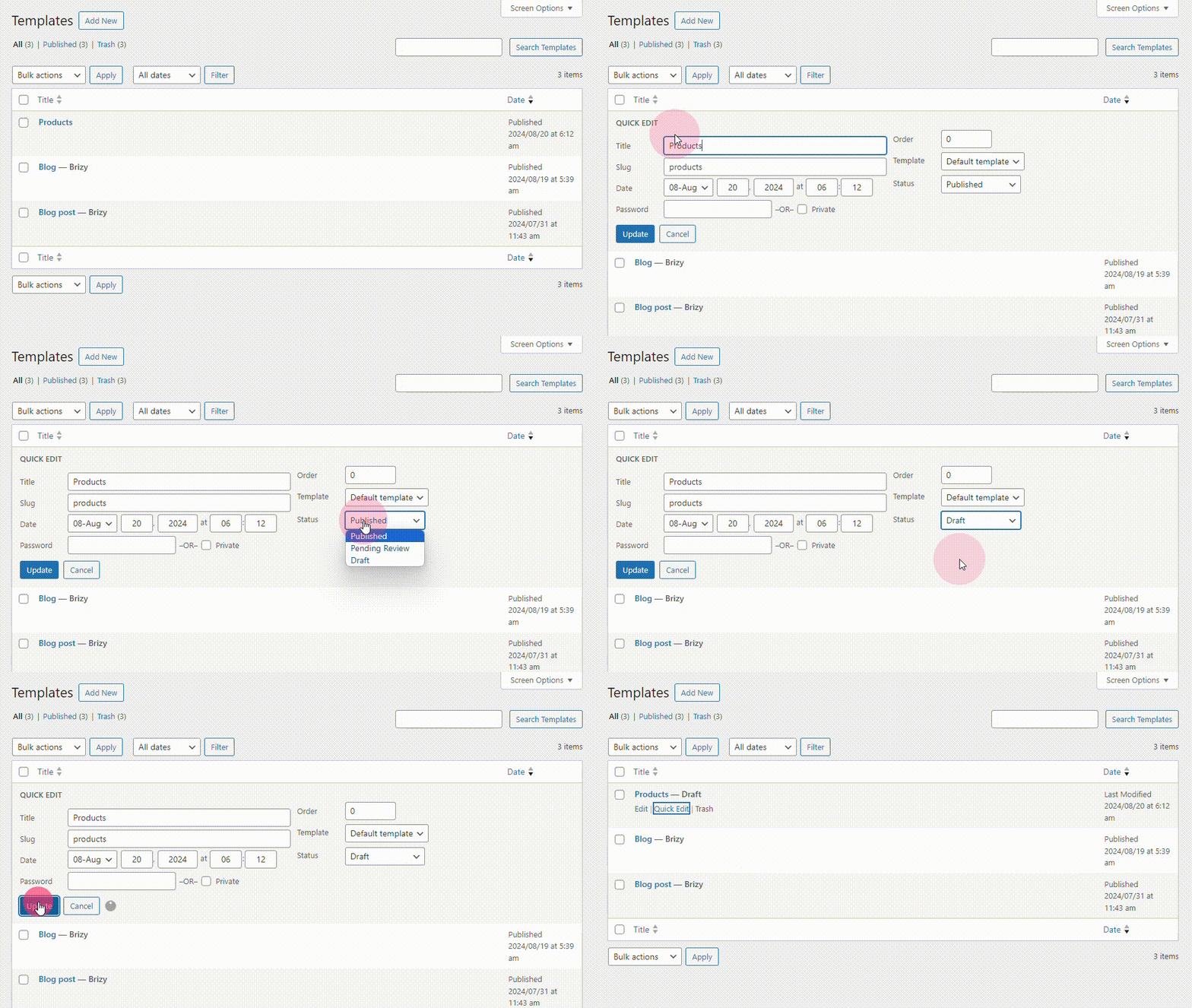
The "Customised Test Kits" product page will then follow the Blocksy product page design. Since your website uses the Blocksy header and footer, the product page is likely to have a consistent look compared to the rest of the webpages. Please get back to us with your findings
0 -
Hi KC,
Unfortunately the "Advanced Product Fields For Woocommerce" plugin doesn't affect the issue with the accordion when I de-activate the plugin:
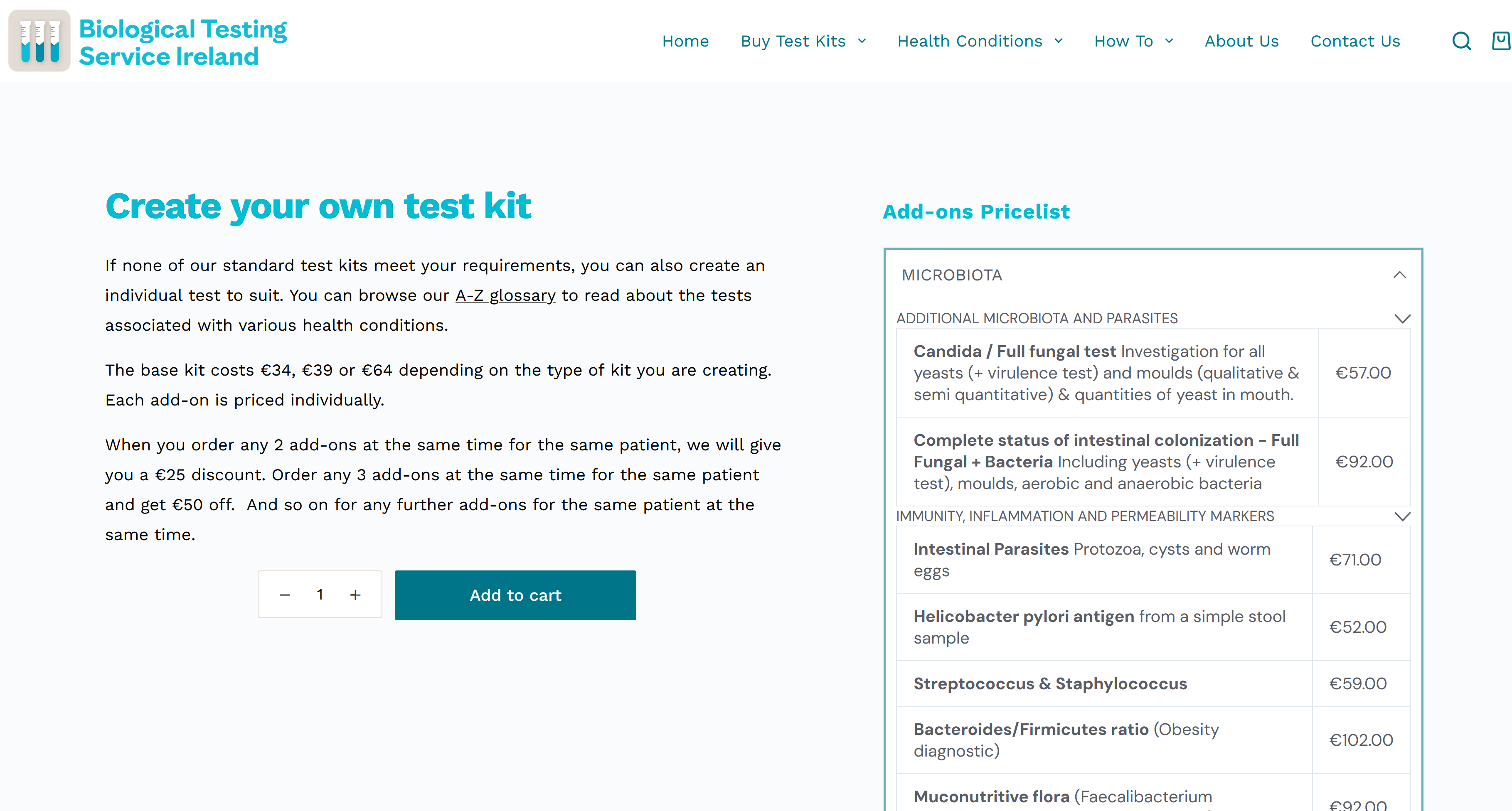
Also it doesn't work to switch the Brizy Product template to 'Draft' as the page is specifically designed to have the accordion pricelist on the right hand side. If I revert back to the Blocksy Product page I lose the pricelist which is necessary to aid a customer in purchasing this product.
0 -
Hi Orla,
We would need access to your project to offer further help. Please add a new user to your WordPress Dashboard and send the following details to our email: communitysupport@brizy.io
- Community Post link: https://support.brizy.io/hc/en-us/community/posts/20847125698450
- WordPress Admin URL:
- Username
- Password
Please let us know in this forum when you send us the email.
0 -
Thanks KC. Just sent your the details there.
0 -
Hi Orla,
You are using HTML embed codes to add the pricing tables to the accordion element, which appears to be incompatible with Brizy's most recent versions. To resolve the issue, kindly recreate the pricing tables within the accordion element with Brizy Columns and the Text elements.
0 -
Thanks KC. I had checked other elements but hadn't thought about the Embed element.
I appreciate your help!
0
Please sign in to leave a comment.
Comments
8 comments