Update button just spins then times out

If I'm adding new content, when I click update it just spins and then times out and says I need to refresh my page, the changes never save. I'm able to edit existing content and the update / save works just fine. If I delete some content, then I'm able to add content and the update / save works just fine. It's almost like Brizy won't allow any additional content, like it hit a max content for the page. I have tried deactivating all plugins and still have this issue.
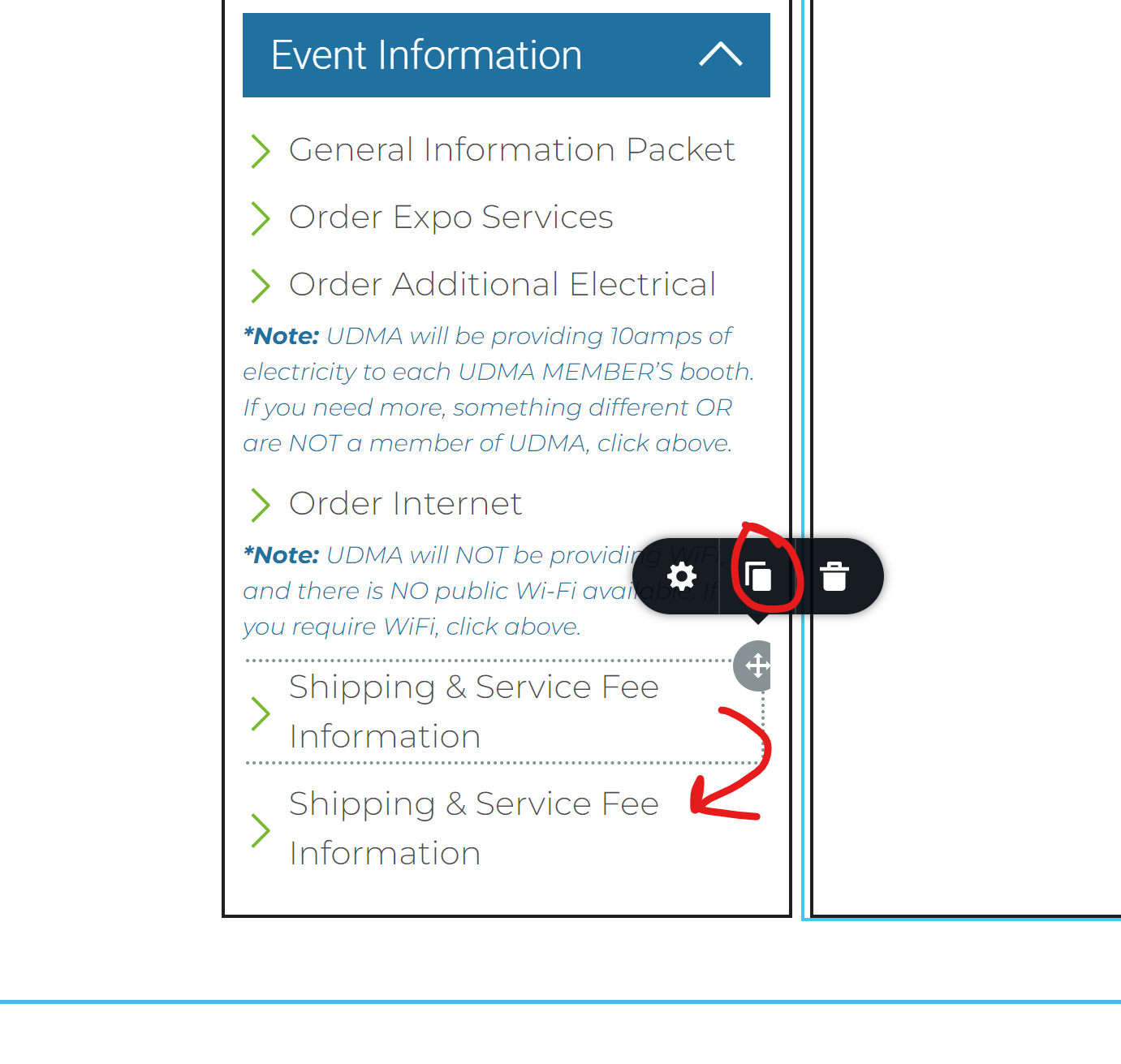
In the screenshot below, if I edit any existing text, it will 'Update/Save'. If I copy the last item, it will not 'Update/Save'. Same situation if I try to add any new content anywhere on the page.
-

Hi Aaron,
Thank you for contacting us.
We have found that this issue is prevalent among users who have WordFence installed.
To resolve the issue, please set WordFence to Learning mode by following the steps below:
A. In the WordFence plugin settings, navigate to Firewall;
B. Enable Learning Mode and set it to automatically switch back to "Enabled Protecting" in 2 days; this will allow WordFence to learn the actions from the Brizy editor.
C. Save your WordFence changes.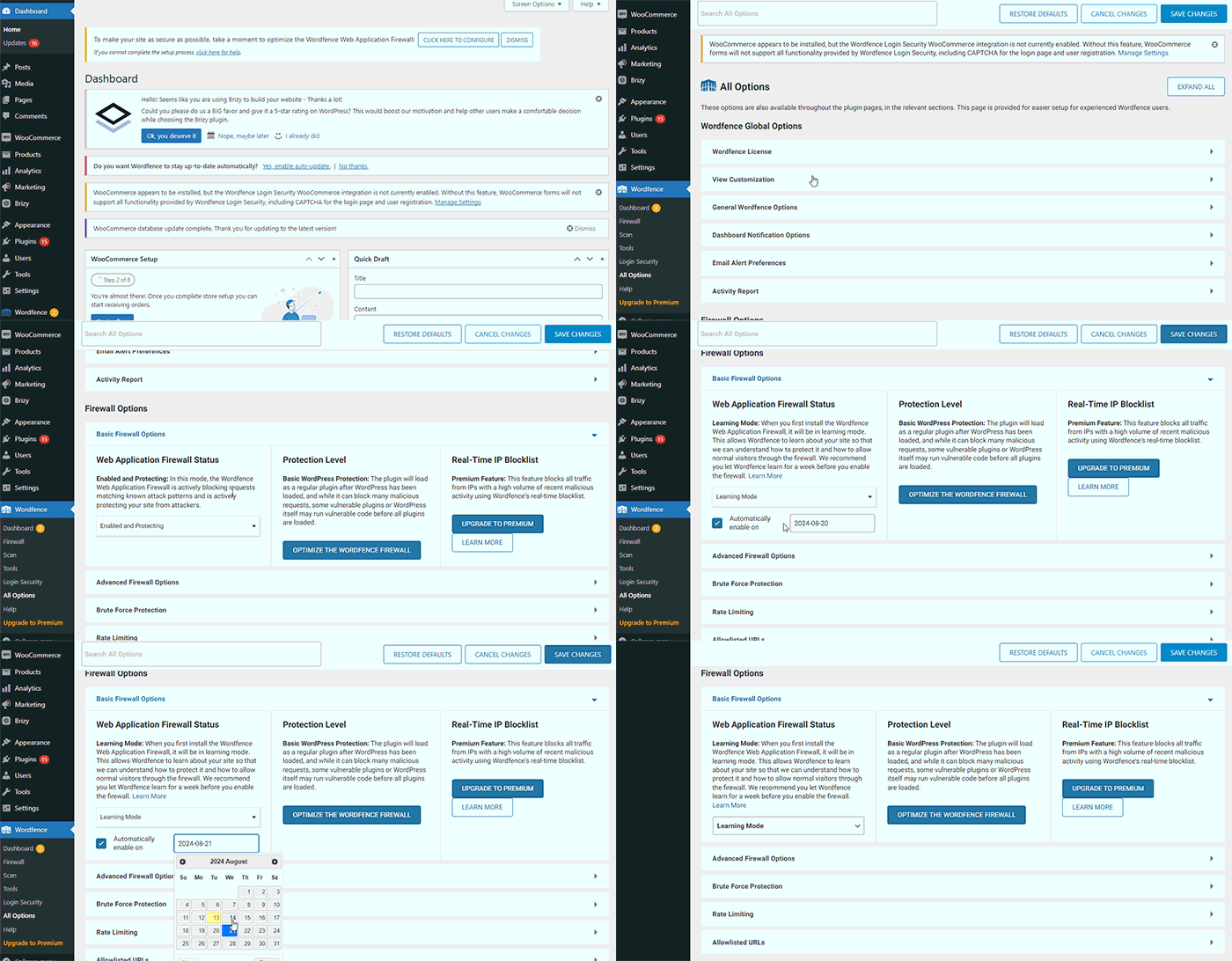
By following these steps, you can save or update your Brizy pages.
If you do not have WordFence, please also check if you have access in your Hosting panel to disable Firewall/ModSecurity, as this may help resolve the issue.
Please try this and inform me of the outcome.
Best regards,
Ariel H.0 -
I do not have WordFence installed nor do I have the firewall / ModSecurity.
0 -
Hi Aaron,
Thank you for waiting.
Could you kindly provide us temporary access to your WP Admin details so we can take a closer look. Please add us as an Admin user to your WordPress Dashboard and send the following details to: communitysupport@brizy.io
Community Post link: https://support.brizy.io/hc/en-us/community/posts/20816663092754
WordPress Admin URL:
Username:
Password:Please make a full backup of your site as a precaution.
Best regards,
Ariel H.0 -
Hi Joseph,
Thank you for your cooperation.
From my observation, the issue seems to be linked to pages with numerous page revisions.
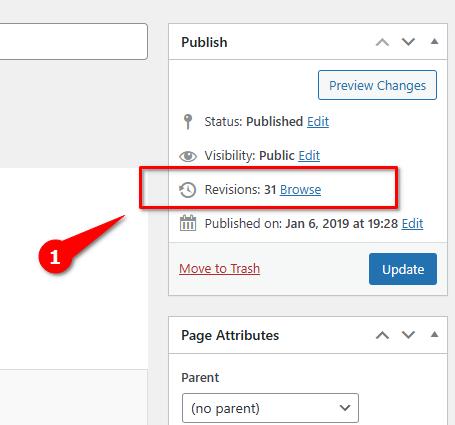
Additionally, you may need to optimize your database. It's worth noting that this problem does not occur on newly created pages.
To address this issue, I recommend trying the steps outlined in this link to see if it resolves the issue:
https://www.elegantthemes.com/blog/wordpress/how-to-manage-wordpress-revisions-to-optimize-site-performanceIn the above article offers a manual method of limiting page revisions using PHPMyAdmin, or you can opt for WP Optimize, which is simpler to operate.
Please give this a try and inform me of the outcome.
Best regards,
Ariel H.0 -
Hello, I have removed all the revisions and installed the WP Optimize with no success. I even created a new page with the same blocks and I have the same issue. I'm not able to add any new content to the Upcoming Events page. Please help as my client needs to get this page completed ASAP.
0 -

Hi Aaron,
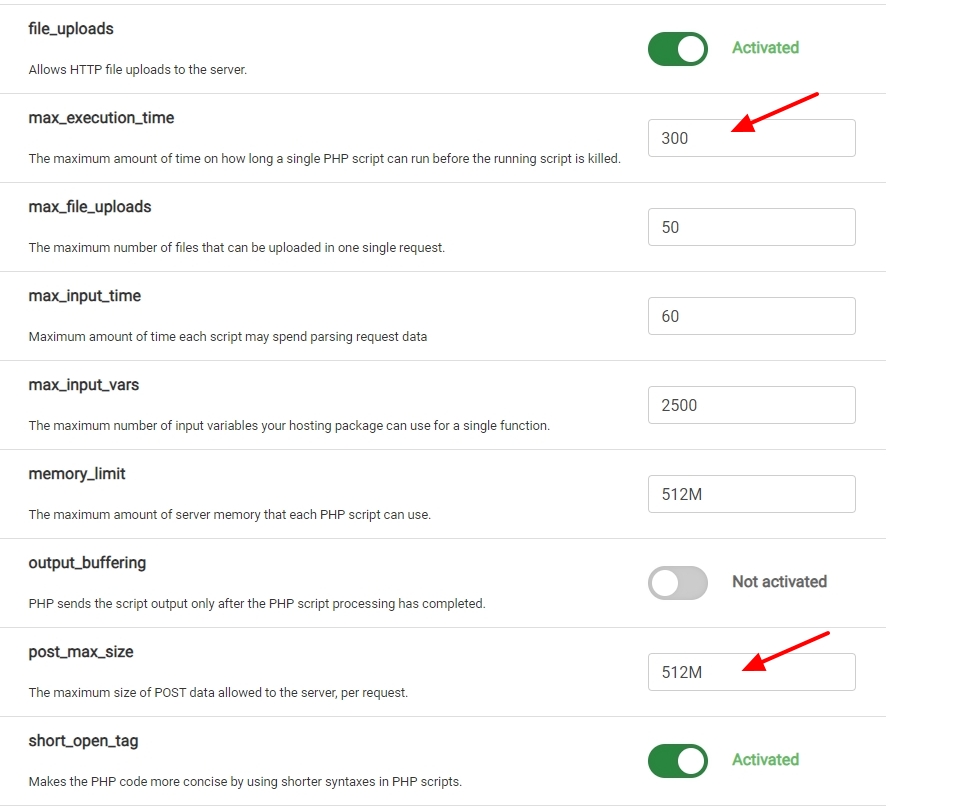
In your project, currently "PHP time limit" is set to 30 seconds and "PHP post max size" is set to 32M
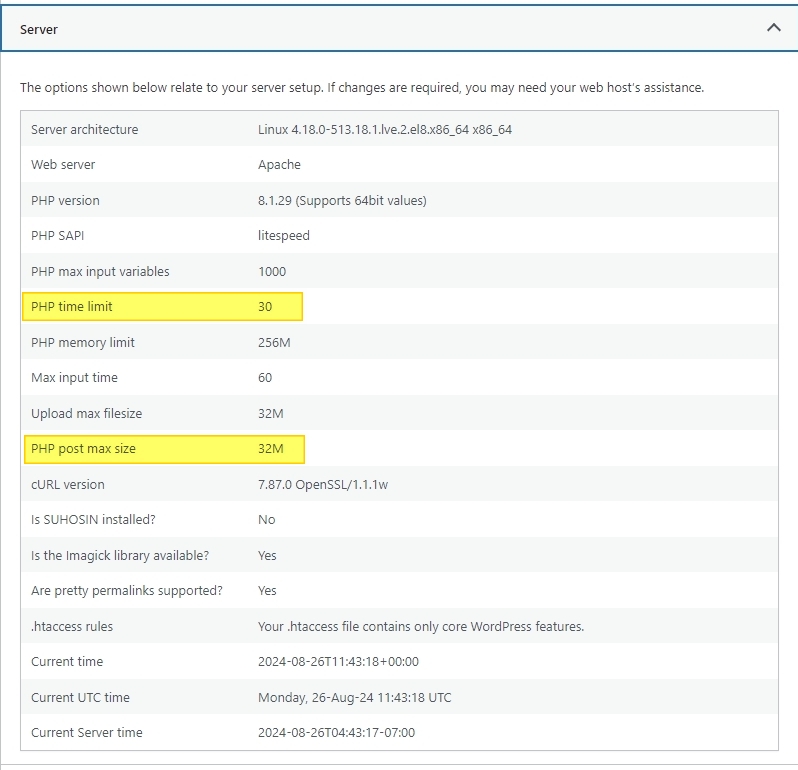
Kindly sign into your hosting control panel and increase max_execution_time to 300 seconds and post_max_size to 512M and check if the issue resolves. If you have access to cPanel, kindly follow the procedure in this screen recording to set these values https://jmp.sh/GeA00OxZ
If you are not sure how to configure these values, please take the help of your hosting provider.
 0
0 -
I have made both of those edits in my cPanel and the issue remains. I have also updated all my themes and plugins. I'm still not able to add any additional content to this page.
0 -
Hi Aaron,
We're sorry to hear you're having this issue with Brizy.
Could you also provide us with temporary access to your cPanel so we can further investigate the issue? Please send your cPanel credentials to communitysupport@brizy.io. Please include this reference number in the subject line: 20816663092754.
I look forward to your response.
Best regards,
Ariel H.0 -
Hi Aaron,
Thank you for your cooperation. Upon checking, it appears that the issue is related to ModSecurity, specifically that the problematic page exceeded the maximum size of the HTTP request.
To address this issue, please ask your hosting provider to increase both SecRequestBodyLimit and SecRequestBodyNoFilesLimit in the ModSecurity configuration. We attempted to add the following directives in the .htaccess file, but it is not currently allowed by the server configuration. These changes need to be made at the server level:
<IfModule mod_security.c>
    SecRequestBodyLimit 4194304
    SecRequestBodyNoFilesLimit 2097152
</IfModule>
Please try this and let me know how it goes.
Best regards,
Ariel H.0 -
Hi Ariel, I will reach out to get this updated, but I was wondering why this page is requiring this change? There is not that much information on it. Do you think it is the use of the accordions? I just don't want to keep running into this issue as I keep adding more content.
0 -
Hi Aaron,
I believe the issue might be related to the accordions. I'm currently running some tests on my end using a copy of your template to see if I can reproduce the problem. I'll update you once I have the results.
Best regards,
Ariel H.0 -
Hi Aaron,
I’ve imported the layout into my testing environment, and the issue isn’t occurring on my end: https://youtu.be/tuhdwD5MOUY
Please let us know once your hosting provider has implemented the changes we requested in our previous message.
Best regards,
Ariel H.0 -
Interesting. Does your server not use Mod Security, or are the parameters you listed adjusted to the higher values?
0 -
Hi Aaron,
ModSecurity is disabled on this testing server. However, the settings we've provided above worked for some previous users who encountered the same issue, so I hope this will also resolve the problem on your end.
0 -
So I talked to GoDaddy, and because this website is on their shared hosting platform, we are not allowed to change any of the ModSecurity parameters or disable it.
I did some more trouble shooting, and now I'm not even able to edit text on the page. I tried to delete a character, add it back, hit Update and it did the same thing, just spinning. If I delete content, I'm sometimes able to Update, but if I try to add it back I get the same issue.
Did you look at the Error Log and see the Brizy warnings?
Below are the warnings that come up when editing a different page and it works:
[25-Oct-2024 16:53:33 UTC] PHP Warning:  Attempt to read property "post_type" on null in /home/fbn01bnhkhlb/public_html/temp/wp-content/plugins/brizy/admin/blocks/main.php on line 207
[25-Oct-2024 16:53:33 UTC] PHP Warning:  Attempt to read property "ID" on null in /home/fbn01bnhkhlb/public_html/temp/wp-content/plugins/brizy/admin/blocks/main.php on line 208
When I try to update the "Upcoming Events" page and hit Update and it just spins, I get no errors.
When I deleted a block from "Upcoming Events" page and then hit Update I got these errors. The first 3 are from when I deleted the block (before hitting the Update button). The next two from when the Update completed successfully.
[25-Oct-2024 16:57:51 UTC] PHP Warning:  Attempt to read property "post_content" on null in /home/fbn01bnhkhlb/public_html/temp/wp-content/themes/blocksy/inc/css/static-files.php on line 262
[25-Oct-2024 16:57:52 UTC] PHP Warning:  Attempt to read property "post_content" on null in /home/fbn01bnhkhlb/public_html/temp/wp-content/themes/blocksy/inc/css/static-files.php on line 262
[25-Oct-2024 16:57:52 UTC] PHP Warning:  Attempt to read property "post_content" on null in /home/fbn01bnhkhlb/public_html/temp/wp-content/themes/blocksy/inc/css/static-files.php on line 262
[25-Oct-2024 16:58:04 UTC] PHP Warning:  Attempt to read property "post_type" on null in /home/fbn01bnhkhlb/public_html/temp/wp-content/plugins/brizy/admin/blocks/main.php on line 207
[25-Oct-2024 16:58:04 UTC] PHP Warning:  Attempt to read property "ID" on null in /home/fbn01bnhkhlb/public_html/temp/wp-content/plugins/brizy/admin/blocks/main.php on line 208
I'm really not sure what to do here. I even tried deleting the nested accordions and it wouldn't allow me to Update. Is there just something corrupted with this page?
0 -
Hi Aaron,
I apologize for the inconvenience. This is a known issue with the latest update, but please note that these are non-fatal warnings. We've shared a temporary fix here to prevent them from displaying on the front end:
https://support.brizy.io/hc/en-us/community/posts/22191360985746If you need to make changes to your website, I can provide versions of Brizy and Brizy Pro from before the compiler feature was introduced. Please see if these versions work for your site.
Best regards,
Ariel H.0
Please sign in to leave a comment.
Comments
16 comments