Spaces are displayed differently?

Hello Brizy,
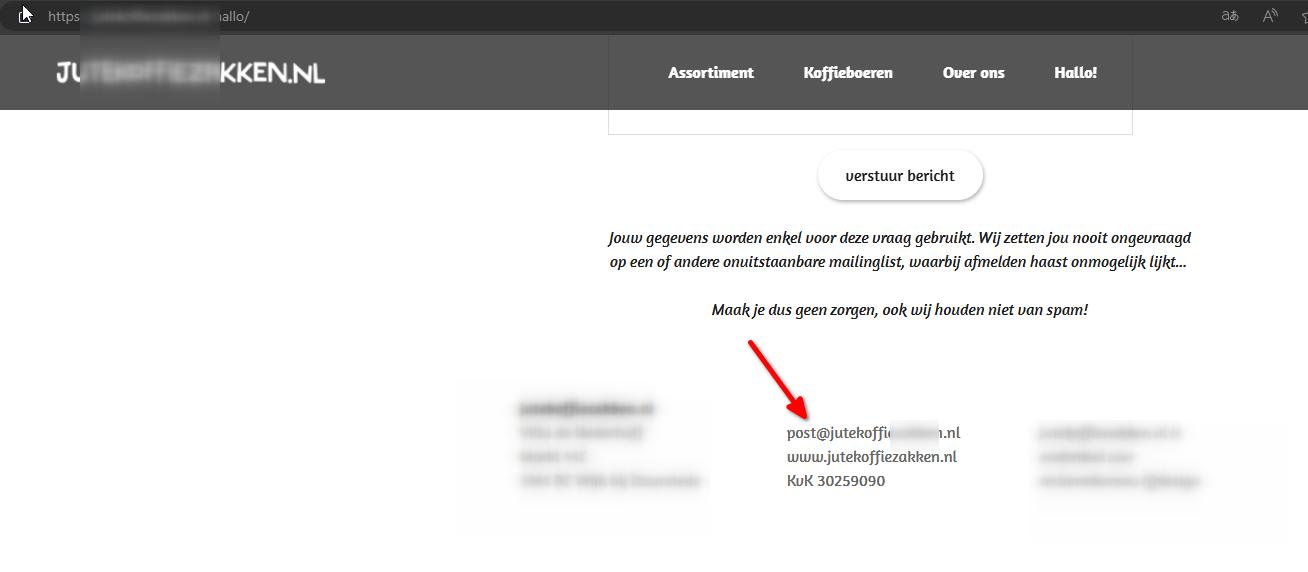
I'm facing an space issue. In the Brizy builder I've placed (on purpose) two spaces in our e-mailaddress: post @ jutekoffiezakken.nl.
In the Brizy builder it's saved and on the "normal" Chrome view it's also shows two spaces. But in the Incognito mode the two spaces are gone... Also in Safari we don't see the spaces (normal view and incognito).
We've made a screen record: https://youtu.be/C-52lLLMHgg
Please help, thank you and all the best from The Netherlands (your colleague Ariel H. already has our WP login).
-

Hi Xander,
Thank you for reaching out to us.
The email address seems to be displaying correctly on my end. Have you managed to resolve the issue?
I am looking forward to your response.
Best regards,
Ariel H.0 -
Hello Ariel,
In this case "correctly" means the e-mail address has 2 spaces (so the address won't be scraped by any online spam robot).
So we have displaying in the Brizy builder correctly: 2 spaces, but in the incognito mode the two spaces are gone...
Please help, thank you 🙏
0 -

Hi Xander,
Try to avoid adding spaces around the @ symbol. For example, you could add spaces like in po st@jutekoffiezakken. nl. Would this would work for you?
0 -
Hello KC,
I really appreciate your solution, but we don't want this. I hope you'll understand.
How is it possible that in the "normal" Chrome view the 2 spaces are visible, but in the incognito mode the spaces are gone? See the YouTube screenrecord we made: https://youtu.be/C-52lLLMHgg
Do you also see this difference on your computer? I also checked Safari: both normal and incognito mode the 2 spaces aren't visible... 🤷🏼
Please help, thank you 🙏
0 -
Hi Xander,
Kindly try this and let us know if it works.
- Delete the previously added email address
- Copy the email post @ jutekoffiezakken.nl and past it into the text box (instead of typing it using a keyboard) and save your work and check if it displays well in the frontend in incognito mode.
0 -
Hello KC,
Thank you, unfortunately this solution didn't work.
I've also made a slight change in another sentence: I've placed a double "!!":
Before in Brizy builder:
Maak je dus geen zorgen, ook wij houden niet van spam!Now in Brizy builder:
Maak je dus geen zorgen, ook wij houden niet van spam!!This "!" shows also differently...:
When we look at this page in normal view Chrome, we see the double !. But in Incognito mode we see only one "!"
I found out that when we log out in WordPress, Chrome shows only one "!" in both normal view and incognito view. But still the Brizy page has two !!.
We made a screen record again: https://youtu.be/Pt7otCRkTTU
In Safari the page always shows one !, no matter if we are loged-in or out in WP. Also both normal view as incognito view shows one !.
So it seems like all changes we make on this page, whether it's a " @ " or "!" it's not working like it should be...
What would be the solution for this matter? Thank you.
0 -
Hello again KC,
We found out an other page also has the same issue: we make changes in the Brizy builder, but the changes reacts differently in Chrome.
This time we made a change of year: we replaced "2024" for "2025", save it, and the change only work when we're logged in in WP and view in the normal Chrome mode... In incognito mode "2024" shows up again.
When logged out both normal and incognito view shows the old "2024".
This is the screen record: https://youtu.be/aXlUuqwDwk0
Please help, because we really can not work this way. 😔
Note that we also have another conversation with your co-worker Ariel about not saving our pages properly: https://support.brizy.io/hc/en-us/community/posts/20485903754386 We're testing this matter, but it looks like just a few pages can be saved.
Thank you
0 -
Hi Xander,
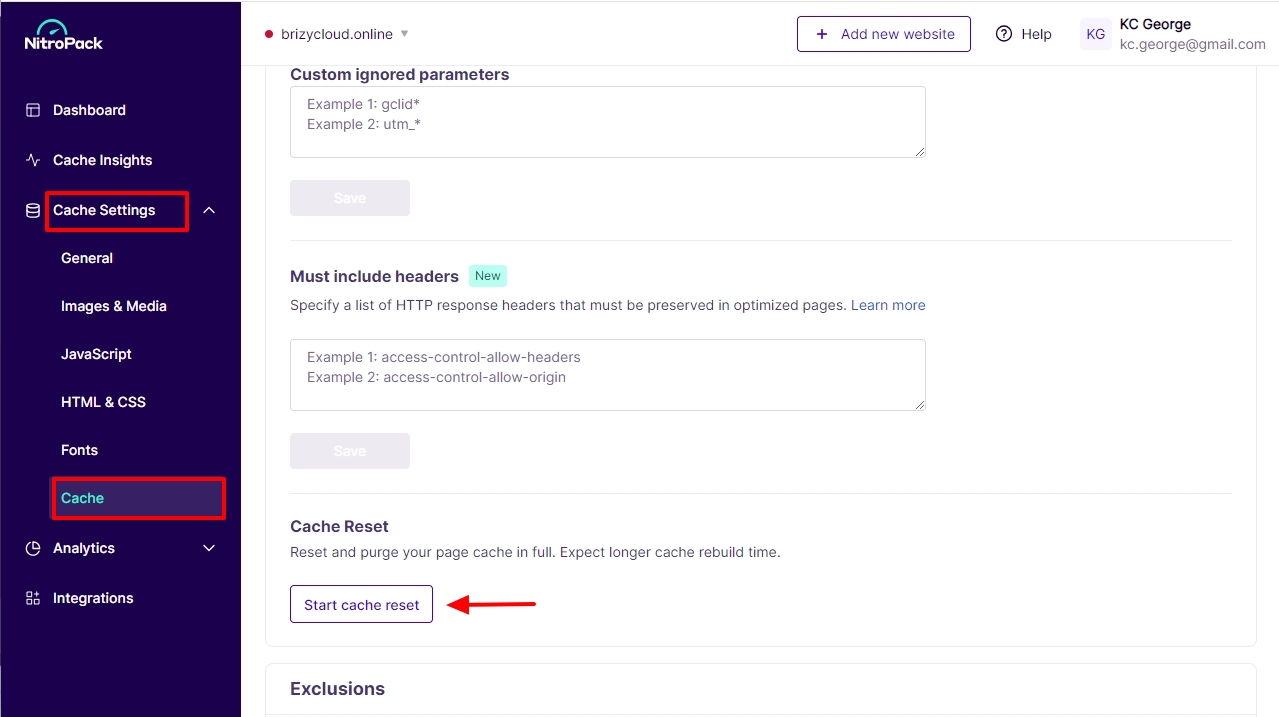
The difference in the website frontend when logged in and when not logged in (incognito) is because you are seeing a cached page in the incognito mode. Kindly purge the Nitropack cache and check again. Sign into your Nitropack account and on the left sidebar under Cache Settings - Cache, scroll down to the heading "Cache Reset" and click on "Start Cache Reset"
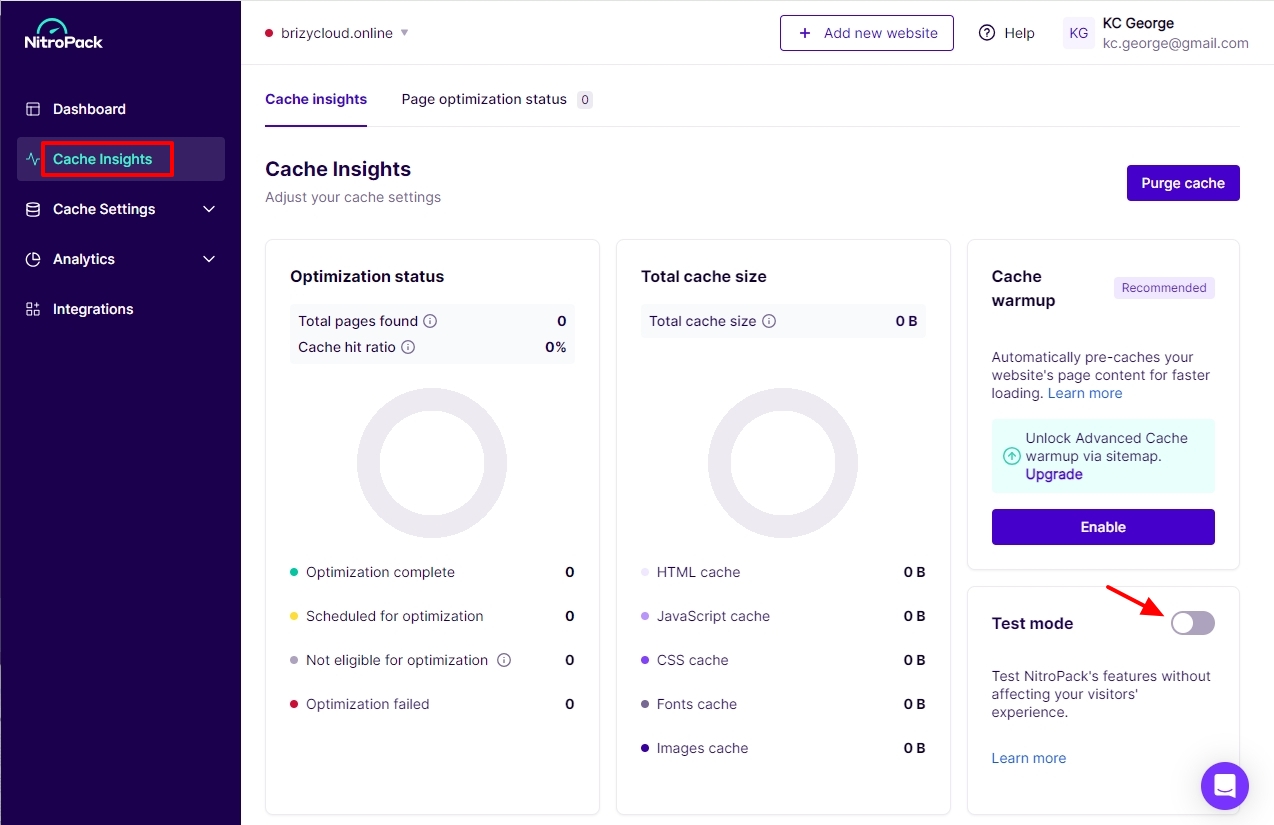
When making changes to your website, you may want to enable the Nitropack Test mode and disable it after you have made the changes.
Can we try adding email address "post @ jutekoffiezakken.nl" to your footer in your WordPress Dashboard and see if we can make it work? (I could make it work at my end) We will need access to your project to do this.
0 -
Hello KC,
Great!! You solved this problem, thank you 🙏 Also the mailadres is show correctly. Yeah!
Yet something is still going on... because we build the "Hallo" page from scratch, the menu item suddenly disappears. We see it in the Kadence theme (and in Brizy) but not in the front end...
We made a screen record: https://youtu.be/HLcxTibt0N0
I guess it has something to do with an other type of cache, but I'm not sure how to solve this. What could be the solution?
Thank you 🙏
0 -
Hello Xander,
Please try this and see if it helps to resolve the issue with your menu.
Make a minor change to the header block (like increase the padding by 1 pixel and reverse it) and save your work by clicking on the "Update" button at the bottom right corner. Then check to see if the menu updates are visible in the website frontend.
0 -
Hello KC,
YES! You've solved this problem, great! Thank you 🙏
0
Please sign in to leave a comment.
Comments
11 comments