Brizy could not load, could not find #brz-ed-root after upgrade to pro, on wordpess

I upgraded to Brizy Pro. (maybe coincidence?) Now I get the error "Sorry, Brizy could not load, Your theme must use the the_content filter in order for Brizy to work" & "could not find #brz-ed-root" when I try to edit some pages.
I started reading the support articles but there seem to be many reasons this could happen.
Is this to do with themes? I am using Blocksy. Should I use Default or Brizy theme?
My pages are working, but I can't edit with Brizy!
Wordpress version 6.6.1
Brizy 2.5.2
Brizy Pro 2.5.1
Blocksy Companion 2.0.61
Other plugins installed
Any help would be appreciated.
-

Hi Benedick
Thank you for contacting us.
The Blocksy theme is designed to be fully compatible with Brizy. It could be conflict with other plugins that is causing the issue.
Could you please confirm if you can replicate the same issue with all other plugins disabled besides Brizy and Brizy Pro? If disabling third-party plugins fixes the issue, enable the rest of the plugins gradually as you test your site until the issue occurs. This process will help you determine which plugin is causing the issue.
Additionally, we encountered users who were unable to edit and update their pages. It has come to our attention that this issue is prevalent among users using WordFence. If you are using WordFence, kindly follow these steps to temporarily switch WordFence Firewall to Learning Mode:
A. In the WordFence plugin settings, go to Firewall;
B. Turn on Learning Mode, set to automatically switch back to "Enabled Protecting" in 2 days, this should allow it to learn the actions from Brizy editor.
C. Save your WordFence changes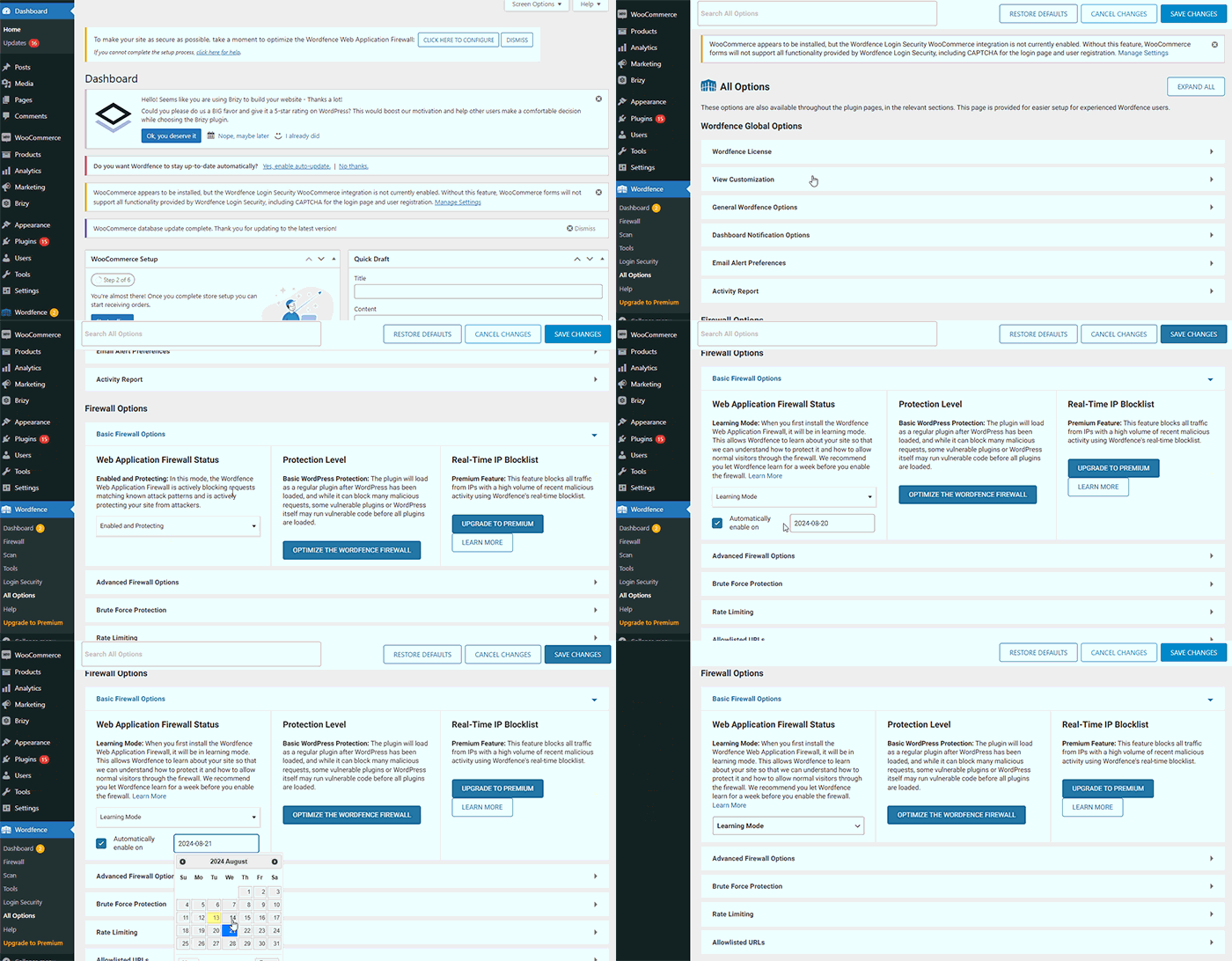
This should allow you to save or update your Brizy pages.
Please try this and let me know how it goes.
Best regards,
Ariel H.0 -
Thank you.
I am not using WordFence
I will try disabling all plugins and see if I can work out which is causing the problem.
0 -

Hi Benedick,
If deactivating plugins does not help, we would like to take a look at your project to troubleshoot this issue. Please add a new user to your WordPress Dashboard and send the following details to our email: communitysupport@brizy.io
- Community Post link: https://support.brizy.io/hc/en-us/community/posts/20730356191506
- WordPress Admin URL:
- Username
- Password
Please let us know in this forum when you send us the email.
0 -
I will do.
It may take me a couple of days before I find time to do this.
0 -
I found the problem plugin
* Passster Version 4.2.6.5
Causes the issue on my password protected pages.
Solution: deactivate the plugin.
Thanks for the help here, my first time asking for help on this forum.
Can anyone advise me on a Plugin that I can use, compatible with Brizy, for password protecting pages?
My site is low volume, very simple needs. I need simple a password protection for some pages/sections
0 -
Hi Benedick,
Have you tried the native password protection feature of the Gutenberg editor? If you have not, open the page in the Gutenberg editor and click on the 'Status' of your page. In the screenshot, I clicked on "Published". Then enable the "Password protected" option and add a password.
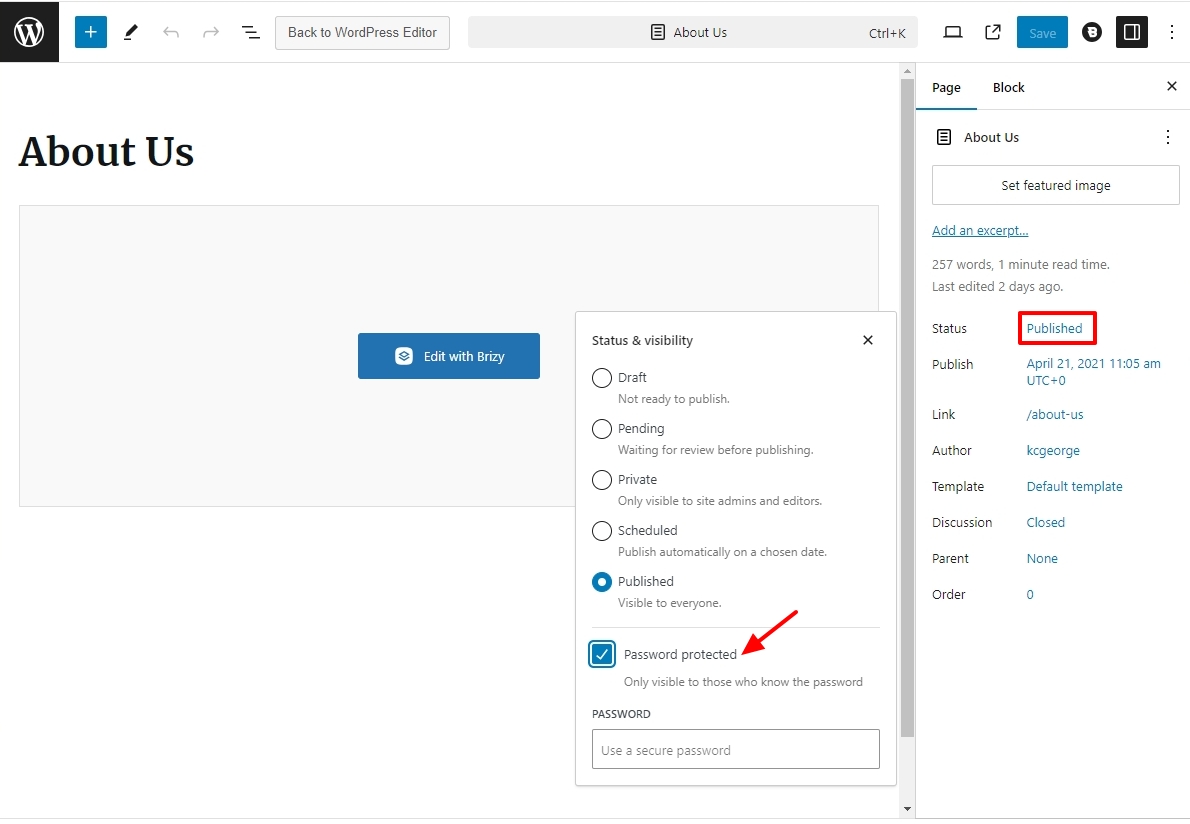
Have a look at https://brizy.online/password-protected/, a page setup using this approach. Use the password Password to open the page.
0 -
@K C George - thank you, that works!
No need for a plugin :)
0
Please sign in to leave a comment.
Comments
7 comments