Brizy and Brizy pro: After Version 2.5.0 not letting me update pages

After Version: 2.5.0 it's not letting me update pages, when I press "update" it shows me the message: "Could not publish or save page. This page needs a refresh. You’ve probably updated this page (or another page) in a different tab or browser." I didn't connect from another browser, I checked the log also, no weird log-ins I press refress and happens the same. I didn't update anthing else apart from brizy and brizy pro
after version 2.5.1 of Brizy the problem wasn't fixed (will I also have to wait for version 2.5.1 of Brizy pro?)
i returned to version 2.4.45 of Brizy but I don't have the same oprion for Brizy pro, so i had to delete all the pro elements of the site. (now everything seems to work fine)
So:
a) when will be safe to update Brizy?
b) when can I reinstall Brizy Pro without facing the same problem?
-

Hi George,
Thank you for contacting us. Unfortunately, this issue is still ongoing.
You can access the previous version of Brizy Pro through this link - https://tinyurl.com/mr3b4bev.
If you are considering reverting to older versions, please also disable automatic updates to prevent the Brizy free version from updating after installation - https://www.wpbeginner.com/wp-tutorials/how-to-disable-automatic-updates-in-wordpress/.
The easier approach is to install "Easy Updates Manager plugin" as described in the above article to disable automatic updates.If you have any further questions, please let us know.
Best regards,
Ariel H.0 -
Hello Ariel, thanks for the answer, do we have any relative news?
0 -
Hi George,
Thank you for keeping in touch.
You can now update to the latest versions of Brizy and Brizy Pro.
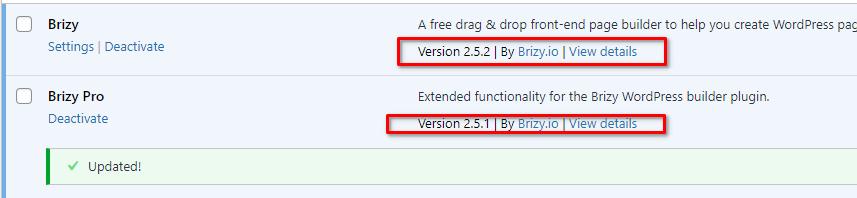
However, for added safety, I recommend trying to update the plugins in a staging site first to identify any potential conflicts with third-party plugins before updating Brizy and Brizy Pro on your live site.
Recent investigations have indicated that this issue is associated with WordFence. If you have WordFence installed on your site, please consider following these steps to address the issue.
1. In the WordFence plugin settings, go to Firewall;
2. Turn on Learning Mode - https://imgur.com/TucapoH;
3. Go back to your Brizy page, make some minor adjustments, and then save the changes;
4. After completing the changes, go back to the WordFence settings and re-enable the 'Enabled and Protecting' option.If you don't use WordFence, please also verify if you have access to temporarily disable the Firewall/Mod Security in your hosting console. This should help resolve the issue.
If the issue continues, please provide us temporary access to one of your websites, experiencing this issue.. Please add us as an Admin user to your WordPress Dashboard and send the following details to: communitysupport@brizy.io
Community Post link: https://support.brizy.io/hc/en-us/community/posts/20400891564690
WordPress Admin URL:
Username:
Password:Please make a full backup of your site as a precaution.
Best regards,
Ariel H.0 -
Hi Ariel, it worked thanks! So from now on is this the only way I can update Brizy pages or it will be fixed in later versions?
0 -

Hi George,
The steps outlined above will assist Wordfence to determine that Brizy editing has no security risks and is safe. Wordfence should ideally stop blocking Brizy from editing pages once it learns this lesson. A Brizy bug fix would not be required for this process.
0
Please sign in to leave a comment.
Comments
5 comments