Glonal header and footers disapear

Hi there,
Since the latest update of Brizy Glonal header and footers disapear.
To fix this we had to open the global element and save it. The global areas (header and footer etc) then reappeared.
Not sure if it's a bug but thought you might want to know.
Thanks,
Darren
-

Hi Michael,
Thank you for reaching out to us.
Could you please provide us with temporary access to one of your sites experiencing this issue so we can investigate further? Kindly add us as an Admin user to your WordPress Dashboard and send the following details to: communitysupport@brizy.io
Community Post link: https://support.brizy.io/hc/en-us/community/posts/20322037268754
WordPress Admin URL:
Username:
Password:If possible, please also provide us with FTP/cPanel access to your website in case we need to access your WP files directly.
Please ensure to make a full backup of your site as a precaution.
Best regards,
Ariel H.0 -
Hi Michael,
Thank you for taking the time to create the staging site.
After disabling WordFence, we encountered an error in the console that prevents us from saving changes to your pages. The error indicates that the size of the data being sent to the server in a POST request exceeds the server's configured limit.
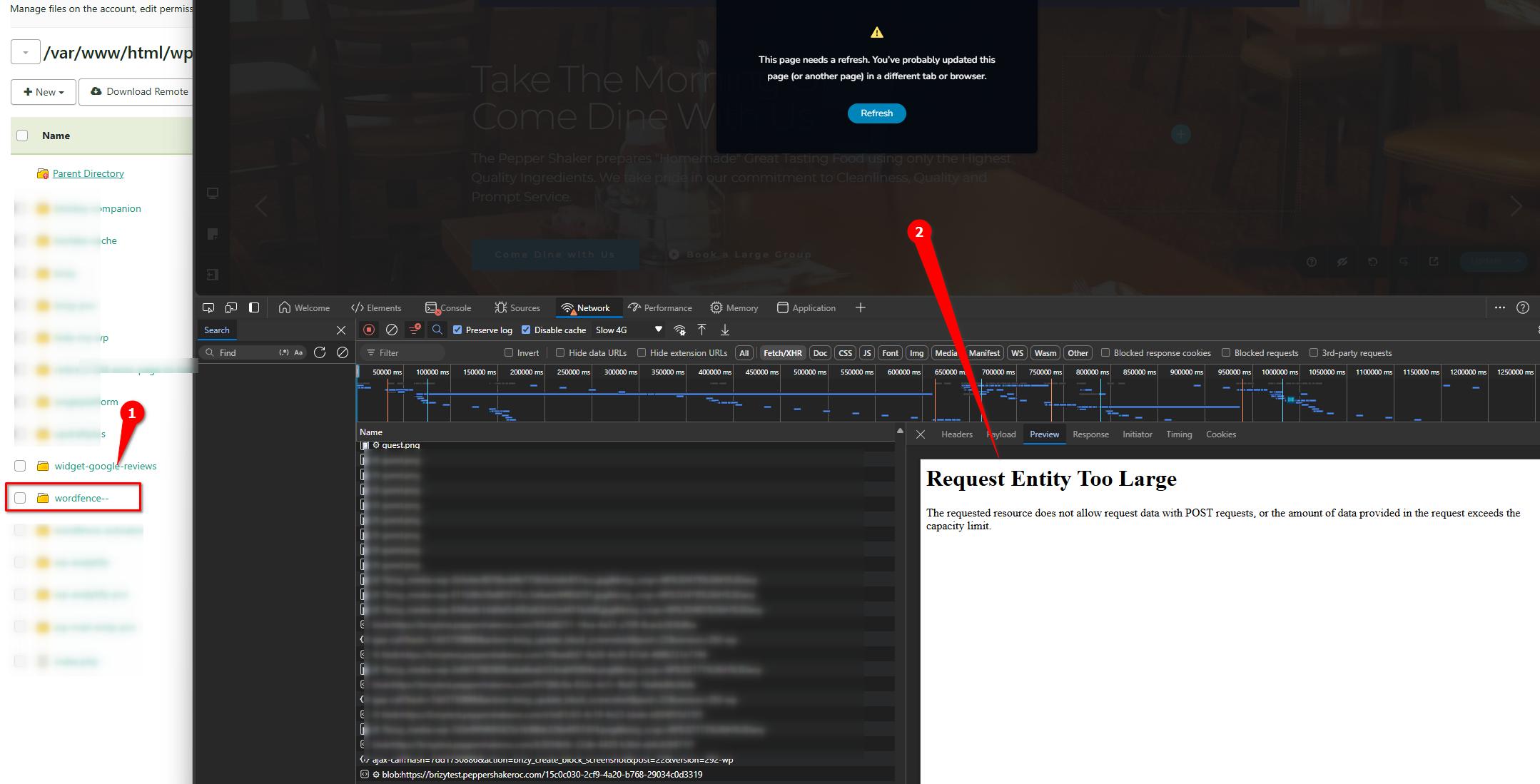
We tried adding the following directives to the `wp-config.php` file, but it seems the settings were ignored:
@ini_set('upload_max_size', '64M');
@ini_set('post_max_size', '64M');
Could you please try making these adjustments on your end? Also, try raising the PHP memory limit to at least 512M for the best results.
The header and footer on the pages appear to be working now; however, the error persists whenever updates to the page are made. Purging the Borlabs Cache also helped.
If updating the `upload_max_size` and `post_max_size` fixes the issue, you can enable WordFence and set it to Learning Mode, update your pages so it can learn your actions, and then switch it back to "Enabled Protection."
Please try this and let me know how it goes.
Best regards,
Ariel H.0
Please sign in to leave a comment.
Comments
32 comments