Website Crashing

Hi,
Firstly, I've updated all plugins (brizy and brizy pro), and disabled unnecessary ones.
Since some days ago, my website has not been working properly.
Please visit my website: https://mondsafaris.com/
Today it crashed
-

Hi Robert,
Thank you for getting in touch with us.
We apologize for the inconvenience. We have recently received similar reports. Could you please attempt to revert to these older versions: https://tinyurl.com/4z3cj26y
Steps to roll back:
1. Navigate to the Plugins section and uninstall both Brizy and Brizy Pro.
2. Begin by uploading and activating Brizy.
3. Proceed to upload Brizy Pro and activate it.Please try these steps and inform me of the results. Rest assured; we will update you once we have resolved the issue with the recent update.
Best regards,
Ariel H.0 -
Site is back on but the license key is wrong
i tried to deactivate the old license key and replace with the new one, i get the error helow
cURL error 28: Connection timeout after 10000 ms0 -
Hi Robert,
Please try to disable all other plugins except for Brizy and Brizy Pro to see if you can activate the license. Additionally, check if you have the option to temporarily disable ModSecurity on your server and see if this resolves the issue. If needed, kindly reach out to your hosting provider for assistance with this error message.
Here is a helpful resource: [https://www.wpbeginner.com/wp-tutorials/how-to-fix-curl-error-28-connection-timed-out-after-x-milliseconds/]
Please give this a try and update me on the outcome.
Kind regards,
Ariel H.0 -
i contacted the host and this what they said
Hello
The error is most probably due to blocked IP address in the Outgoing Connections manager of the respective cPanel account. You will have to check which IP is necessary for the license connection of the plugin and enable it via the Outgoing Connections filter of the cPanel account in question.
You can check the documentation of the plugin in question or contact their support department for more information.
Website is one but not displaying any images
0 -
Hi Robert,
Thank you for keeping in touch.
This is something we need to inspect from your WP Admin page and cPanel. Please add us as an Admin user to your WordPress Dashboard and send the following details to: communitysupport@brizy.io
Community Post link: https://support.brizy.io/hc/en-us/community/posts/20309372390034
WordPress Admin URL:
Username:
Password:Make a full backup of your site as a precaution.
Additionally, it would be helpful if you could provide us with access to cPanel so we can take a closer look into this issue.
Best regards,
Ariel H.0 -
I have Sent the email
0 -
Hello Ariel
Am still waiting. for your response regarding the email i sent0 -
The website has become sooooo slow
0 -
Hi Robert,
Thank you for your cooperation.
Unfortunately, the cPanel credentials provided did not work. Please check in your cPanel if you have the capability to disable ModSecurity for this website.
If you do not have this access, please escalate the issue to your hosting provider as they are best equipped to resolve the encountered issue.
I have arranged a temporary test environment for you to demonstrate that activation is functioning correctly on this server. You can also test activating/deactivating your license here without any issues - https://tinyurl.com/32bj7ket
Best regards,
Ariel H.0 -
i have the set the same password and username for cpanel , please. try again
0 -
Thanks i have fixed the problem
0 -
But unfortunely the website takes long to load
0 -
Hi Robert,
Thank you for the update.
Please ask your hosting provider to raise the current PHP Memory limit from 256MB to 512MB or higher for best results.
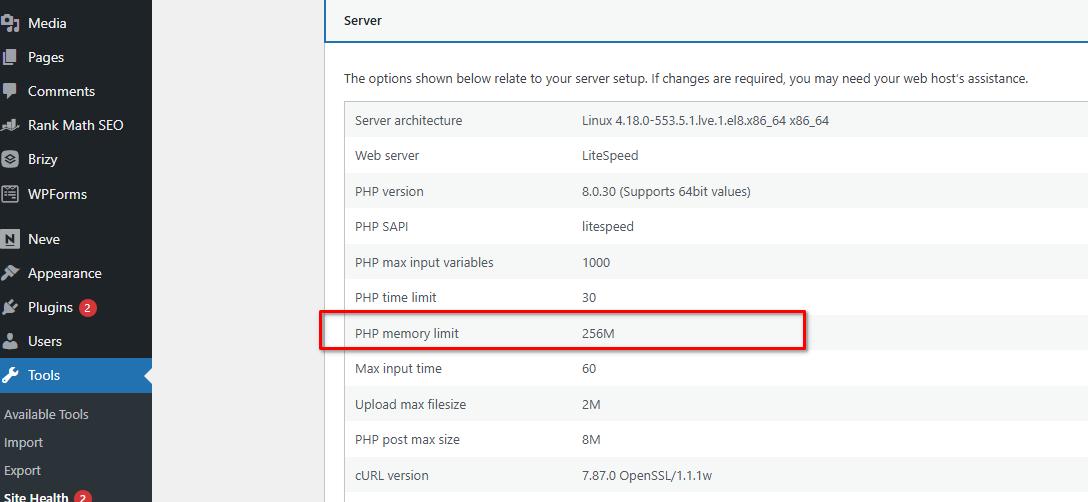
Please try this and let me know if this helps.
Best regards,
Ariel H.0
Please sign in to leave a comment.
Comments
13 comments