Brizy Pro Updated But Not Working

Hello,
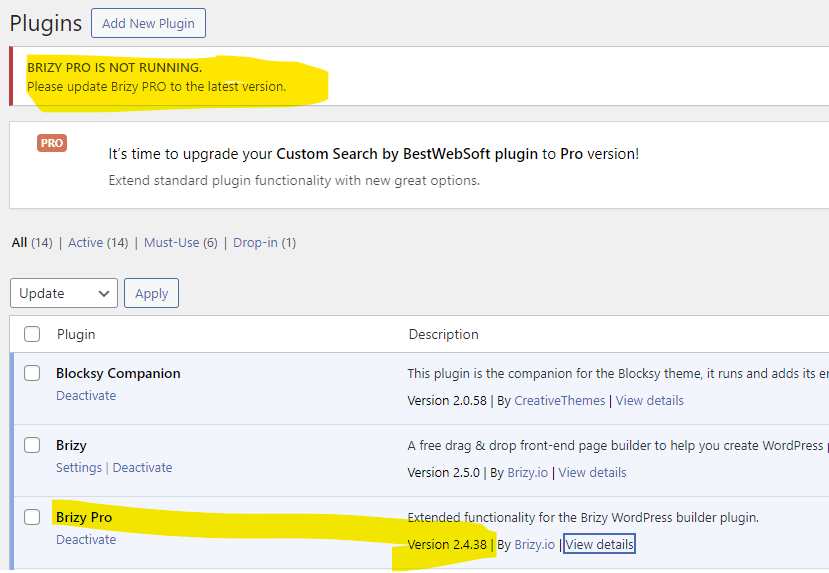
My wordpress plugin is updated, but I have a weird notice. Also, my entire website has gone bonkers and nothing is working...
Can you please have a look at what's going on?
-

Hi Amanda,
Thank you for your message.
In order to Update the PRO version, go to your Dashboard >> Update tab; You will see the latest version of our PRO plugin - https://jmp.sh/c8ZlQGuE; Select the PRO version and click Update plugin.
Let me know if you managed to update the PRO version to the latest version.
Thank you,
Regards, Natalia
0 -
Hi Natalia,
I included the screenshot particularly because it is updated to the latest version. This is the version that I see on my dashboard here in Brizy.io as well - am I wrong, is there another version? Is 2.4.38 not the latest one?
I have tried your suggestion - I've also tried deactivating and activating it again, but it doesn't seem to resolve the issue.
I look forward to hearing from you. Let me know if you need access to the site to have a look at it and which email I should send the admin rights to.
0 -
So, after I refreshed the Brizy.io page it showed the new version. Update wasn't available in my WordPress backend, but I downloaded the new plugin from here and resolved the issue.
0 -
Hi Amanda,
Can I ask you what is your current WordPress version?
The latest version of our PRO plugin is 2.5.0 released today, alongside with the FREE version.
Thank you,
Regards, Natalia
0 -

hello same problem !
0 -

Hi Mathieu,
Thank you for reaching out to us.
Please make sure that you are using the latest versions of both Brizy and Brizy Pro.

Kindly give this a try and inform me of the outcome.
Best regards,
Ariel H.0 -
Yes it is !
 0
0 -
Hi Mathieu,
Thank you for the update.
Could you please provide us some screenshots to demonstrate the issue you are facing.
Also please add us as an Admin user to your WordPress Dashboard and send the following details to: communitysupport@brizy.io so we can inspect your site.
Community Post link: https://support.brizy.io/hc/en-us/community/posts/20298424288914
WordPress Admin URL:
Username:
Password:Please make a full backup of your site as a precaution.
Best regards,
Ariel H.0 -
There is a bigger issue in all my websites with brizy pro since last update there is a bug with globals elements they are not displayed in front but they are in the editor but you can't save any pages !
0 -
Hi Mathieu,
Thank you for the update.
We apologize for the inconvenience. We have recently received similar reports, and our developers are actively working to resolve it as quickly as possible. If this is urgent, you can revert to these older versions: https://tinyurl.com/4z3cj26y
Steps to roll back:
1. Navigate to the Plugins section and uninstall both Brizy and Brizy Pro.
2. Begin by uploading and activating Brizy.
3. Proceed to upload Brizy Pro and activate it.Please try these steps and inform me of the results. Rest assured; we will update you once we have resolved the issue with the recent update.
Best regards,
Ariel H.0
Please sign in to leave a comment.
Comments
10 comments