Categories

Hi
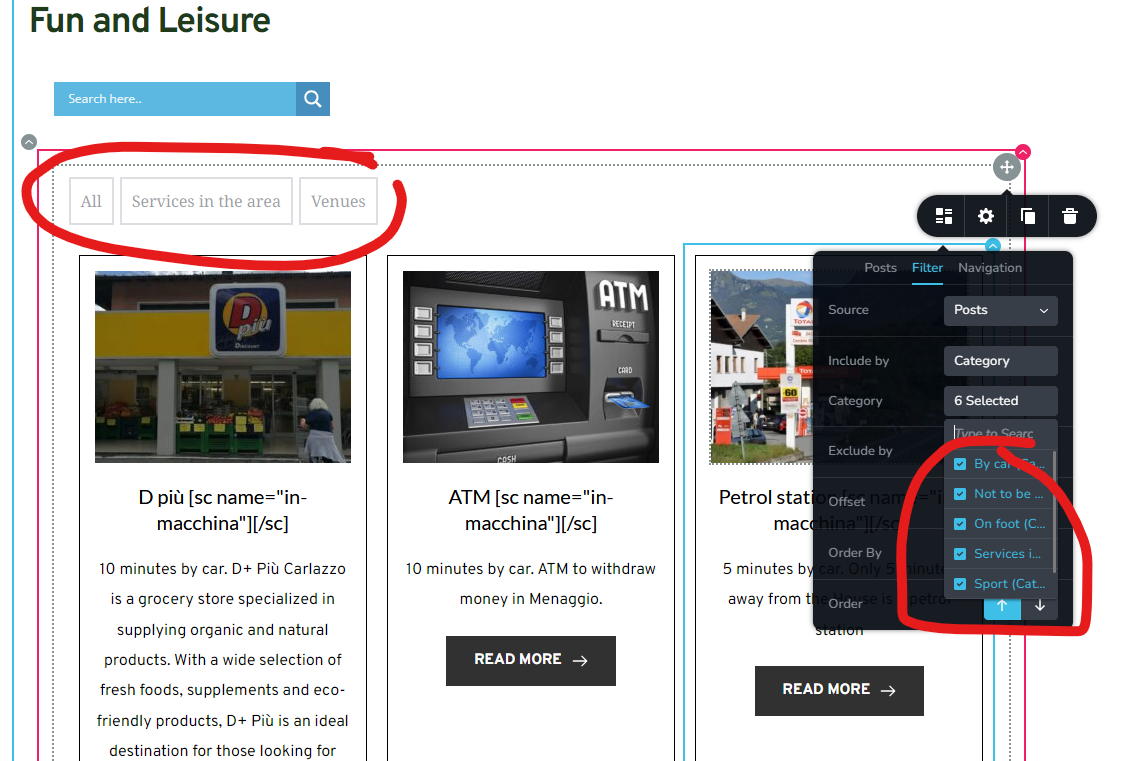
As I usually do, I have selected the correct categories I want to display in the page, as you can see by the screenshot.
But as I have underlined, even if I select more categories, only 3 will display.
I have removed and reassigned more times, but nothing changes.
Thank you
-

Hi Gianpietro,
Thank you for reaching out to us.
After making changes to the categories in the post element, please click on Update, then reload or refresh your page or template to see if this resolves the issue.
Please give this a try and inform me of the outcome.
Best regards,
Ariel H.0 -
Hi Ariel,
thanks for your reply, that is the first thing I have done, but didn't work.
please let me know
thanks
0 -
Hi Gianpietro,
Thank you for the update.
This is something we need to inspect from your WP Admin page. Please add us as an Admin user to your WordPress Dashboard and send the following details to: communitysupport@brizy.io
Community Post link: https://support.brizy.io/hc/en-us/community/posts/20221988386194
WordPress Admin URL:
Username:
Password:
URL of the problematic page:Please make a full backup of your site as a precaution.
In the meantime, could you please try disabling all other plugins except for Brizy and Brizy Pro to see if the issue persists?
Best regards,
Ariel H.0 -
Hi Ariel
thanks, I have created user and sent the email.
I deactivated plugins, and yes, the issue persists
thanks
0 -
Hi Gianpietro,
Thank you for your cooperation, and I apologize for the delay in my response.
Upon checking, the categories appear to be functioning correctly.
Initially, the categories may not be visible. To view them, please preview the page and use the navigation at the bottom of the post element to move to the next page. There, you will see the categories that are not displayed. This will also be evident when you increase the number of rows in the editor. Please see this screencast - https://youtu.be/INIhY46fOSI.
If you have any questions, please feel free to let us know.
Best regards,
Ariel H.0 -
Hi Ariel,
now I understand. The referring article of the categorie must be visible to see the category filter on the top.
It's not very convenient because one would like to see all the existing categories in the page, regardless if the respective article is visible or not, otherwise they will never know if that category exists.
And it's not very convenient to have to scroll the page through 15 rows to be able to click on Next, but if that is the way it is, ok.
thanks
0 -
Hi Gianpietro,
If you want to display all categories, please try this approach - https://youtu.be/LJ74CAoLfT8
The idea is to create a new menu and add all categories and use it in your archive page.
I hope this helps.
Best regards,
Ariel H.0
Please sign in to leave a comment.
Comments
7 comments