No background

Hi
I have no background? when i go to the edit section the background shows, men but when i go back to the publish section there is no?? please help
https://opbygning.innosites.dk/
-

Hi Daniel,
Thank you for reaching out to us.
Could you please try setting the background image to "Original" and see if this will help address the issue?
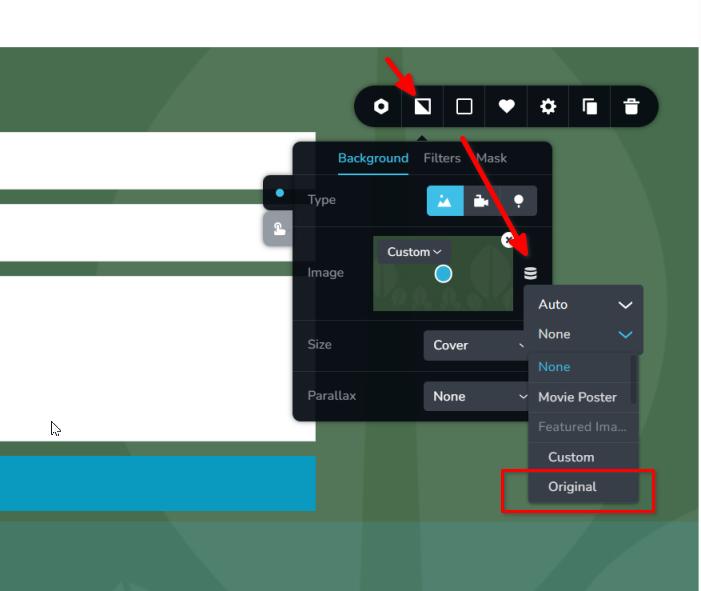
Please try this and let me know how it goes.
Best regards,
Ariel H.0 -
It does not work? what to do then
0 -
Hi Daniel,
Thank you for the update.
Please remove the images from the media library and re-upload them. It is essential to rename the images before uploading to avoid using cached file names.
If the issue persists, you can troubleshoot by temporarily deactivating all plugins except for Brizy and Brizy Pro to check for any conflicts. Additionally, consider switching to a different theme.
If you have already tried these steps without success, kindly provide us with temporary access to your WP Admin details. Adding us as an Admin user to your WordPress Dashboard and sending the following details to communitysupport@brizy.io will assist us in further investigating the issue:
Community Post link: https://support.brizy.io/hc/en-us/community/posts/19872364475026
WordPress Admin URL:
Username:
Password:Please ensure to create a full backup of your site as a precaution.
Best regards,
Ariel H.0
Please sign in to leave a comment.
Comments
3 comments