Pods link to email address in Brizy template

Hi there,
We've got a Pods template that has an email address field but in the brizy template there doesn't look to be a way to make it an email link.
If we add mailto: in the link to field then you can't select the field to link to.
If we select the field in link to it then just links to a 404 page with the email address in it, for example https://www.plc.freshhq.co.uk/about-us/our-team/charlene.turner@paramountlegalcosts.co.uk
Is there a way aroud this?
Thanks,
Darren
-

Hi Darren,
Kindly follow these steps
- Select the Text you want to link to the email address.
- In the Link tool, select the URL option
- Click on the Database icon and select the dynamic Email field you have added using PODS
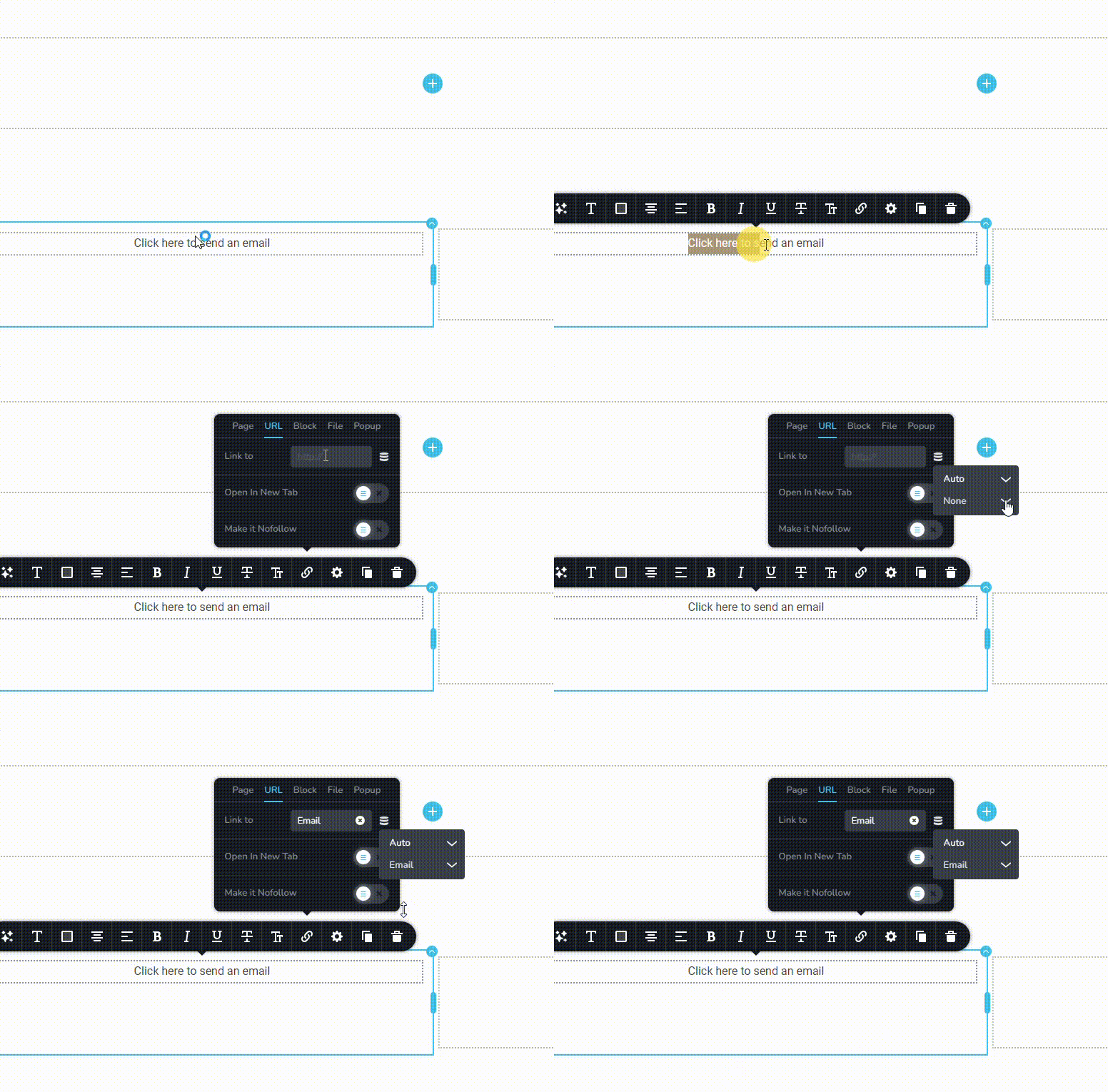 0
0 -
Hi,
Thanks for this. I've followed these steps and I'm still having the same problem. The url becomes - https://www.plc.freshhq.co.uk/about-us/our-team/charlene.turner@paramountlegalcosts.co.uk
Not a mailto: link like it should be.
Are you able to take another look please?
Thanks
0 -
Hi Darren,
I have added a dynamic mailto link to a blog post following this approach and it works at my end. Kindly have a look at https://brizy.tech/how-to-style-a-console-table/ Scroll down to the bottom to see the link.
0 -
Hi George,
And this is pulling through from Pods? I'm sorry but this is just not working for us at all. It results in the link in my message below and rather than a mailto link, is a full url that leads to a 404 page.
Is there any way you could please login and have a look?
Thanks
0 -
Hi Darren,
In my example, I am using ACF to add the email filed to blog posts.
Yes; we can have a look. Please add a new user to your WordPress Dashboard and send the following details to our email: communitysupport@brizy.io
- Community Post link: https://support.brizy.io/hc/en-us/community/posts/18894436316818
- WordPress Admin URL:
- Username
- Password
Please also let us know the steps to reproduce the issue you are facing. Kindly make a screen recording explaining how you are testing this function.
0 -
Hi Darren,
I could not reproduce the issue you are facing. All email addresses are linking correctly to its respective mailto. Kindly see my test at https://jmp.sh/xsmEjR3B
If I have not understood the problem correctly, kindly get back to us with further instructions.
0 -
Hi,
Apologies. We were on a time pressure to get the site live and have instead found a work around - that's why it appears to be working.
Thanks for your time though. Really appreciated.
Eilidh
0 -

Hey Darren or KC, I am facing the same issue right now, could you please share your solution? I am having the same issue with tel: type links.
0 -
Hi Francisco,
Have you tried the solution provided in the first comment above? Did you face any issue while trying to link to an email address? Can you elaborate what you have tried so far and what issues you are facing?
0
Please sign in to leave a comment.
Comments
9 comments