Spinning Wheel on Wordpress Site

Hi Support,
Can you kindly check my wordpress site for Grannysfudgeshop.co.za It seems to be spinning when I try to edit a page after updating to the latest Brizy & Brizy Pro plugins. I cannot get into the editor. I checked the PHP Memory in case and that was normal.
Kind regards
Trevoulin
-

Hi Trevoulin,
Thank you for contacting us.
This is something we need to inspect from your WP Admin page. Please add us as an Admin user to your WordPress Dashboard and send the following details to: communitysupport@brizy.io
Community Post link: https://support.brizy.io/hc/en-us/community/posts/18695792284434
WordPress Admin URL:
Username:
Password:Please make a full backup of your site as a precaution.
In the meantime, could you please try disabling all other plugins except for Brizy and Brizy Pro to see if the issue persists? If the issue does not occur with other plugins disabled, it is possible that there may be a conflict with one of the third-party plugins installed on your site. Additionally, you can try temporarily switching to another theme to determine if the issue is related to your current theme.
Best regards,
Ariel H.0 -
Hi Trevoulin,
Thank you for your cooperation.
The issue seems to be caused by a conflict with JetPack Boost. We were able to resolve it by disabling "Defer Non-Essential JavaScript" and "Concatenate JS" options in JetPack Boost. This conflict occurs when Jetpack Boost prioritizes speeding up page load times by delaying the loading of non-essential JavaScript, while Brizy Builder requires immediate access to JavaScript for its editing features.

You can choose to disable JetPack Boost whenever you need to make changes to your websites using Brizy Builder, and then re-enable it once you have published the changes on your pages.
If you have any further questions, please let us know.
Best regards,
Ariel H.0 -
Dear Ariel,
Thank you for this, the issue has been resolved I am able to edit pages once again. May I ask why the quantity field doesn't show any numbers?
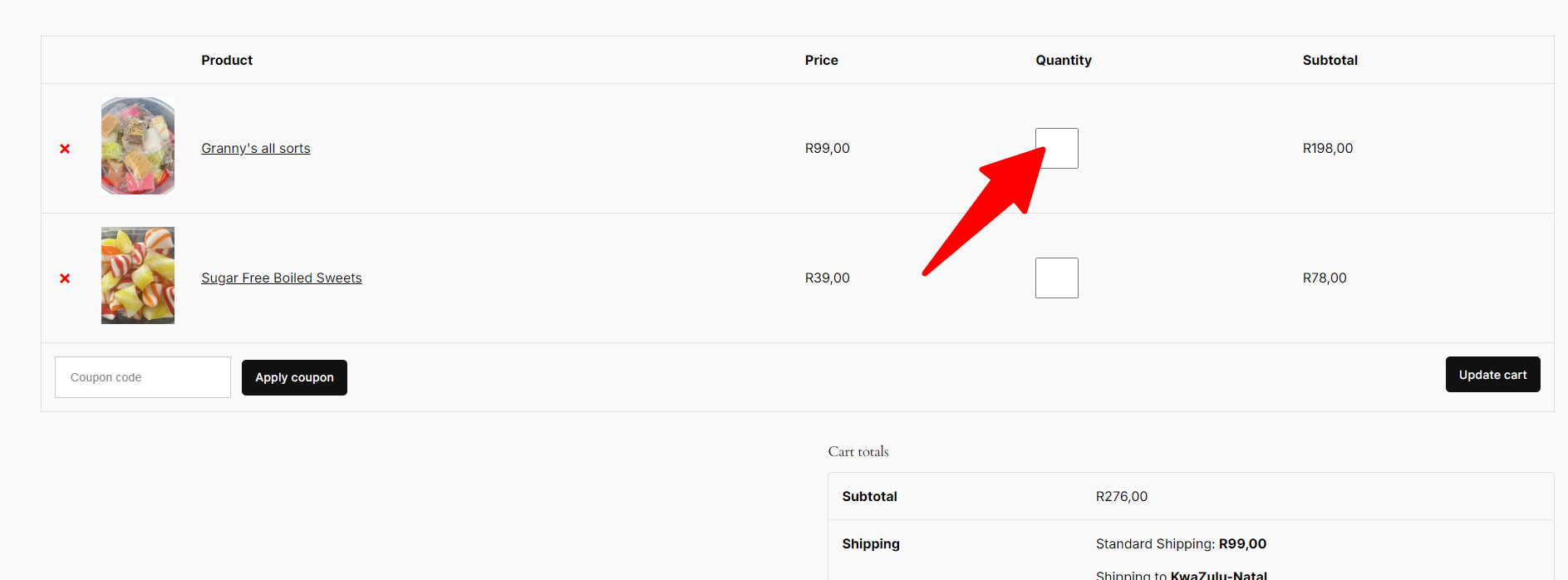 0
0 -

Hi Trevoulin,
The design of the cart page is derived from your theme. Brizy merely displays the theme's cart page design using the 'Pages' element. Kindly try changing your theme for a better design for your cart page.
0 -
Hi KC & Ariel,
Thanks for this. All issues have been resolved. KC I did change the theme and saw the display of the quantity box was better. Thank you.0
Please sign in to leave a comment.
Comments
5 comments