Desktop Header WON'T hide on Mobile

Many times I have created a second header for use on Mobile devices, so this is nothing new to me. But I am stymied. Though I have hidden the mobile header from the desktop, and the desktop from the mobile view, they are BOTH showing up on the mobile view and neither hamburger menu will open the tray.

-

Hi Michael,
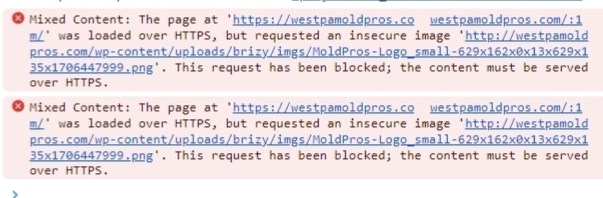
When inspecting your website using Chrome DevTools, it shows that your website has mixed content. Please see this screenshot https://jmp.sh/mDvgq6pG
A mixed content implies that your website loads HTTPS and HTTP scripts or content at the same time. Browsers block the display of a page or display warning messages if secure content is mixed with insecure content. You can read more about it here How to Quickly Fix Mixed Content Warnings
Can you please take the help of your hosting provider to fix the mixed content issue and check if the above issue resolves? If it does not, please get back to us. We will take a look at it again.
0 -
Good day, and thank you so much for your quick reply. I have added the recommended code to the .htaccess file - forcing it to only deliver content over HTTPS and when that did not work, I added a highly regarded plugin to do the same, but neither action has solved the issue. I am waiting on a chat with hosting Tech Support, but if you can set eyes on it again at the same time, I would appreciate it. Thanks
0 -
One additional problem persists that may be related. First Paint load times are being held back simply by the logo in the header. I have reduced the file size as much as I dare, but it still lags behind the rest of the page.
Also, the fact that they menu button (when the site is viewed on a mobile device) is dead, is very concerning.
0 -

Hi Michael,
Thank you for keeping in touch.
This is something we need to inspect from your WP Admin page. Please add us as an Admin user to your WordPress Dashboard and send the following details to: communitysupport@brizy.io
Community Post link: https://support.brizy.io/hc/en-us/community/posts/16679443478162
WordPress Admin URL:
Username:
Password:Please make a full backup of your site as a precaution.
In the meantime, could you please try to disable the WPMU DEV plugin and see if this makes any difference?
Best regards,
Ariel H.0 -
I am not certain if the it was the cache in my mobile browser, the disabling of majority of WPMUDEV system or something you have done since receiving access, but the site is now functioning as to be expected.
I rely heavily upon the mutli-function of the WPMUDEV system, not only for site performance, SEO and dashboard access to all sites I manage (around 60) for conducting all plugin updates from a single location; but it seems to be in conflict with Brizy often. Any suggestions for a suitable replacement with the same broad functionality?
0 -
Hi Michael,
Thank you for the update.
It seems like the issue might be related to how the system is optimizing the assets. Sadly, I couldn't find the option to turn off CSS and JS Minification in their settings. Can you reach out to their support and see if they can help with this?
Please try this and let me know how it goes.
Best regards,
Ariel H.0 -
Ariel -
I finally heard back from Hosting TS and they said that a single image was what was attempting to load over HTTP. If it is within your folder /brizy/ does this support that it is due this CSS and JS setting?
 0
0 -
Do you recommend a good Cache plugin that will not conflict with Brizy?
0 -
Hi Michael,
It seems like the mixed content issue is related to cache. Flushing the cache can often help in resolving mixed content issues.
As for cache plugins you can try the following:
Litespeed cache: This plugin has 3 Million + active installations and is a popular caching plugin. There are a lot of settings with Litespeed. Please read this article to make the right selections in the plugin. https://www.hostinger.in/tutorials/litespeed-website-optimization-tool/
WP Optimize: This plugin has 1 Million + active installations. Quite easy to setup and has a few selections to make.
I hope this helps.
Best regards,
Ariel H.0 -
Thanks, switched the site to WP Optimize and it appears to be doing better. Pages still load too slowly, though.
0 -
Hi Michael,
Thank you for the update.
It's possible that the website cache didn't take effect immediately when you were checking it. Sometimes it takes a bit of time for the changes to be applied.
I just checked, and your site loaded in under 6 seconds - https://www.webpagetest.org/video/view.php?tests=240130_BiDc2A_62J-r:1-c:0Best regards,
Ariel H.0
Please sign in to leave a comment.
Comments
11 comments