Brizy editor does not load

I want to edit some pages but the editor of Brizy does not load. The circle is turning around and around..
-

Hi Sharony,
Thank you for reaching out to us.
This is something we would like to investigate from your dashboard. Could you please provide us with the WordPress credentials, so we can look into this issue further?
Please add us as a user to your WordPress Dashboard and send the following details to: communitysupport@brizy.io
Community Post link: https://support.brizy.io/hc/en-us/community/posts/16466268958353
WordPress Admin URL:
Username
PasswordPlease make a full backup of your website as a precaution.
Meanwhile, this could be due to an incompatibility between Brizy and a plugin or your theme.
You can identify the conflicting software by:
1. Deactivating one plugin at a time and checking if the problem resolves.
2. Temporarily switch to another theme and check if the issue goes away.In addition, please ensure that you are already using the most recent versions of Brizy and Brizy Pro.
(Brizy Version 2.4.24 and Brizy Pro Version 2.4.23)Please try this and let me know how it goes.
Best regards,
Ariel H.0 -
Hi Arie, thank you. I've sent an e0mail to communitysupport@brizy.io.
Best regards, Sharony0 -

Hi Sharony,
I signed in to your WordPress Dashboard and could open your homepage in the Brizy Editor. Please have a look at this screen recording. https://jmp.sh/khOepQz4
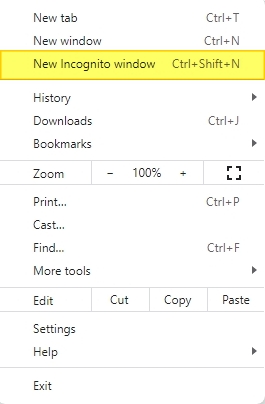
Can you try signing in to your WordPress Dashboard from a private (incognito) window of your browser and see if that makes a difference? Please also try using an alternate browser.
 0
0 -
Thank you for looking at it KC George.
I am working in safari.. It does not open in normal mode or private mode. Strange that it worked here before. I have now also installed Chrome and it works there, thank you!0
Please sign in to leave a comment.
Comments
4 comments