Critical Error

Wordpress Brizy Plug In
Website showing critical error. Have already addressed it with Wordpress they state it is a Brizy issue. I see no updates. PLEASE ADDRESS urgently.
-

Hi Kathryn,
Thank you for reaching out to us.
This is something we would like to investigate from your dashboard. Could you please provide us with the WordPress credentials, so we can look into this issue further?
Please add us as a user to your WordPress Dashboard and send the following details to: communitysupport@brizy.io
Community Post link: https://support.brizy.io/hc/en-us/community/posts/16327552288145
WordPress Admin URL:
Username
Password
Also, provide us some screenshots to demonstrate the issue or screenshots of errors you have encountered.Please make a full backup of your website as a precaution.
Meanwhile, this could be due to an incompatibility between Brizy and a plugin or your theme.
You can identify the conflicting software by:
1. Deactivating one plugin at a time and checking if the problem resolves.
2. Temporarily switch to another theme and check if the issue goes away.In addition, please ensure that you are already using the most recent versions of Brizy and Brizy Pro.
(Brizy Version 2.4.22 and Brizy Pro Version 2.4.21)Please try this and let me know how it goes.
Best regards,
Ariel H.0 -
Login Credentials -----
0 -
Hi Kathryn,
Thank you for the update.
We have your credentials but you forgot to include the login URL or your website URL so we can log in to your site and check the issue.
I am looking forward to your response.
Best regards,
Ariel H.
0 -
I sent the URL yesterday and emailed again for a follow up today.
I tried deactivating every plug in and it did not get the site up. The only one that made a difference was deactivating Brizy. Which left my website a jumbled. When I reactivated it I was met with a critical error again. Can you PLEASE address this? It is very urgent.
0 -
Hi Kathryn,
We receive several credentials on this email address every day, so we don't know which one is your website. To ensure a smooth process, we kindly request you to follow the provided format below:
Please add us as a user to your WordPress Dashboard and send the following details to: communitysupport@brizy.io
Community Post link: https://support.brizy.io/hc/en-us/community/posts/16327552288145
WordPress Admin URL:
Username
Password
Also, provide us some screenshots to demonstrate the issue or screenshots of errors you have encountered.Please make a full backup of your website as a precaution.
Thank you for your cooperation.
Best regards,
Ariel H.0 -

Hi Kathryn,
In your WordPress Dashboard under Tools - Site Logs, this error message gets repeated
PHP Fatal error: Allowed memory size of 536870912 bytes exhausted (tried to allocate 37752832 bytes) in /srv/htdocs/wp-content/plugins/brizy/editor/api/client.php on line 214
The PHP memory limit is set to 512 MB at the moment. Do you have an option to increase the PHP memory limit? Please check with wordpress.com if they can temporarily increase the PHP limit to allow us to reinstall the plugins.
I attempted to reinstall Brizy on your server. The plugin installation process does not get completed and few messages keep looping endlessly. Hence it is difficult to confirm if the plugin was installed completely. Increasing the memory limit can help reinstall the plugins correctly.
Alternatively if you provide us with FTP access to the server, we would like to attempt to install the Brizy and Brizy Pro plugins manually and check if that resolves the issue.
0 -
Www.enrichedlivingmichigan.org
0 -
Can I have an update on this please?
0 -
Per wordpress.com: The PHP settings on sites hosted at WordPress.com cannot be changed as they are globally fixed for all sites. The memory limit is set to 512 MB, and this is the maximum allowed. Memory exhaustion issues on a site are usually caused by plugins or themes that aren't working correctly, not by a lack of memory. Performing an audit of your plugins and themes by deactivating them individually and loading the page can help determine the issue. Please reach out to the respective developers of the plugins or themes that are causing issues for further assistance. Unfortunately, WordPress.com support cannot increase the PHP memory limit at this time.
0 -
Hi Kathryn,
Can you please confirm is this website was migrated using a WordPress migration tool?
When trying to reinstall Brizy and Brizy Pro, the plugin installation process continues on an endless loop. Hence we are not sure if the plugin is fully installed.
Do you have FTP access to your server? If you have, we will try and reinstall Brizy and Brizy Pro using FTP.
0 -
Wordpress does not have FTW capabilities.
Our organization cannot confirm the migration and have asked wordpress to confirm. The Brizy Pro plug in is now asking me to redownload?
0 -
FTP access achieved:
Address:
Port: 22
Username:
Password:0 -
Hi Kathryn,
I have installed previous versions of Brizy and Brizy Pro on your website using the FTP access you have provided. The website frontend started working fine now.

Please remember these points
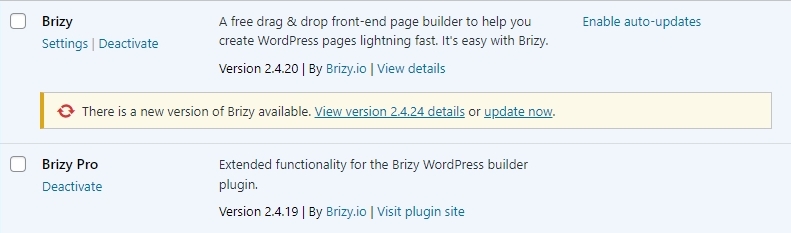
- I have installed Brizy 2.4.20 and Brizy Pro 2.4.19 in your WordPress Dashboard. If you update these plugins to the latest versions, the error "There has been a critical error on this website." is likely to return. Hence please do not update Brizy and Brizy Pro plugins.
- When you see the notification "There is a new version of Brizy available. Update Now" you may feel prompted to click on 'Update Now'. Please do not.
- If Brizy or Brizy Pro gets auto updated, the error "There has been a critical error on this website" can return. Hence do not click on "Enable auto-updates" for Brizy and Brizy Pro.
 0
0 -
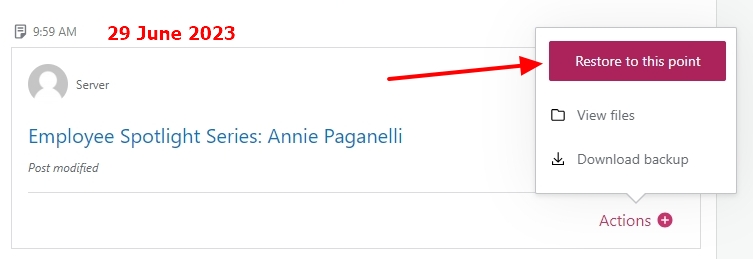
The Jetpack backup taken on 29 June 2023 at 9:59 AM is taken when the website is working well without the error "There has been a critical error on this website". For some reason, if the error returns, please restore your website from this backup by clicking on "Restore to this point" button.
 0
0
Please sign in to leave a comment.
Comments
14 comments