Emails and Countdowns

Hi there,
On my website, guideintowellness.com/workshops, there is a countdown that isn't live. It sits at 0-0-0-0 for everything. Also I linked Wordpress to my Mailchimp and linked my email buttons to Mailchimp but when I test it, the emails are not recorded and the user gets a red error message that says "email not sent."
Thanks,
Amy
-

Hi Amy,
Thank you for keeping in touch.
This is something we need to inspect from your WP Admin page. Please add us as an Admin user to your WordPress Dashboard and send the following details to: communitysupport@brizy.io
- Community Post link: https://support.brizy.io/hc/en-us/community/posts/16198311410834
- WordPress Admin URL:
- Username:
- Password:
Please make a full backup of your site as a precaution.
Best regards,
Ariel H.0 -
Hi Amy,
Thank you for your cooperation.
Upon checking, it appears that the issue was due to the date format, which should be in the day-month-year format. After making the necessary adjustments to the date format, the countdown timer is now functioning correctly.
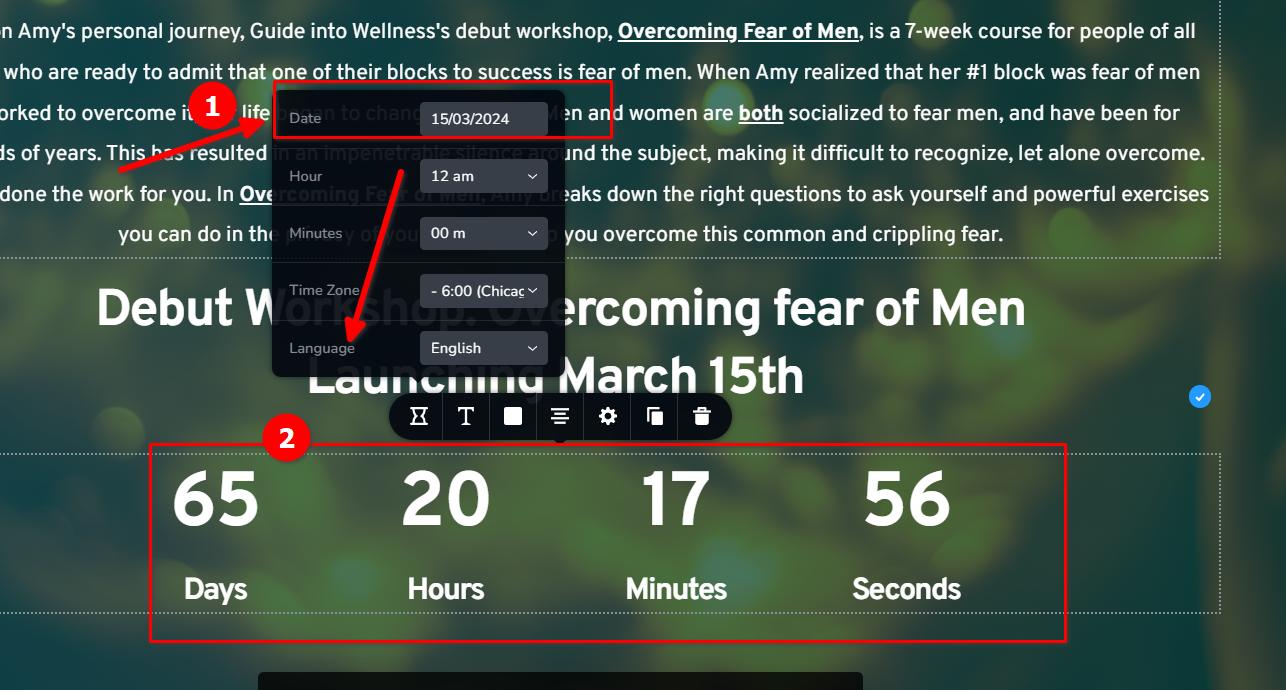
Regarding the issue with the form element, I duplicated your existing form and used my Gmail Email account and MailChimp API Keys in the settings to investigate the issue. It seems to be functioning correctly. This is demonstrated on this screencast: https://youtu.be/e-PXBxIKynsTo resolve this, you may need to reconfigure the form and ensure that you have followed the instructions provided in this link to configure Gmail to receive notifications:
https://support.brizy.io/hc/en-us/articles/360044216151-Email-notification-via-GmailAdditionally, for integrating the form with MailChimp, please refer to this link:
https://support.brizy.io/hc/en-us/articles/360043381952Please try this and let me know how it goes.
Best regards,
Ariel H.0 -
I have backed up and sent you the details via the included email.
0
Please sign in to leave a comment.
Comments
3 comments