This page needs a refresh. You’ve probably updated this page (or another page) in a different tab or browser.

Please help! I'm getting the kiss of death, "This page needs a refresh. You’ve probably updated this page (or another page) in a different tab or browser" message. Solo dev, only one builder tab is open. I've updated all of my plugins, ran the DB cleaner, and switched browsers.
I still can't update the website. This is incredibly frustrating, as our careers page has broken and candidates can no longer apply to our company without my ability to update a piece of code on the site.
-

Hi Vince,
We apologize for the inconvenience you're experiencing. This problem usually arises when there is a mismatch between the versions of Brizy and Brizy Pro. To resolve this, please make sure that you have the latest versions of both plugins installed.

If the issue continues, this is something we need to inspect from your WP Admin page. Please add us as an Admin user to your WordPress Dashboard and send the following details to: communitysupport@brizy.io
Community Post link: https://support.brizy.io/hc/en-us/community/posts/15743731529490
WordPress Admin URL:
Username:
Password:Please make a full backup of your site as a precaution.
Best regards,
Ariel H.1 -
Hi Ariel,
I've visited the plugins page and there is no additional update for Brizy Pro to bring it to 2.4.35. I also cannot downgrade Brizy to 2.4.32.
I've added your email as an admin to the site. Please review and let me know the next steps I need to take to fix the issue.
Thank you!
0 -

Hi Vince,
It appears that your email did not contain any reference to this community post URL, making it challenging to determine which email was sent by you. Could you please provide the project's URL so that we can search our emails for the URL?
0 -
KC & Ariel,
I emailed you yesterday with the details as well as the community post URL.
I’ve added your email communitysupport@brizy.io to our website’s admin user list so you have access to diagnose and help with the issue we’re facing with Brizy builder.For reference, the Community post link is: https://support.brizy.io/hc/en-us/community/posts/15743731529490Please let me know if there’s anything else you need me to do to fix the problem. Thank you for your help!0 -
Hi Vince,
I could not find your email including in the Spam folder. Can you resend the email with these details again?
- Community Post link: https://support.brizy.io/hc/en-us/community/posts/15743731529490
- WordPress Admin URL:
- Username:
- Password:
0 -
Hi KC,
I now understand what information you were missing. I sent it in an email just now.
Please let me know if you are able to gain access. Thank you!
0 -
Hi Vince,
We still do not have your email in our Inbox. Please see this screen recording https://jmp.sh/DC5gwFSl
Do you want to send the same details to support@brizy.io?
0 -
Hi KC,
I just sent the email to support@brizy.io. Please let me know if you are able to gain access.
Thank you!
0 -
Hi Vince,
Thanks. I could get access to your WordPress Dashboard finally. I need some help with reproducing the problem you are facing though. Please see my test at https://jmp.sh/l1O3AeFZ What are the steps I must follow to see the error you are seeing?
Can you also try these
- If you access your WordPress Dashboard from a private (incognito) window of your browser, do you see the same error?
- Have you tried opening your WordPress Dashboard from a different browser? Do you see the same error?
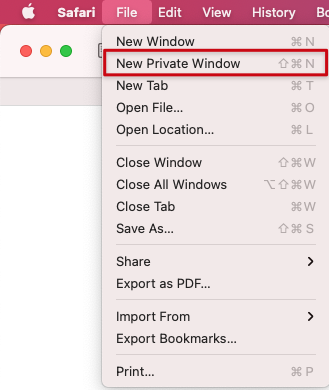 0
0 -
Hi KC,
Thank you so much for testing the problem on our website. I have tried to update the site in three different browsers and all of their private windows (Chrome, Firefox, and Safari).
Specifically I'm trying to update our Careers page. Near the bottom of the page, where it says "Available Positions," I need to insert an embed field with this piece of code:
<script type="text/javascript" src=https://jobs.
ourcareerpages.com/Resources/ > </script>js/ccp_widget_support.js
<link rel="stylesheet" href=https://jobs.ourcareerpages.com/Resources/ />css/ccp_widget_support.css
<script type="text/javascript" >
var options = {
CCPCode: "CSE"
,ElementID: "BDHRJobListings"
,ShowCustomContent: false
};
bdhr.generateListing(options);
</script>No matter what I do, when I insert the code I receive, " This page needs a refresh. You’ve probably updated this page (or another page) in a different tab or browser." This is particularly unfortunate because it means candidates cannot apply to our company until the code is updated.
Please let me know if you are able to replicate this issue and diagnose how to fix it. Thank you.
0 -
Hi Vince,
I could add the above embed code to your Career page and save it. However the code does not display well in the page frontend. Please see this screen recording https://jmp.sh/DE9ZELhP
0 -
Hi KC,
I believe you've solved the issue for me— the code was incomplete, and perhaps something about the way it was written was preventing the page from updating on my end. I received a new piece of code and inserted it and the page updated and displayed fine.
I'm going to test some other pages to make sure I can make updates, but I think we won't have any further problems.
Thank you!
0 -
Hi Stéfan,
Thank you for reaching out to us.
This issue could be fixed by setting WordFence to learning mode for a few days. This will allow WordPress to learn Brizy actions while you are working on your website. It should automatically return to "Protected Mode" after a few days and resolve the issue. After setting it to learning mode, we were able to update and save changes to a page, as demonstrated in this screencast: https://youtu.be/6xiqc-SunDk
If you have any further questions, please let us know.
Best regards,
Ariel H.0 -

I have the same issue. I have brizy's latest free plugin and the latest pro plugin. They don't match. I'm unable to save my work. Lost half a day so far. Sending you the info at communitysupport@brizy.io
0 -
Hi Durand,
Thank you for reaching out.
The issue you’re facing is caused by a 406 error, which means the request sent from the Brizy Builder editor is being blocked by ModSecurity on your server.
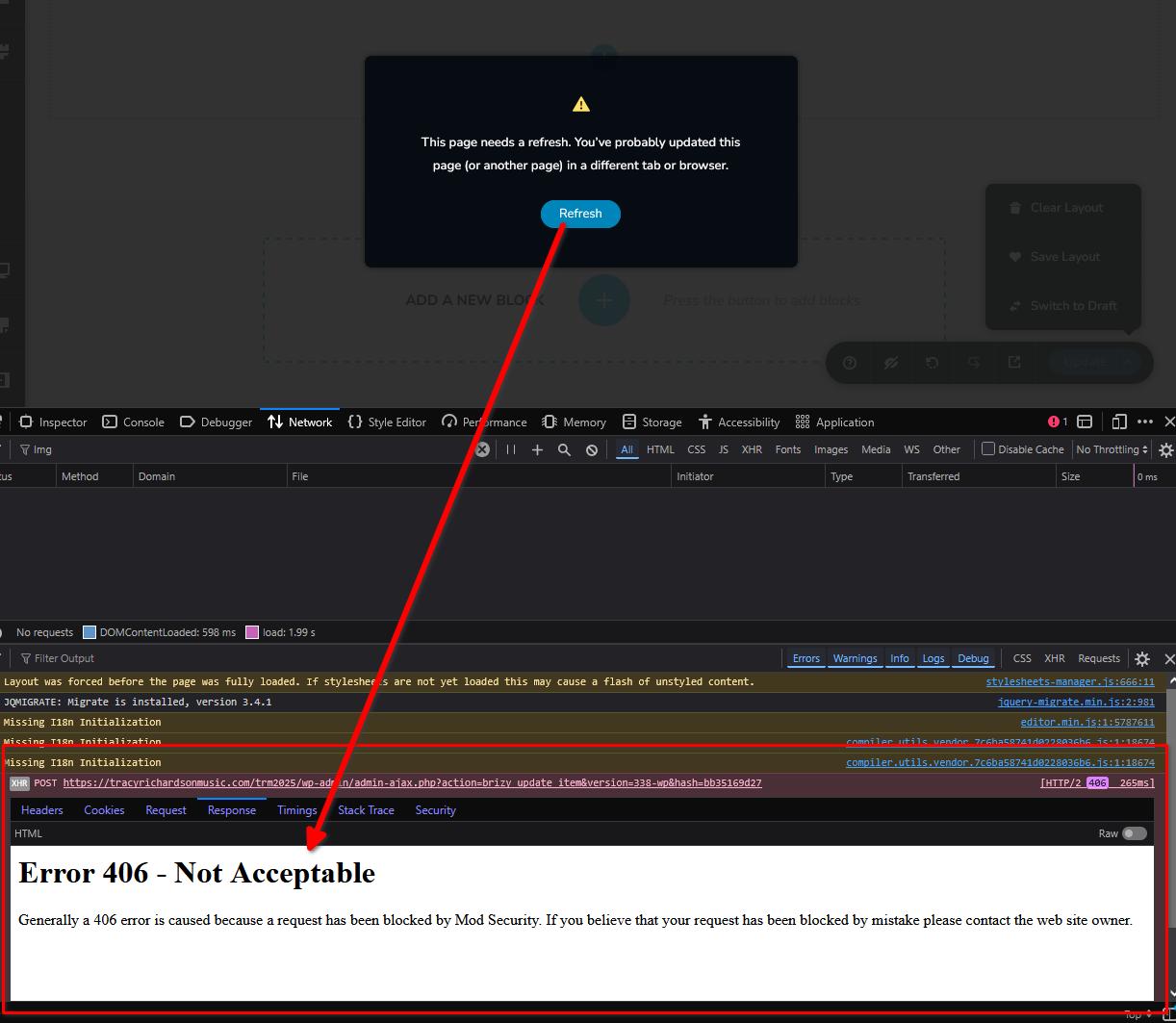
To resolve this, please try disabling ModSecurity as outlined in this support article: https://support.brizy.io/hc/en-us/articles/22590197512210
If you prefer not to disable ModSecurity, you can instead increase the "SecRequestBodyLimit" and "SecRequestBodyNoFilesLimit" values as described in the same article.
If ModSecurity isn’t accessible in your cPanel, kindly contact your hosting provider and ask them to adjust these settings for you.
Best regards,
Ariel H0 -

WE NEED AN UPDATED PRO!! Last year, using Brizy
0 -
Hi Joshua,
Thank you for reaching out.
Could you please provide a bit more context about the issue you’re experiencing? The message seems to be cut off, and additional details will help us better understand your concern.
Best regards,
Ariel H0 -

Can you help with this error:
This page needs a refresh. You’ve probably updated this page (or another page) in a different tab or browser.I can't share private details here and the support ticketing sent me here.
0 -
Hello Aaron,
Can we look at your WordPress dashboard to help you resolve this issue? Please add a new user to your WordPress Dashboard and send the following details to our email: communitysupport@brizy.io
- Support Forum reference: https://support.brizy.io/hc/en-us/community/posts/15743731529490
- WordPress Admin URL:
- Username
- Password
Your email must include a link to this thread's URL, otherwise we will be unable to locate your support ticket. Please notify us in this thread when you send us the email.
0 -
Hi Aaron,
Just following up on our previous email to check if you had a chance to review it. Please let us know when you’re ready to share the details so we can proceed and help you fix the issue.
Kind regards,
Ariel H.0
Please sign in to leave a comment.
Comments
20 comments