Brizy Post Save and Update Issue

Hi,
When I have updated to the latest version of brizy and brizy pro. After this I can neither save a post or update one. Whenever i try to do so it says "This page needs to be refreshed".
Please help
-

Hi Wasim,
Thank you for keeping in touch.
This is something we need to inspect from your WP Admin page. Please add us as an Admin user to your WordPress Dashboard and send the following details to: communitysupport@brizy.io
Community Post link: https://support.brizy.io/hc/en-us/community/posts/15256449953170
WordPress Admin URL:
Username:
Password:Please make a full backup of your site as a precaution.
In the meantime, could you please try disabling all other plugins except for Brizy and Brizy Pro to see if the issue persists? If the issue does not occur with other plugins disabled, it is possible that there may be a conflict with one of the third-party plugins installed on your site. Additionally, you can try temporarily switching to another theme to determine if the issue is related to your current theme.
Best regards,
Ariel H.0 -
Hi Ariel,
I have disabled all the plugins except Brizy and brizy pro and even then the issue persists so its definitely not a plugin issue.
0 -
Hi Wasim,
Could you kindly grant us temporary access to your WP Admin Dashboard? This will allow us to investigate the issue further.
Best regards,
Ariel H.0 -
hi Areil,
I have granted temporary access and emailed the login link at communitysupport@brizy.io. Please check
0 -
Hi Wasim,
Thank you for your cooperation.
I've created a separate private ticket for this issue and forwarded it to a colleague for further investigation. You should expect a response from them soon.
Best regards,
Ariel H.0 -
thanks, could you please also ask them to cc email ID hozefa@
0 -
Hi, I havent rcvd any email.
0 -
Hi Wasim,
Sorry for the delay. My colleague Basharat has responded to you in the private ticket.
Best regards,
Ariel H.0 -
Hi Areil,
unfortunately the email was different. I have chaNGED PLEASE check and respond to that email
0 -
Hi Wasim,
Thank you for keeping in touch.
I asked him to include the email you mentioned, but it looks like it didn't send. In any case, it appears that the issue is related to a security software on your server that is preventing requests from Brizy. Please reach out to your hosting provider and request them to disable any security software, such as ModSecurity. Once the deactivation is done, please let us know.
I am looking forward to your response.
Best regards,
Ariel H.0 -
thanks, i will check
0 -

This also happen to me, what's the solution ?
0 -
Hi Dee,
Thank you for the update.
We have found that this issue is prevalent among users who have WordFence installed.
To resolve the issue, please set WordFence to Learning mode by following the steps below:
A. In the WordFence plugin settings, navigate to Firewall;
B. Enable Learning Mode and set it to automatically switch back to "Enabled Protecting" in 2 days; this will allow WordFence to learn the actions from the Brizy editor.
C. Save your WordFence changes.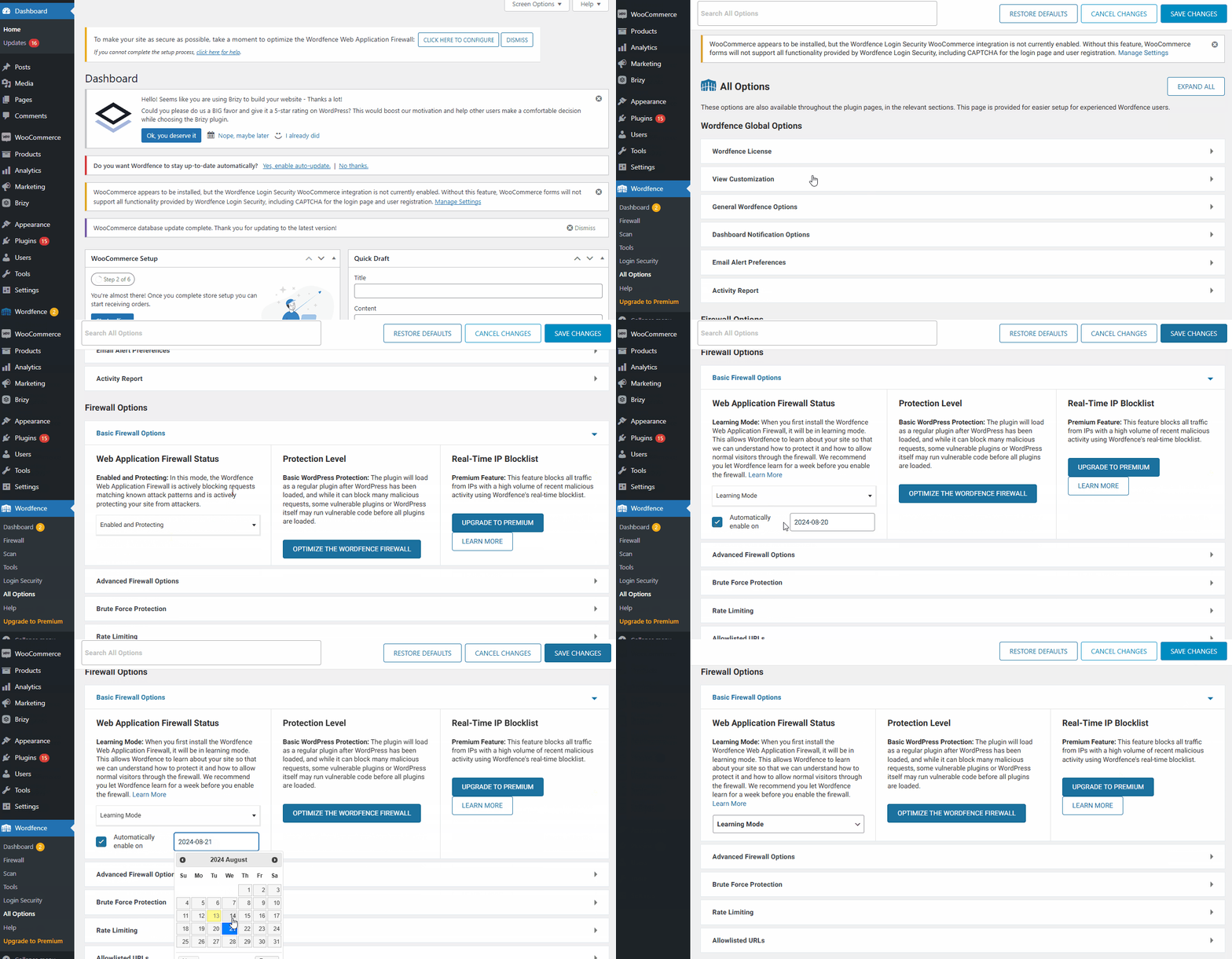
By following these steps, you can save or update your Brizy pages.
If you do not have WordFence, please also check if you have access in your Hosting panel to disable Firewall/ModSecurity, as this may help resolve the issue.
Please try this and inform me of the outcome.
Best regards,
Ariel H.0
Please sign in to leave a comment.
Comments
13 comments