Duplicate Headers (with Global Block), Updates page causes problems , and wp-postmeta is huge

Hi all, I'm stuck in this weird situation.
I've used global blocks to create header and footer for my website (https://duckma.com).
What I'm facing is:
- Duplicate headers in some pages
- Blank headers in some pages
- when I update a global block it is overwritten with old content
- The menus don't sync with correct contents (I've got other links that point to a 404 page)
- Multilanguage (WPML) is causing duplicates (i have different blocks for each language)
- Wp_Postmeta table is very big (17,051 rows and 531.2 MiB)
Some context:
WordPress 6.4.1 running Blocksy Child theme.
Siteground Hosting
- 157 pages (68 eng / 89 ita)
- 131 posts (55 eng / 76 ita)
Here's the listofactiveplugins.
I've tried disabling all the unnecessary plugins and keep active only brizy and wpml and the issue persists.
Any clues ?
-

Hi Matteo,
In your Global Header, if you see one display condition for each individual page, delete page specific display conditions and add a single condition for all pages. This should help reduce the number of display conditions from 157 to 1
Include - Pages - All
Similarly if you see 131 display conditions for different blog posts, delete all of them and have a single Display Condition. This should help reduce 131 display conditions to 1
Include - Posts - All
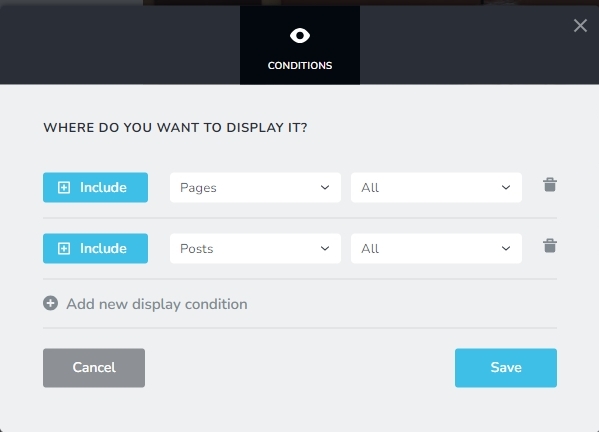
After reducing the total number of Display Conditions to a few (less than 5), please check if the issue persists.
0 -
Hi George, thank you for the reply.
Unfortunately it didn't work.. I got duplicate contents an all the site.
Also how can I get 5 conditions if I have two languages? (I'm using WPML)
For the size I deleted all the saved blocks and leave only the once I'm using (6 in total)... the table is still very big and the site is veeery slow (almost 30 seconds to save a page in brizy and 10-15 seconds to open )0 -
Hi Matteo,
I have glanced through some of your pages and did not come across any that had a duplicate or blank header. Please see my test here https://jmp.sh/JjnPvwrd Please give us the URLs of pages that still have duplicate or blank headers.
Looks like you have two variations of the same header and a third header for the your blog posts. If you can combine these three into one header, it can further simply your global blocks.
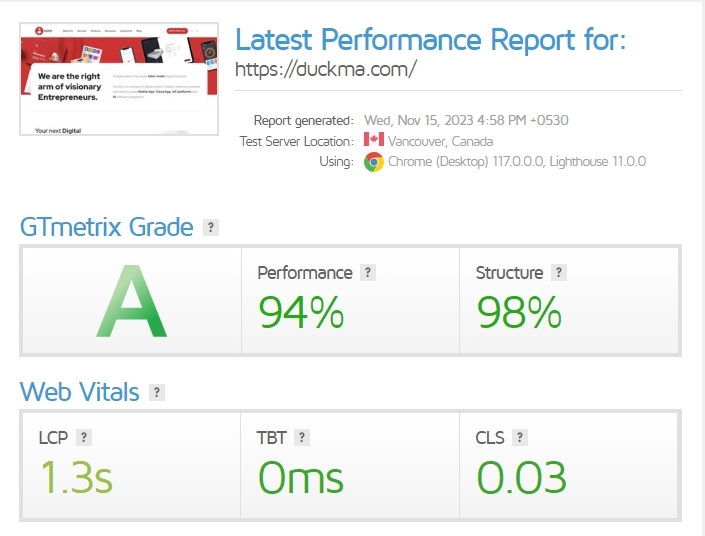
The performance of your website look reasonably good on GT Metrix. Please have a look at this report https://gtmetrix.com/reports/duckma.com/34TOAexX/
 0
0 -
Hi George, we updated all pages manually. Using Global blocks, as my previous comment, has not worked.
The speed of viewing is not the point.
The website has a good grade due to nitropack that optimize the frontend. (and it's great).But the admin panel and Brizy editor are not usable.
I can't even access one page in edit, Brizy editor takes 10-15 seconds to open and almost 30 seconds to save a page (and it is going up).
What I see is the Wp_Postmeta table is growing a lot every time I save a page.0 -
Hi Matteo,
10-15 seconds loading time and 30 seconds to save a page is quite high and unusual. We will need access to your WordPress Dashboard to troubleshoot this issue.
Please add a new user to your WordPress Dashboard and send the following details to our email: communitysupport@brizy.io
- Community Post link: https://support.brizy.io/hc/en-us/community/posts/15034991985938
- WordPress Admin URL:
- Username
- Password
Please let us know here when you send us the email.
0 -
sent the email. Thank you for the support.
0 -
Hi Matteo,
Websites hosted by SiteGround automatically have their performance enhanced by the server. Using independent plugins for caching and optimization can result in multiple optimizations and complicate your website's operation. In order to prevent multiple page optimizations, I have temporarily disabled two plugins.
- WP Optimize
- Nginx Helper
Please use the Speed Optimizer plugin to get integrated page optimizations with SiteGround Server optimizations.
The About Us page opened in 9–10 seconds at my end, and I was able to save it in 5–6 seconds. Kindly verify if these minor changes also result in faster loading and saving of the Brizy pages on your end. Please see this screen recording for my test https://jmp.sh/MNrdoE1u
0 -
Well that's not a valuable solution and it doesn't fix the issue at all.
First becouse Nitropack (speed optimizer that enables the site reach the GTMetrix score in the upper message) is not compatible with SG Optimizer https://support.nitropack.io/en/articles/8390249-siteground-and-nitropack
Second because the Database size skyrocket more: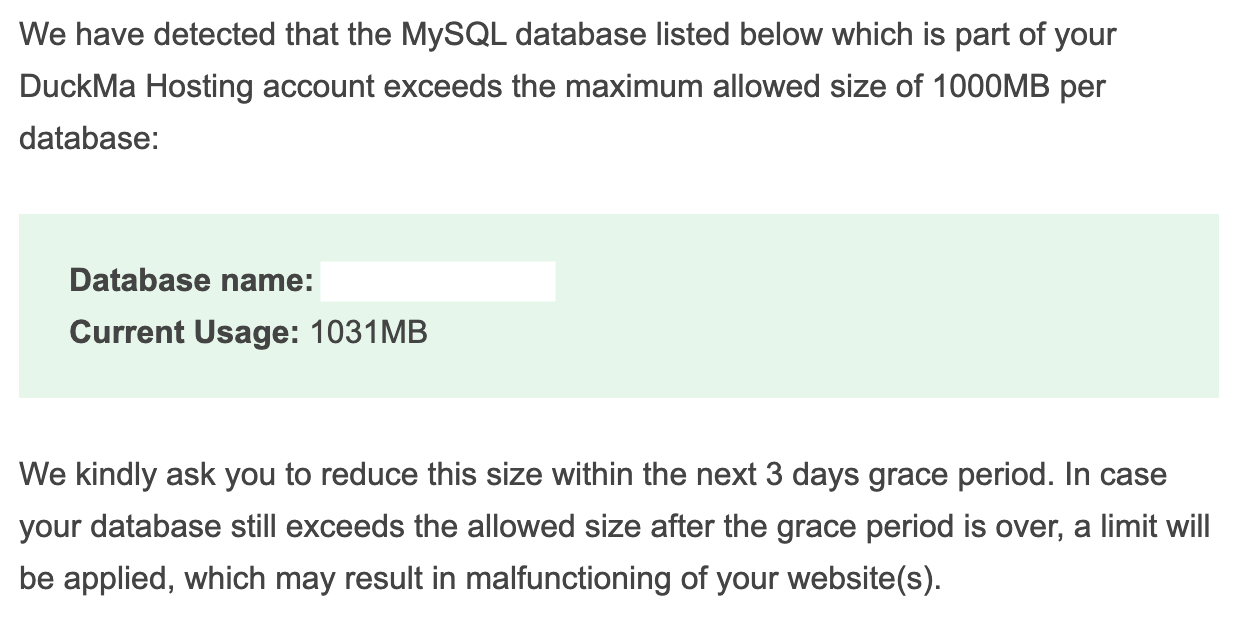
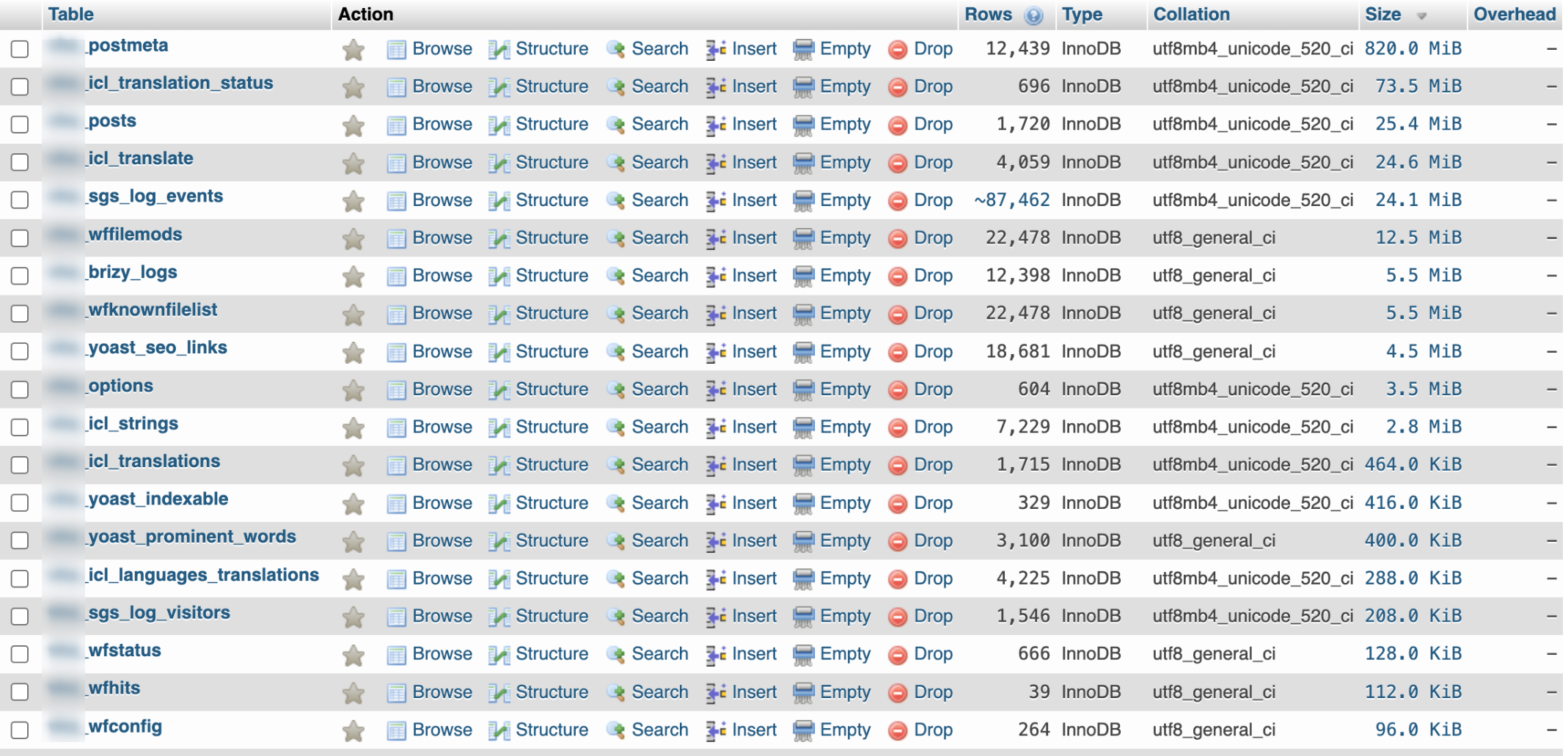
Is it ok that a website with 158 pages and 131 posts have a mysql db of 1GB?0 -
Hi Matteo,
After enabling the Speed Optimizer plugin, your GT Metrix score remains the same. Please have a look at https://gtmetrix.com/reports/duckma.com/jc3tcg0w/ Please continue to keep the plugin enabled and check if you face any issues.
Please follow the this article to reduce the database size How to reduce the database size of a WordPress application?
You could also try implementing the database optimization suggestions using Advanced Database Cleaner plugin. You can install the plugin temporarily, implement the database optimization and delete it. Please take a backup of your website before carrying out database optimizations.
0 -
Thank you for your suggestions.
I've manage to make the editing go faster using the SiteGround Optimization Plugin on the Admin panel, excluding posts and pages (optimized through Nitropack).
I've optimized the images using the same plugin, and it sped up a little more.
For the DB, following the plugin and the article, the size of wp_postmeta is still bigger then usual.
Following the article you linked:The “Meta” database tables
These types of tables contain additional fields that are required by your main database tables. Usually, these fields are added by plugins. [...] Under certain circumstances, some information may remain in these database tables although it is no longer required. This can lead to the growth of the database and it is safe to delete such information as it is not used by any of the posts, comments, users or terms.
Could you provide a SQL query to remove unused content for brizy in such table?0 -

Hi Matteo,
Thank you for the update.
Just wanted to mention that the use of wp_postmeta is not exclusive to Brizy. This article here (https://www.webnots.com/large-post-meta-table-in-wordpress-here-is-how-to-cleanup/) explains it in detail. It also provides an SQL query and instructions on how to use it. If you decide to go down this path, it's highly recommended to create a backup of your database beforehand.
Best regards,
Ariel H.0 -
Yes, I've already went through that.
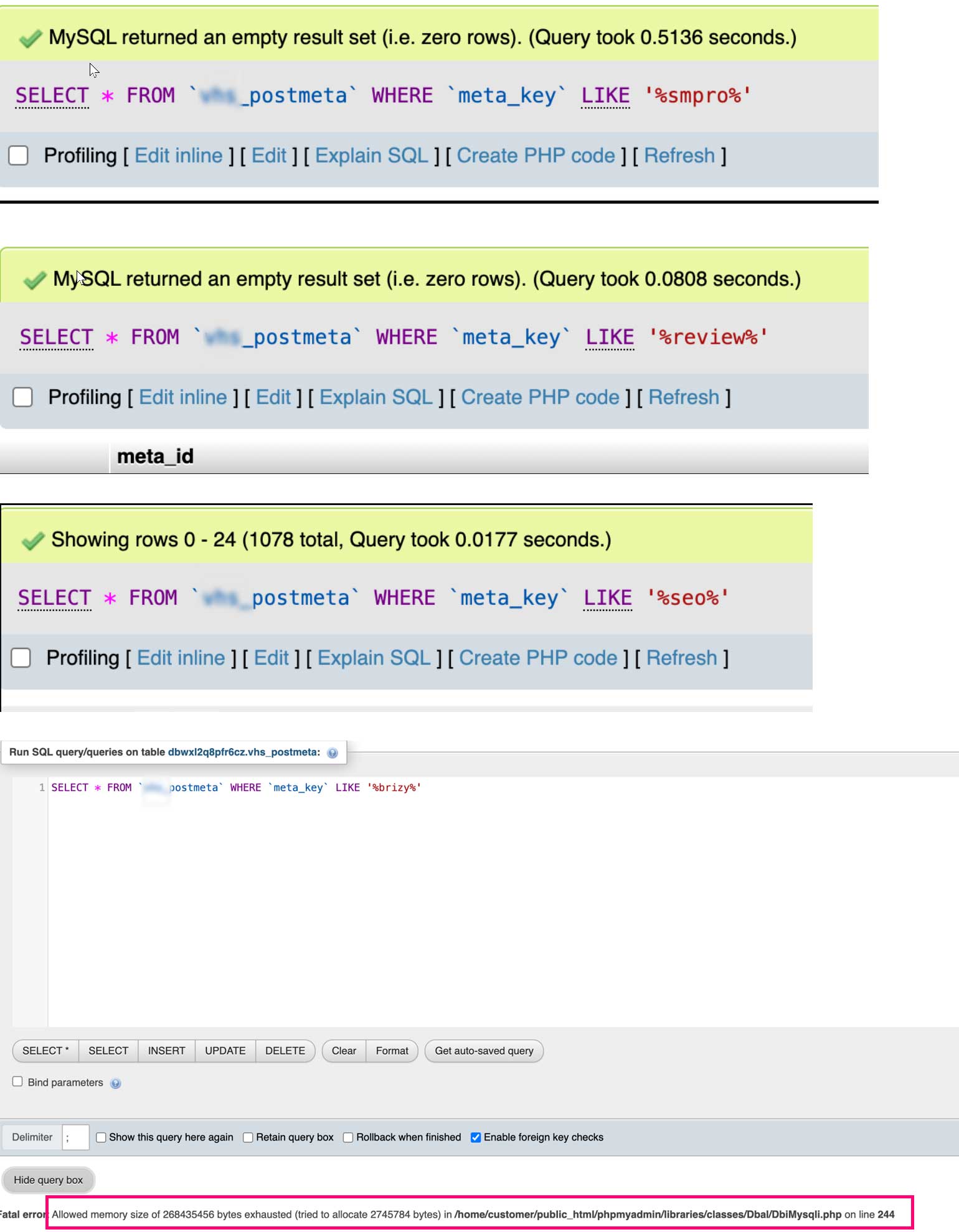
As you can see It seems brizy..
0 -
Hi Matteo,
Sometimes the database tables can crash or become inefficient. To address this, I suggest trying a couple of steps in PHPMyAdmin. First, select all the tables and run the "Repair table" option. After that, repeat the process, but this time select the "Optimize table" option. Once you've done that, go back and run the query again to see if it makes any difference.
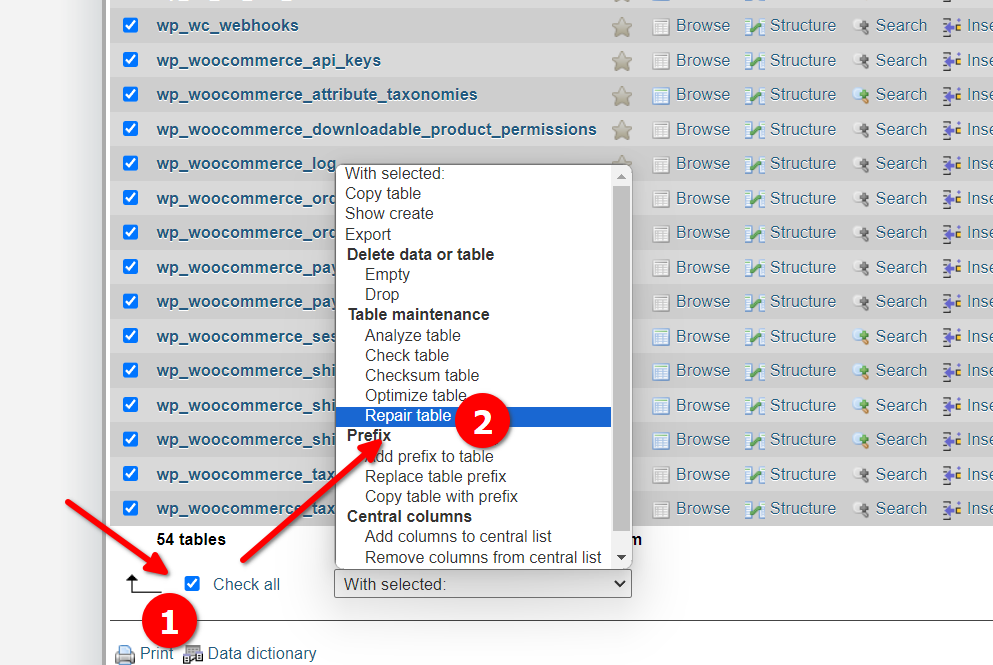
Please try this and let me know how it goes.
Best regards,
Ariel H.0 -
Hi Matteo,
Manual cleanup of database tables is not a recommended practice. If you continue reading under the heading 'The “Meta” database tables' of the SiteGround article, it says "The easiest way to clear these database tables is via a third-party plugin. There are plenty of free plugins that can get the job done like Advanced Database Cleaner or WP-Optimize"
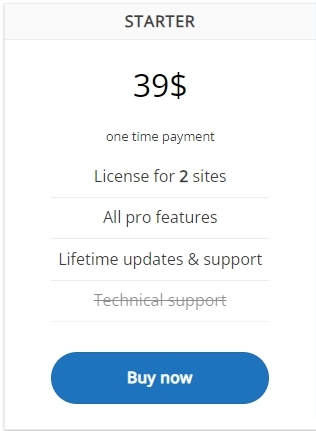
Please consider the 'Starter' plan of the Advanced Database Cleaner plugin for a one time payment of $39. https://sigmaplugin.com/downloads/wordpress-advanced-database-cleaner/ The premium version can clean up orphaned metadata. You can delete
- orphan post metadata
- orphan comment metadata
- orphan user metadata
- orphan term metadata
- orphan relationships
 0
0 -
"Repair table" is not available for those tables, but Optimize tables decrease the size in half of the postmeta.
I can confirm all the issues are fixed:
- duplicate headers and footers: inserted manually header and footer to each pages
- speed admin panel: made a combination of SG Optimize (excluding pages and posts) and Nitropack
- table size: optimize the pages with SG Optimize and manually, did the trick.
Thank you!0
Please sign in to leave a comment.
Comments
15 comments