Brizy popup - Link

Is there any way to set a regular link to open a brizy popup that is already created and linked in another link.
I mean, i have the text "more information" that is set by brizy to open a popup, but then i want to add the same action (a link that open a popup) in a bottom menu that i have and thats not configured in brizy, can i set an url that makes the popup open?
I tried using the #ID linked by the original "more information" but doesnt work.
Thanks.
-

Hi,
Thank you for contacting us.
Unfortunately, there's no option to create a link from an existing popup.
However, you can use Brizy to redesign the footer or bottom menu, which allows you to use the popup more effectively.
Best regards,
Ariel H.0 -
It's a floating menu (fixed at the bottom) than only shows when you scroll up, and showed only in some pages. Is that possible with brizy?
0 -
Hi,
Thank you for keeping in touch.
This can be achieved by using custom CSS and JavaScript.
I've prepared a screencast for you on this link to demonstrate how this can be done.
https://youtu.be/e11bMWs_3eIHere is the custom CSS:
#sticky {
    position: fixed;
    bottom: 0;
    left: 0;
    display: none;
    width: 100%;
    background-color: #f1f1f1;
    text-align: center;
    padding: 20px 0;
    box-sizing: border-box;
  }
And the JS Code:<script>
window.onscroll = function() {scrollFunction()};
function scrollFunction() {
if (document.body.scrollTop > 20 || document.documentElement.scrollTop > 20) {
document.getElementById("sticky").style.display = "block";
} else {
document.getElementById("sticky").style.display = "none";
}
}
</script>It is important to note that every website is unique, and the CSS / JS code may require some modifications. If necessary, please review the code and make any necessary adjustments to fit your website.
Best regards,
Ariel H.0 -

Hi
Please have a look at this page https://digital-works.brizy.site/. I have setup a fixed bottom bar that displays when you scroll up on the homepage; it does not show on other pages. This is built using Brizy's native elements.
You can save an on-click popup under Saved Popups library and reuse it on different buttons/icons/ images on multiple pages.
0 -
Thanks to both of you.
Kind regards.
0 -
Hi,
Thank you for the update.
Could you please provide us temporary access to your WP Admin login details, so we can check the issue? I also assume that this is on your development environment, otherwise, is it possible that you can set up a staging version of this website?
Please add us as a user to your WordPress Dashboard and send the following details to: communitysupport@brizy.io
Community Post link: https://support.brizy.io/hc/en-us/community/posts/14902755569425
WordPress Admin URL:
Username:
Password:I am looking forward to your response.
Best regards,
Ariel H.0 -
Sent.
0 -
Hi,
Thank you for the update.
It looks like somebody is working on this page, so we were unable to inspect it - https://prnt.sc/v6YlLDUZXqSz
In any case, I have given you temporary access to my test page, so you can check and compare. You can open the home page of this website and scroll down to the bottom to see how we did it.
Please use the below link to access this site:
https://staging.server001.xyz/new01/wp-admin/?wtlwp_token=3d96766811f448cfa0c2f111594135a71f8259c24348c974014a2a6ef586d62b54df7c8bf278bf80c81160b969cb9d5d8163fcb13909342c0d541a2b0d07d972Best regards,
Ariel H.0 -
That error its shown to me sometimes, but nobody else were working on the page, maybe is memory limit of the server or something wrong, sometimes that is showed but the page is correctly updated.
0 -
For example, to me shows that you are working on the page:
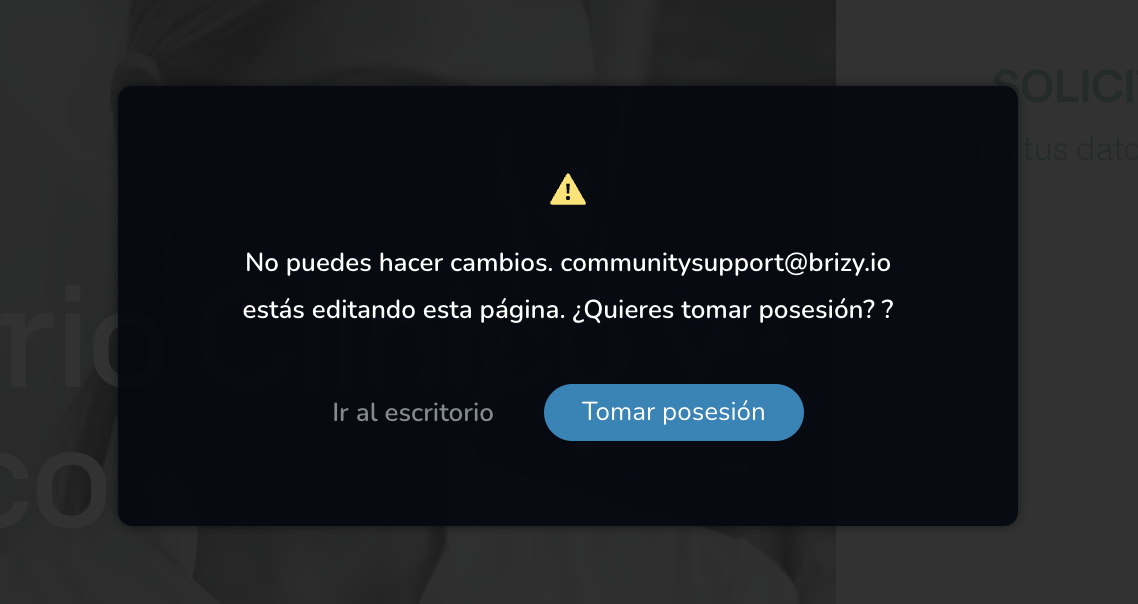 0
0 -
Hi,
Thank you for the update.
Please ensure that your server has PHP 8.0 or higher, also, please raise the PHP Memory Limit to 256MB or higher for best results.
You may need to reach out to your hosting provider, so they can help you make the necessary changes.Meanwhile, you are free to try out the staging environment that I have prepared for you.
Best regards,
Ariel H.0 -
We are using php 8.1 and thats a clean WP installation. Also using Neve theme as base and litespeed plugin.
I have the same code and configuration that you are using on your site, maybe is there another javascript code that i can use placing it on functions.php ?
0 -
I tried in another website and seems to work. Maybe i should delete and add the items again in this one, sometimes brizy makes strange behaviours.
0 -
Hi,
I'm glad that it works on another website.
There are no additional scripts added in functions.php on this test website, however, on your website, the console is reporting this issue:
https://prnt.sc/PyO7kT7mfJtZThere are many reasons for this, but the common one is WP memory limit issue and file permissions. If your server is using .htaccess, try to create a new one and see if this helps.
In addition, please also check your file permissions:
https://wordpress.org/documentation/article/changing-file-permissions/
I have disabled all the rest of the plugins but the issue remains so I assume that this has something to do with your server.If you have any further questions, please let us know.
Best regards,
Ariel H.0 -
I replicate in 2 site, server is the same as the first one, i make it work but it only hide when you are in the top of the page, please check:
- https://landing.grupoceep.com/tecnico-superior-en-administracion-finanzas-landing/
- https://landings.universanidad.es/tecnico-superior-en-dietetica-y-nutricion/
Where did you find that console errors? Can you look for something strange in this two?
I already try update the htaccess but same result.
0 -
Maybe we can try adding the snippet code into the functions instead of the brizy embed?
0 -
Hi,
It's also possible to add it in functions.php; however, you will need to save the script as a separate JS file and create a function to register the new script. Unfortunately, this is no longer part of our normal support. I'm also providing the scripts as a one–time courtesy since I've used a similar script on a website that I manage.
You can change the behavior of the block and decide when the block shows by adding an offset. In this example, when a user scrolls within 200 pixels of the bottom of the page, the block shows.
<script>
  window.onscroll = function() {scrollFunction()};

  function scrollFunction() {
    if ((window.innerHeight + window.pageYOffset) >= document.body.offsetHeight - 200) {
      document.getElementById("sticky").style.display = "block";
    } else {
      document.getElementById("sticky").style.display = "none";
    }
  }
</script>
I have updated the script on my staging site, so you can check there too.
About the error message, I noticed that it was taking some time to save the page, which is unusual, then I opened the inspector to check for any errors. Error 500 is more related to your server.
I hope this helps.
Best regards,
Ariel H.0 -
Adding it in functions.php make it works smoothly, so everything is ok now.
Thanks Ariel.
0
Please sign in to leave a comment.
Comments
18 comments