after site domain sent live unable to change images

after site domain sent live on set im unable to change images - I believe theres a setting I need to update? thx
Also on when building template pages, im unable to add global blocks, wondering if you've ever run into that before.
-

Hi Edgar,
Recent Brizy versions have incompatibilities with Jetpack Image optimizations and GoDaddy CDN. If you have enabled any of the following options, please disable it to upload images using Brizy.
- In your WordPress Dashboard under Jetpack - Dashboard scroll down to the heading "Performance and Growth" and disable the option 'Image Accelerator' https://jmp.sh/SU32wfE9
- Under Jetpack - Settings, under the Performance tab, disable the option 'Speed up image load times' https://jmp.sh/neap53iR
- If you have installed Jetpack Boost, under Jetpack - Boost disable the option 'Image CDN' https://jmp.sh/FUSoE1ZP
- If you are hosting with GoDaddy and using their CDN, please disable the CDN option from your GoDaddy account. You can follow instructions in this article. Enable or disable my CDN
If none of the above helps, please get back to us with your website URL. We will take a look.
Please try this display condition for your global block
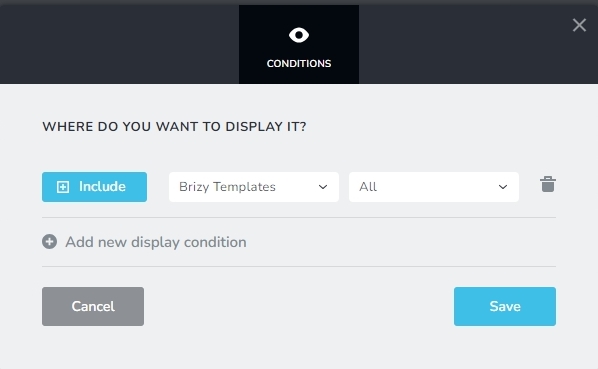 0
0 -
for image - not using jetpack or go daddy
its for this site: link removed
wp rocket is no longer active and only thing caching is the cloud ways varnish cache.
0 -
lol actually I had wp rocket active on that site , I have deactivated it but still having issue of not able to upload images.
0 -

Hi Edgar,
Thank you for the update.
To assist you further, kindly grant us temporary access to your WP Admin. Please add us as a user in your WordPress Dashboard and share the following information with us at communitysupport@brizy.io:
Community Post link: https://support.brizy.io/hc/en-us/community/posts/14693887821586
WordPress Admin URL:
Username:
Password:In addition, we'll require access to your FTP or cPanel for direct website file access. Kindly provide:
cPanel / FTP host:
Username:
Password:Please make a full backup of your website as a precaution.
I am looking forward to your response.
Best regards,
Ariel H.0 -
Also thanks for this tips on display conditions - 404 page and templates are working!
0
Please sign in to leave a comment.
Comments
5 comments