brizy pro (wordpress) pages do not load the brizy editor and mini-cart does not open anymore

Please help to solve the issue because my website is not working anymore. When I want to edit a page (any) of template the loader keeps spinning. The editor will not load.
On my live site the mini-cart does not open and some pro elements will not load.
-

Hi Harry,
Thank you for contacting us.
Please try the following and see if this will help.
- Try to temporarily switch to another theme and see if this will resolve the issue.
- If switching themes, didn't help, also try to disable all other plugins besides Brizy, Brizy Pro, and WooCommerce and see if this makes any difference.
If all the above fails, please provide us temporary access to your WP Admin credentials, so we can further check the issue. Add us as a user to your WordPress Dashboard and send the following details to: communitysupport@brizy.io
Community Post link: https://support.brizy.io/hc/en-us/community/posts/14675905074321
WordPress Admin URL:
Username:
Password:Please make a full backup of your website as a precaution.
I am looking forward to your response.
Best regards,
Ariel H.0 -

Hi Harry,
We have fixed this issue on your WordPress Dashboard. Please check and let us know if everything works fine.
0 -
Thanks a lot! The website is running nicely again!
I am interested in what was the cause of it all. Can I solve the problem myself in the future?
I see that the latest changes (done weeks before the problem) to the styling are gone. The typography & colors are set to the "old" version. Is this related to the cause of the problem?
I checked the brizy editor. It loads fine. But I have some issues there:
(1) Only the button element displays an error in the editor but shows fine in the frontend (see screen print): "Er is een fout opgetreden bij het proberen dit element te tonen. Je kunt meld een probleem of verwijder dit element" or in English: "An error occurred when trying to display this element. You can report a problem or remove this element".
(2) When clicking the styling icon (vertical menu left) then I get a blank screen (related to the missing changes to the styling?)
Then I have a second website (kroost.de) with the same problems.
Thanks again and best regards,
Harry
 0
0 -
Hi Harry,
In your WordPress Dashboard when trying to add a Brizy license this error showed "Execution stopped. Attempt to save invalid project data". This error is normally fixed by our developers. When you add a Brizy license to kroost.de and if you see the above error message, please give us access to this project as well. We will get request one of our developers to fix it for you.
The error with the button in the Brizy editor appears related to Safari browser. If you are using Safari 15.6.1 on macOS 10.15, please upgrade to Safari 16.4.1 and macOS to 11, 12 or 13.Please also check if you see this issue when using another browser like Google Chrome.
If you continue to have the issue when opening the styling icon, can you please do a screen recording for us to understand the issue better?
0 -
Hello KC,
Please also fix kroost.de. I sent the credentials by mail.
I can conform that the version of the safari browser was the issue. Firefox and chrome work fine. Both problems: the button and the styling menu work as expected with these browsers.
Thanks for the support!!
Harry
0 -
Hi Harry,
I could not see any error on your website https://kroost.de/. Please see this video for my test. https://jmp.sh/PDnA9tOd What problem are you facing with this website?
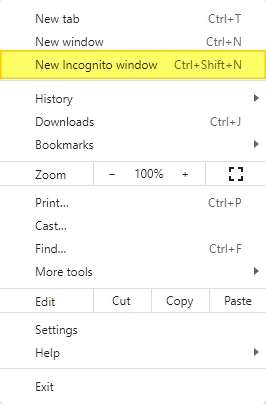
Please try signing into this WordPress Dashboard from a private (incognito) window of your browser and see if that makes a difference.
 0
0 -
Hi KC,
You are right. Everything is works as it should. Thanks for all the support!
Best,
Harry
0
Please sign in to leave a comment.
Comments
7 comments