plugin doesn't work

What does this mean and how can I fix it:
Return type of BrizyPlaceholders\AbstractPlaceholder::jsonSerialize() should either be compatible with JsonSerializable::jsonSerialize(): mixed, or the #[\ReturnTypeWillChange] attribute should be used to temporarily suppress the notice in /home/profertis/public_html/wp-content/plugins/brizy/vendor/bagrinsergiu/content-placeholder/lib/AbstractPlaceholder.php on line 93
-

Hi Rianne,
Could you please provide us with more information about the situation that led to this error?
- When you came across this error, what were you trying to do?
- Did you see this error in the Brizy Editor, the front end of the website, an error log, or some other place?
- What actions need to be taken on our end in order for us to see the same error?
- Could you send a screenshot or do you have a URL where we can see this error?
0 -
I was trying to install the plugin, my images were deleted and it all went very weird.
I saw this error front and back end and I still do
If you go to the website: www.profertis.nl I think you wil see the error
0 -
Hi Rianne,
WordPress debug mode could be enabled on your website. Please install the plugin WP Debugging and disable the WordPress debug mode (by ticking off the set WP_DEBUG to true) to get rid of this message from the website frontend.
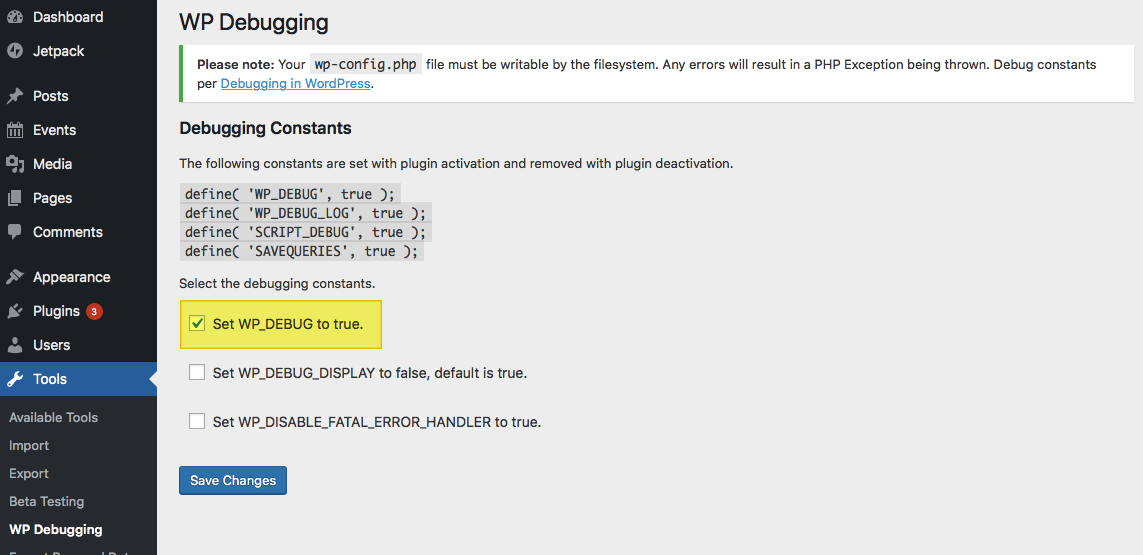
If you give us access to your project, we can take a look at why you are not able to use Brizy plugins. Please add a new user to your WordPress Dashboard and send the following details to our email: communitysupport@brizy.io
- Community Post link: https://support.brizy.io/hc/en-us/community/posts/14656595738770
- WordPress Admin URL:
- Username
- Password
Please let us know here when you send us the email.
0
Please sign in to leave a comment.
Comments
3 comments